 PluginStats
@denkwerk/unplugin-favicon-generator weekly downloads statistics
By denkwerk (3 listings) · npm · Webpack plugins
Vite, Rollup, Rolldown, webpack and Rspack plugin that generates favicons, touch icons and a web app manifest from an SVG or a Figma node, and adds the head tags
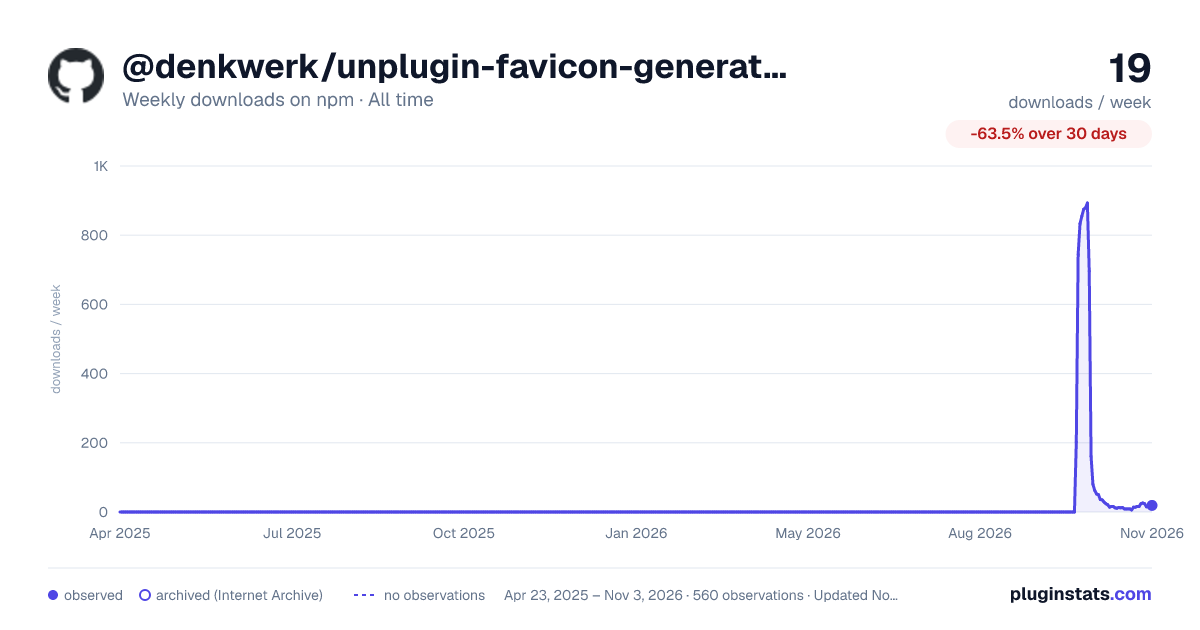
@denkwerk/unplugin-favicon-generator has 13 recorded weekly downloads on npm, a change of -7.1% over the past 7 days.
About @denkwerk/unplugin-favicon-generator
A bundler plugin, written once with unplugin, that generates favicons and an
Apple touch icon from one SVG, a raster image or a Figma component and writes them into your build output.
Additionally, it can add a web app manifest, a theme color and Windows tiles. It is built on
@denkwerk/favicon-generator.
- Nothing is written to
public/: the files are generated intonode_modules/.cache/favicon-generatorand emitted as build assets. - Output is cached until the options or the source image change. A Figma export is reused while the Figma file is unchanged, which one small API request checks.
- Vite: the tags are injected into every HTML page and follow
base; the dev server serves the files and reloads the page when the image or the config file changes. Server (SSR) builds get no copies of the files.
Setup
pnpm add -D @denkwerk/unplugin-favicon-generator
// vite.config.ts
import favicons from '@denkwerk/unplugin-favicon-generator/vite'

export default defineConfig({
  plugins: [favicons({ input: './assets/favicon.svg' })],
})
// rollup.config.js
import favicons from '@denkwerk/unplugin-favicon-generator/rollup'

export default {
  plugins: [favicons({ input: './assets/favicon.svg' })],
}
// rolldown.config.js
import favicons from '@denkwerk/unplugin-favicon-generator/rolldown'

export default {
  plugins: [favicons({ input: './assets/favicon.svg' })],
}
tsdown builds with Rolldown, so it takes the same plugin in plugins of tsdown.config.ts.
// webpack.config.js
import favicons from '@denkwerk/unplugin-favicon-generator/webpack'

export default {
  plugins: [favicons({ input: './assets/favicon.svg' })],
}
// rspack.config.js
import favicons from '@denkwerk/unplugin-favicon-generator/rspack'

export default {
  plugins: [favicons({ input: './assets/favicon.svg' })],
}
That's it for Vite. Other bundlers have no HTML to add the tags to, so render them yourself (see below).
Remove any favicon.ico or other icons from public/, because they would conflict with the generated ones. The Vite
plugin warns about this.
The tags in your own HTML
The tags are also available as a module, e.g. for an SSR template or a page that is not processed by Vite:
import { html, link, meta } from 'virtual:favicons' // `~favicons` in webpack and Rspack

html // '<link rel="icon" href="/favicon.ico" sizes="32x32">\n…'
link // [{ rel: 'icon', href: '/favicon.ico', sizes: '32x32' }, …]
meta // [{ name: 'theme-color', content: '#02969c' }, …]
webpack and Rspack read virtual: as a URL scheme, so import ~favicons there; it works in the other bundlers
too. For the types, add @denkwerk/unplugin-favicon-generator/client to compilerOptions.types in your
tsconfig.json.
Config file
Instead of (or in addition to) plugin options, the plugin reads a favicon.config.ts, the same file the
CLI uses:
// favicon.config.ts
import { defineConfig } from '@denkwerk/favicon-generator'

export default defineConfig({
  input: './assets/favicon.svg',
  themeColor: '#02969c',
})
It is looked up with the CLI's rules, starting in Vite's root (or root, see below): the first of
favicon.config.{js,ts,mjs,mts,cjs,cts,json}, then parent directories up to the nearest one with a package.json
or .git. Plugin options take precedence over the file, and the options of a group (manifest, …) are merged key
by key. The file's output, overwrite and snippets are ignored because the plugin decides where files go.
Add @denkwerk/favicon-generator to your dependencies so the file can import defineConfig.
Options
Besides these plugin options, every @denkwerk/favicon-generator option except
output, overwrite and snippets is supported (themeColor, manifest, windows, legacy, figmaToken, …).
Relative paths are resolved against root.…
Description from the npm listing.
- favicon
- favicon-generator
- favicons
- favicon.ico
- apple-touch-icon
- web-app-manifest
- manifest
- pwa
- svg
- figma
- icons
- unplugin
- vite
- vite-plugin
- rollup
- rollup-plugin
- rolldown
- rolldown-plugin
- tsdown
- webpack
README badge
Show your rank in a README or on your website. The badge updates automatically.
Charts
Images: 30d · 1y · all time · 1600×900 dark



Adoption over time
7/30/90-day growth
Ranking history
Listing placement
Listing placement
Filled points are observed values; hollow points come from Internet Archive snapshots of the listing page. Dashed segments span periods with no observations — values between points are not interpolated.
Each band is one page of 20. Weekly downloads on a linear scale. Placement is projected from weekly downloads, so it can differ from the marketplace's own sort order. Hover a dot to see the listing.
Recent observations
Full history (544)Similar npm Webpack plugins plugins
All 20 @denkwerk/unplugin-favicon-generator alternatives- 13 weekly downloads-40.9%
- 13 weekly downloads-78.0%
- 14 weekly downloads-77.8%
- 14 weekly downloads-73.6%
- 14 weekly downloads-72.0%
- 14 weekly downloads-46.2%
Data source
Weekly downloads (trailing 7 complete days) come from the official npm downloads API. Downloads include CI and mirrors and are not equivalent to installs or users. npm publishes no ratings.
Listing: https://www.npmjs.com/package/@denkwerk/unplugin-favicon-generator. First seen Oct 16, 2026; last successful collection Oct 22, 2026. See the methodology.