 PluginStats
@mcp-b/transports weekly downloads statistics
By mcp-b (4 listings) · npm · MCP servers
Browser transport implementations for Model Context Protocol (MCP) - postMessage, Chrome extension messaging, and iframe communication for AI agents and LLMs
@mcp-b/transports has 48,202 recorded weekly downloads on npm, an increase of 11.5% over the past 30 days, ranking #597 of 2,322 tracked listings.
About @mcp-b/transports
@mcp-b/transports
Browser transport implementations for Model Context Protocol (MCP) - Connect AI agents like Claude, ChatGPT, and Gemini to web applications





Reference | First Tool Tutorial | Transport Architecture
@mcp-b/transports provides browser-native MCP transport implementations that enable AI agents and LLMs to communicate with web applications. Whether you're building Chrome extensions, embedded iframes, or in-page AI integrations, this library provides the secure messaging layer you need.
Why Use @mcp-b/transports?
| Feature | Benefit |
|---|---|
| Multiple Transport Types | Choose the right transport for your architecture - Tab, Iframe, or Extension |
| Secure by Default | Origin validation, CORS configuration, and Chrome's secure messaging APIs |
| AI-Agent Ready | Built specifically for MCP, the standard protocol for AI tool integration |
| TypeScript First | Full type safety with comprehensive type definitions |
| MCP SDK v2 | Uses the split MCP server and core packages |
| Works Everywhere | Chrome, Firefox, Edge, and any Chromium-based browser |
Use Cases
- Browser Extensions: Build AI-powered extensions that interact with any webpage
- Embedded AI Widgets: Add AI capabilities to existing web applications via iframes
- In-Page AI Assistants: Create AI tools that work directly within your web app
- Cross-Extension Communication: Let extensions share AI tools with each other
- Enterprise AI Portals: Connect internal AI agents to web-based tools
Installation
npm install @mcp-b/transports @modelcontextprotocol/client @modelcontextprotocol/server zod
The package does not install Chrome extension globals. Extension applications
should add either @types/chrome or chrome-types as a development dependency.
The exported ExtensionPort type accepts ports from either declaration package.
Transport Types
Tab Transports (In-Page Communication)
Use TabServerTransport and TabClientTransport when your MCP server and client are running in the same browser tab. The transport uses window.postMessage for secure communication with origin validation.
Extension Transports (Cross-Context Communication)
Use ExtensionClientTransport and ExtensionServerTransport for communication between browser extension components (sidebar, popup, background) and web pages with MCP servers.
Extension External Transports (Cross-Extension Communication)
Use ExtensionClientTransport and ExtensionServerTransport with an extension ID and
chrome.runtime.onConnectExternal for communication between different browser extensions.
Tab Transport Examples
Server Setup (Web Page)
Create an MCP server in your web page and expose it via TabServerTransport:
import { TabServerTransport } from '@mcp-b/transports';
import { McpServer } from '@modelcontextprotocol/server';
import { z } from 'zod';

// Create MCP server with tools
const server = new McpServer(
  {
    name: 'TODO-APP',
    version: '1.0.0',
  },
  {
    instructions: 'You are a helpful assistant that can create, update, and delete todos.',
  }
);

// Register a tool
server.registerTool(
  'createTodo',
  {
    description: 'Creates a new todo item for the current user',
    inputSchema: z.object({
      todoText: z.string().describe('The content of the todo item.'),
    }),
  },
  async (args) => {
    // Implementation here
    return {
      content: [
        {
          type: 'text',
          text: `Todo created: "${args.todoText}"`,
        },
      ],
    };
  }
);

// Connect to transport with CORS configuration
const transport = new TabServerTransport({
  allowedOrigins: ['*'], // Configure based on your security needs
});
await server.connect(transport);
Client Setup (Same Page)
Connect to the server from within the same page or from an extension content script:
import { TabClientTransport } from '@mcp-b/transports';
import { Client } from '@modelcontextprotocol/client';

// Create transport with target origin
const transport = new TabClientTransport({
  targetOrigin: window.location.origin,
});

// Create and connect client
const client = new Client(
  {
    name: 'ExtensionProxyClient',
    version: '1.0.0',
  },
  {
    versionNegotiation: { mode: 'auto' },
  }
);

await client.connect(transport);

// Use the client
const result = await client.callTool({
  name: 'createTodo',
  arguments: { todoText: 'Buy groceries' },
});
Tab Transport Configuration
TabClientTransport Options
targetOrigin(required): Origin expected from the server window (for security).channelId: Override the default channel identifier (default:mcp-default).
TabServerTransport Options…
Description from the npm listing.
- ai-agents
- ai-assistant
- ai-tools
- anthropic
- browser
- browser-automation
- browser-extension
- chatgpt
- chrome-extension
- claude
- copilot
- cross-origin
- cursor
- gemini
- iframe
- llm
- mcp
- mcp-client
- mcp-server
- mcp-transport
README badge
Show your rank in a README or on your website. The badge updates automatically.
Charts
Images: 30d · 1y · all time · 1600×900 dark


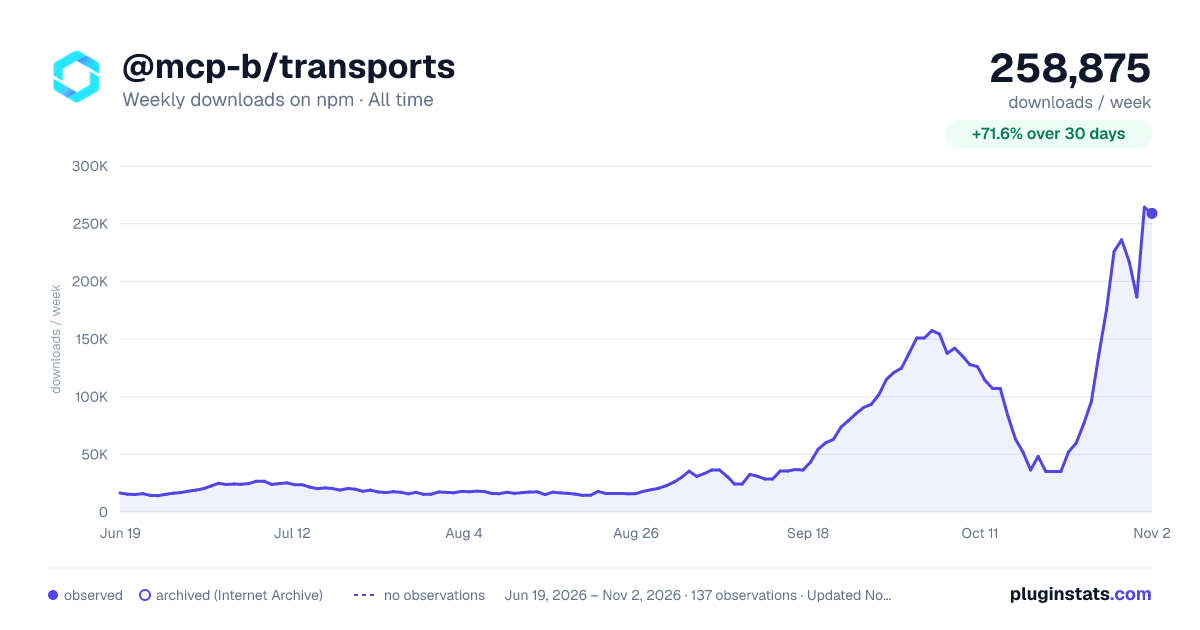

Adoption over time
7/30/90-day growth
Ranking history
Listing placement
Listing placement
Filled points are observed values; hollow points come from Internet Archive snapshots of the listing page. Dashed segments span periods with no observations — values between points are not interpolated.
Each band is one page of 20. Weekly downloads on a linear scale. Placement is projected from weekly downloads, so it can differ from the marketplace's own sort order. Hover a dot to see the listing.
Recent observations
Full history (122)Similar npm MCP servers plugins
All 20 @mcp-b/transports alternativesData source
Weekly downloads (trailing 7 complete days) come from the official npm downloads API. Downloads include CI and mirrors and are not equivalent to installs or users. npm publishes no ratings.
Listing: https://www.npmjs.com/package/@mcp-b/transports. First seen Oct 16, 2026; last successful collection Oct 20, 2026. See the methodology.