 PluginStats
@ai-dossier/cli weekly downloads statistics
By ai-dossier (5 listings) · npm · Claude Code
CLI for signed, versioned agent skills and model-driven orchestration: create, verify, sign, publish, and install skills for Claude Code, Codex, OpenCode, and LLM tools.
@ai-dossier/cli has 4,095 recorded weekly downloads on npm, an increase of 29.9% over the past 30 days.
It ranks #1142 of 2,256 tracked npm listings by weekly downloads.
Over 90 days, weekly downloads changed by +2033%.
PluginStats has 543 daily observations since Apr 23, 2025; the latest is from Oct 17, 2026.
About @ai-dossier/cli
@ai-dossier/cli
Use one portable AI-agent skill across Claude Code, Codex, OpenCode, and MCP-compatible workflows.
@ai-dossier/cli is for developers and AI-agent teams that need to create, verify, sign, publish, and install reusable skills. A dossier is a portable, versioned skill with trust built in: it can be hosted anywhere, verified before use, and installed as a Claude Code skill with install-skill or skill-export.
Part of the ai-dossier ecosystem: pair this CLI with @ai-dossier/core for verification, @ai-dossier/mcp-server for MCP clients, and the ai-dossier project for the complete platform.
The Problem This Solves
A plain skill is unsigned, unversioned, and locked to one tool — and LLMs cannot be relied upon to enforce security checks automatically.
Even with MCP server installed and protocol documentation: • ❌ LLMs may skip verification • ❌ No automatic enforcement mechanism • ❌ Security depends on LLM "remembering" to check
This CLI provides: Mandatory verification enforced by code, not suggestions.
Installation
Option 1: NPM (Recommended)
Install globally:
Or use without installing:
Option 2: Standalone binary (no Node.js)
Prebuilt single-file executables for Linux (x64, arm64), macOS (x64, arm64) and Windows (x64) are attached to each cli-v GitHub Release together with a SHA256SUMS file.
The script detects your OS and CPU, downloads the binary, verifies its SHA256 against SHA256SUMS, and installs it to ~/.local/bin (or --dir / $AI_DOSSIER_INSTALL_DIR). On Windows, download ai-dossier-win32-x64.exe from the release page (or run the script from Git Bash) and verify it with certutil -hashfile ai-dossier-win32-x64.exe SHA256.
macOS Gatekeeper. The binaries are ad-hoc signed but not notarized. Downloaded through install.sh (curl) they run without a prompt; downloaded through a browser, macOS quarantines them and reports the app cannot be verified. Clear it with xattr -d com.apple.quarantine ./ai-dossier-darwin-arm64 (or right-click, Open). Windows SmartScreen may warn on first run of the unsigned .exe: choose "More info", then "Run anyway".
The binary is a Node Single Executable Application (the Node runtime plus the bundled CLI, roughly 120 MB), built by node scripts/build-sea.mjs (make build-binary). Behaviour is identical to the npm install.
Option 3: From Source (Development)
Authentication
Interactive (Browser OAuth)
Non-Interactive (CI/CD, Agents)
Set the DOSSIER_REGISTRY_TOKEN environment variable:
When DOSSIER_REGISTRY_TOKEN is set, it takes precedence over stored credentials. This is recommended for CI/CD pipelines, Docker containers, and AI agent contexts where interactive login is not possible.
Commands that require confirmation (publish, remove, cache clean) will fail with a clear error in non-interactive sessions. Use -y/--yes to skip confirmation prompts.
Usage
Basic Verification
Exit codes: • 0 - Verification passed (safe) • 1 - Verification failed (unsafe) • 2 - Error occurred
Verbose Mode
Shows: • Dossier metadata (title, version, risk level) • Detailed checksum comparison • Signature verification details • Complete risk assessment
Integration with LLM Tools
Claude Code:
Cursor:
Any LLM Tool:
Running Dossiers (run)
ai-dossier run verifies a dossier and executes it with a spawned agent CLI.
Agent selection (--llm)
Accepted values: claude-code, opencode, auto (default). Auto-detection tries claude first, then opencode, then fails with install hints — machines with only Claude Code installed keep their existing behavior. The default agent is also configurable: dossier config defaultLlm .
| Flag | claude-code | opencode |
| --model | --model | --model | | --budget | --max-budget-usd (headless only) | no equivalent — warned and ignored | | --permission-mode | --permission-mode (headless only) | no equivalent — configure permissions in opencode.json | | --allowed-tools | --allowedTools (headless only) | no equivalent — configure tool access in opencode.json |
Unsupported flag combinations print a clear per-flag warning; they are never silently dropped.
• Headless (--headless): claude -p --output-format json or opencode run --format json, dossier content piped via stdin. Usage (tokens/cost) is mined from the captured output and recorded in the run log. • Interactive: claude or opencode run -i -- (a seeded session; the -- separator keeps the --- frontmatter from being parsed as flags). Prefer --headless for large dossiers — interactive opencode passes the prompt as one argv element (~128KB OS limit).
Dry-run preview (--dry-run, --plan-out)
ai-dossier run --dry-run verifies the dossier, then prints a static preview instead of executing it: the files, commands, remote calls and environment variables it declares or contains, a 0-100 risk score, and the LLM command that *would* run.
This is a static preview, not a guarantee. Dossiers are executed by an LLM. The preview is derived from the dossier's declared metadata (risk_level, risk_factors, destructive_operations, tools_required) and a pattern match over its shell / script code blocks. The executing agent may take other actions, and the risk score is a triage heuristic, not a safety guarantee. Unlabeled code blocks are only analysed for lines that start with a well-known tool (git, gh, curl, ...), and executables the analyzer does not recognise are reported as local writes with an (unrecognized executable) note.
Output is grouped and color-coded (colors follow NO_COLOR / FORCE_COLOR):
| Color | Group | Examples |
| green | read-only | ls, grep, git status, echo | | yellow | local writes | > file, tee, mv, cp, git commit, npm run build, unrecognised executables | | red | remote / destructive | gh pr create, git push, curl, aws, kubectl, rm, git push --force, curl ... \| sh |
Risk score. The sum of the components below, capped at 100 (the --dry-run output prints the breakdown):
| Component | Points |…
Description from the npm listing.
- agent-skills
- claude-code-skills
- codex-skills
- signed-skills
- skill-registry
- ai-agent-cli
- workflow-verification
- model-driven-orchestration
- agent-orchestration
- ai-agents
- llm
- skill-md
- claude-code
- claude-skills
- supply-chain-security
- signed
- versioning
Where @ai-dossier/cli sits in the listing
Each band is one page of 20. Weekly downloads on a log scale. Placement is projected from weekly downloads, so it can differ from the marketplace's own sort order. Hover a dot to see the listing.


Charts
Images: 30d · 1y · all time · 1600×900 dark


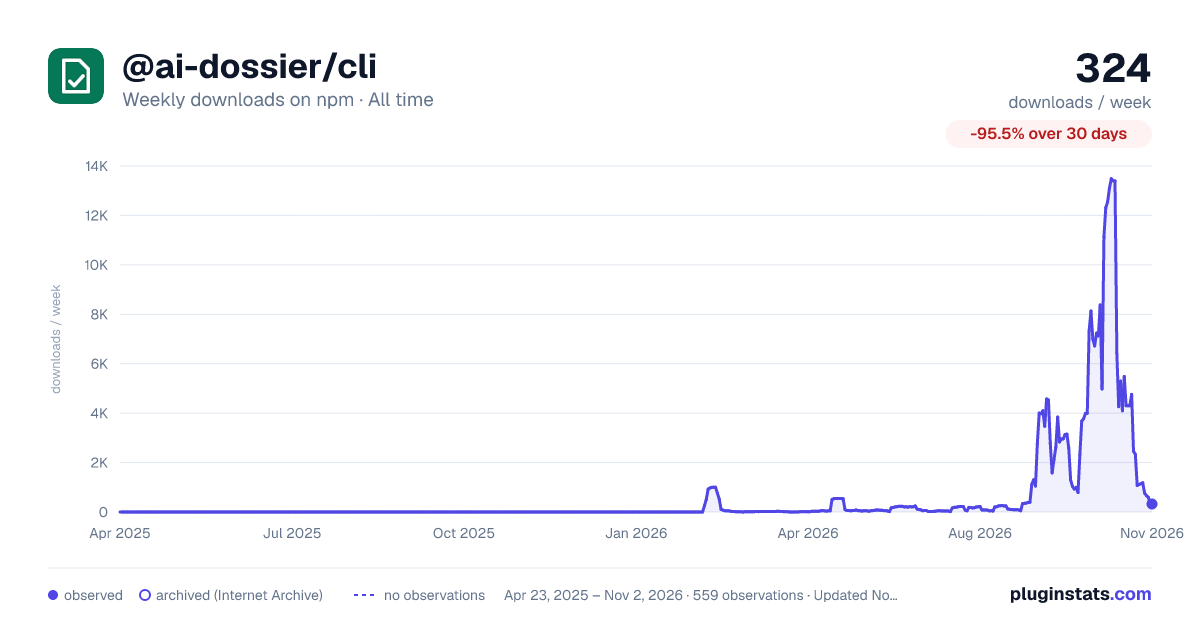

Adoption over time


7/30/90-day growth


Filled points are observed values; hollow points come from Internet Archive snapshots of the listing page. Dashed segments span periods with no observations — values between points are not interpolated.
Recent observations
Full history (543)Similar npm Claude Code plugins
Data source
Weekly downloads (trailing 7 complete days) come from the official npm downloads API. Downloads include CI and mirrors and are not equivalent to installs or users. npm publishes no ratings.
Listing: https://www.npmjs.com/package/@ai-dossier/cli. First seen Oct 16, 2026; last successful collection Oct 19, 2026. See the methodology.