 PluginStats
tailwindcss-fluid-layout weekly downloads statistics
By samuelngs · npm · Tailwind plugins
This plugin makes flexible grid layouts with breakouts super easy! Forget about wrapping everything in containers—just use this plugin to generate grids of all sizes that seamlessly handle breakouts. It’s simple, clean, and ready to roll. Plug it in and l
tailwindcss-fluid-layout has 3 recorded weekly downloads on npm, a decrease of 80.0% over the past 30 days, ranking #2258 of 2,322 tracked listings.
About tailwindcss-fluid-layout
Tailwind CSS Fluid Layout Plugin
This plugin makes flexible grid layouts with breakouts super easy! Forget about wrapping everything in containers—just use this plugin to generate grids of all sizes that seamlessly handle breakouts. It’s simple, clean, and ready to roll. Plug it in and let your layouts flow!
Installation
To get started, add the plugin to your Tailwind setup:
npm install tailwindcss-fluid-layout
Then, add the plugin to your tailwind.config.js file:
module.exports = {
  theme: {
    // ...
  },
  plugins: [
    require('tailwindcss-fluid-layout'),
    // ...
  ],
};
Usage
Start by defining your layout(s) with the desired sizes in the tailwind.config.js file:
module.exports = {
  theme: {
    layouts: {
      main: {
        sizes: {
          content: '800px',
          popout: '1200px',
          // Add as many sizes as you like! You can also use other CSS units like em, %, and more to keep your layouts super flexible.
        },
        padding: '16px', // optional
      },
      // You can create multiple grid layouts, with each key you define serving as the name for its respective grid template.
    },
  },
};
Now, set an element as a container using grid-cols-{name} for a column-based layout or grid-rows-{name} for a row-based layout. Then apply styles to the child elements to control their sizing and positioning within the grid.
<div class="grid-cols-main">
  <div class="col-full">
    <!-- The `full` size is automatically configured for you and set to 100% to fit within the main layout. Please note that this area will ignore any padding settings and will always match the size of the parent layout. -->
  </div>
  <div class="col-content">
    <!-- This element will be sized at `800px` or less to fit within the parent layout. -->
  </div>
  <div class="col-popout">
    <!-- This element will be sized at `1200px` or less to fit within the parent layout. -->
  </div>
</div>
If you would like to position an element to start and end at different grid areas, you could do:
<div class="grid-cols-main">
  <div class="col-start-full col-end-content">
    <!-- This element will be positioned at the start of the parent layout and extend to the end of the content area. -->
  </div>
  <div class="col-start-content-end col-end-full">
    <!-- This element will be positioned starting at the end of the content area and extending to the end of the parent layout. -->
  </div>
</div>
Additional Options
The tailwindcss-fluid-layout plugin comes with optional parameters that allow for further customization. When initializing the plugin, you can pass in an object to set various options. For example:
require('tailwindcss-fluid-layout')({
  path: 'layouts',
  throwOnError: false,
});
Options Explained:
-
path(default:layouts):
This option lets you specify a custom path for your layout configurations. By default, the plugin looks for layout values underlayoutsin thetailwind.config.jsfile, but you can rename this path to whatever you prefer. -
throwOnError(default:false):
When set tofalse, this option prevents the plugin from throwing an error if there are any issues with the layout configurations. If you'd prefer the plugin to throw errors for easier debugging, you can set this option totrue
Limitations
- Currently, all size values within the same layout must be length literals and use the same unit.
Description from the npm listing.
- tailwind
- tailwindcss
- tailwindcss-plugin
- tailwindcss-fluid-layout
- fluid-grid
- fluid-layout
- fluid-breakout-layout
README badge
Show your rank in a README or on your website. The badge updates automatically.
Charts
Images: 30d · 1y · all time · 1600×900 dark


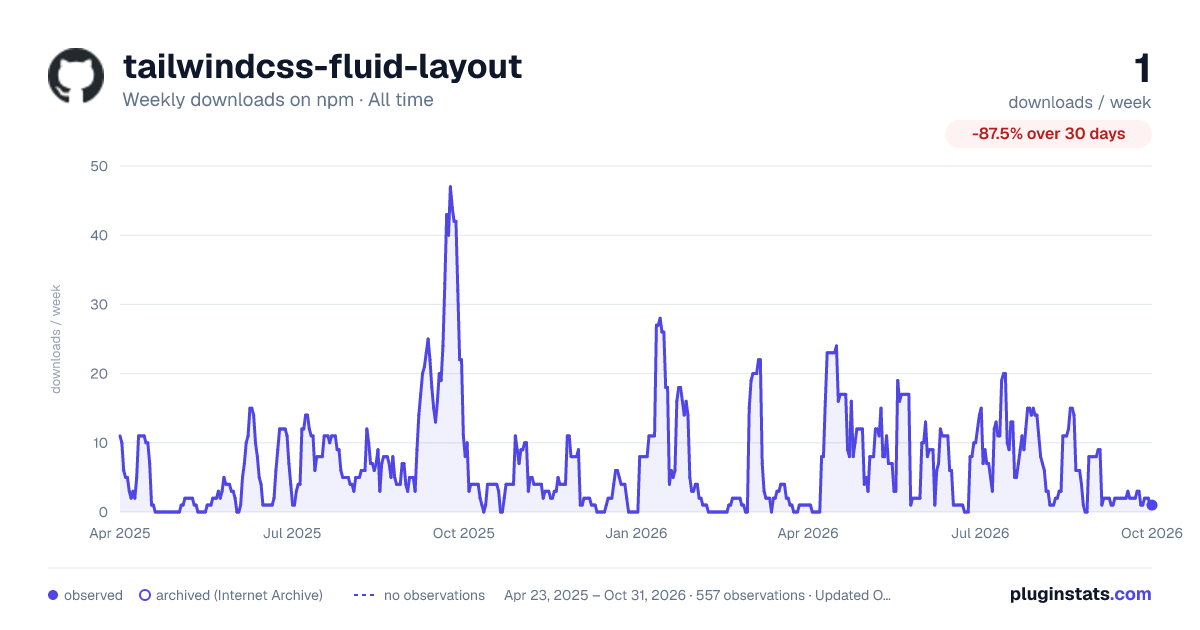

Adoption over time
7/30/90-day growth
Ranking history
Listing placement
Listing placement
Filled points are observed values; hollow points come from Internet Archive snapshots of the listing page. Dashed segments span periods with no observations — values between points are not interpolated.
Each band is one page of 20. Weekly downloads on a linear scale. Placement is projected from weekly downloads, so it can differ from the marketplace's own sort order. Hover a dot to see the listing.
Recent observations
Full history (544)Similar npm Tailwind plugins plugins
All 20 tailwindcss-fluid-layout alternativesData source
Weekly downloads (trailing 7 complete days) come from the official npm downloads API. Downloads include CI and mirrors and are not equivalent to installs or users. npm publishes no ratings.
Listing: https://www.npmjs.com/package/tailwindcss-fluid-layout. First seen Oct 16, 2026; last successful collection Oct 20, 2026. See the methodology.