 PluginStats
babel-plugin-react-docgen weekly downloads statistics
By storybooks · npm · Babel plugins
Babel plugin to add react-docgen info into your code
babel-plugin-react-docgen has 393,846 recorded weekly downloads on npm, a decrease of 36.5% over the past 30 days, ranking #290 of 2,322 tracked listings.
About babel-plugin-react-docgen
babel-plugin-react-docgen
react-docgen allows you to write propType descriptions, class descriptions and access propType metadata programatically.
This babel plugin allow you to access those information right inside your React class.
For an example, let's say you've a React class like this:
/**
  This is an awesome looking button for React.
*/
import React from 'react';

export default class Button extends React.Component {
  render() {
    const { label, onClick } = this.props;
    return (
      <button onClick={onClick}>{ label }</button>
    );
  }
}

Button.propTypes = {
  /**
    Label for the button.
  */
  label: React.PropTypes.string,

  /**
    Triggered when clicked on the button.
  */
  onClick: React.PropTypes.func,
};
With this babel plugin, you can access all these information right inside your app with:
console.log(Button.__docgenInfo);
{
  description: 'This is an awesome looking button for React.',
  props: {
    label: {
      type: {
        name: 'string'
      },
      required: false,
      description: 'Label for the button.'
    },
    onClick: {
      type: {
        name: 'func'
      },
      required: false,
      description: 'Triggered when clicked on the button.'
    }
  }
}
This will be pretty useful for documentations and some other React devtools like Storybook.
Usage
Install the plugin:
npm install -D babel-plugin-react-docgen
Use it inside your .babelrc
{
  "plugins": ["react-docgen"]
}
.babelrc Options
| option | description | default |
|---|---|---|
| resolver | You may use the 3 built-in react-docgen resolvers by specifying its name as a string, or you may specify a custom resolver by specifying the function explicitly. | "findAllExportedComponentDefinition" |
| handlers | All react-docgen handlers are automatically applied. However, custom handlers can be added by specifying them here. Any string value will be loaded by require, and a function will be used directly. | |
| removeMethods | Used to remove docgen information about methods. | false |
| DOC_GEN_COLLECTION_NAME | The name of a global variable where all docgen information can be stored. See below for more information. | |
| ...options | Remaining options will be passed directly as react-docgen options. Any options they allowed will be passed through, but the filename will be overwritten by the filename provided by babel. |
Collect All Docgen Info
Sometimes, it's a pretty good idea to collect all of the docgen info into a collection. Then you could use that to render style guide or similar.
So, we allow you to collect all the docgen info into a global collection. To do that, add following config to when loading this babel plugin:
{
  "plugins":[
    [
      "babel-plugin-react-docgen",
      {
        "DOC_GEN_COLLECTION_NAME": "MY_REACT_DOCS",
        "resolver": "findAllComponentDefinitions", // optional (default: findAllExportedComponentDefinitions)
        "removeMethods": true, // optional (default: false)
        "handlers": ["react-docgen-deprecation-handler"] // optional array of custom handlers
      }
    ]
  ]
}
Then you need to create a global variable(an object) in your app called MY_REACT_DOCS before any code get's executed.
Then we'll save them into that object. We do it by adding a code block like this to the transpiled file:
if (typeof MY_REACT_DOCS !== 'undefined') {
  MY_REACT_DOCS['test/fixtures/case4/actual.js'] = {
    name: 'Button',
    docgenInfo: Button.__docgenInfo,
    path: 'path/to/my/button.js'
  };
}
Compile Performance
We parse your code with react-docgen to get this info, but we only do it for files which contain a React component.
There will be some overhead to your project, but you can leverage babel's cache directory to avoid this a huge performance hit.
Output Size
Yes this increase the output size of your transpiled files. The size increase varies depending on various factors like:
- How many react classes you've
- Amount of docs you've written
- Amount of propTypes you've
Most of the time, you need this plugin when you are developing your app or with another tool like Storybook. So, you may not need to use this on the production version of your app.
Description from the npm listing.
- react
- docs
- docgen
- babel-plugin
README badge
Show your rank in a README or on your website. The badge updates automatically.
Charts
Images: 30d · 1y · all time · 1600×900 dark


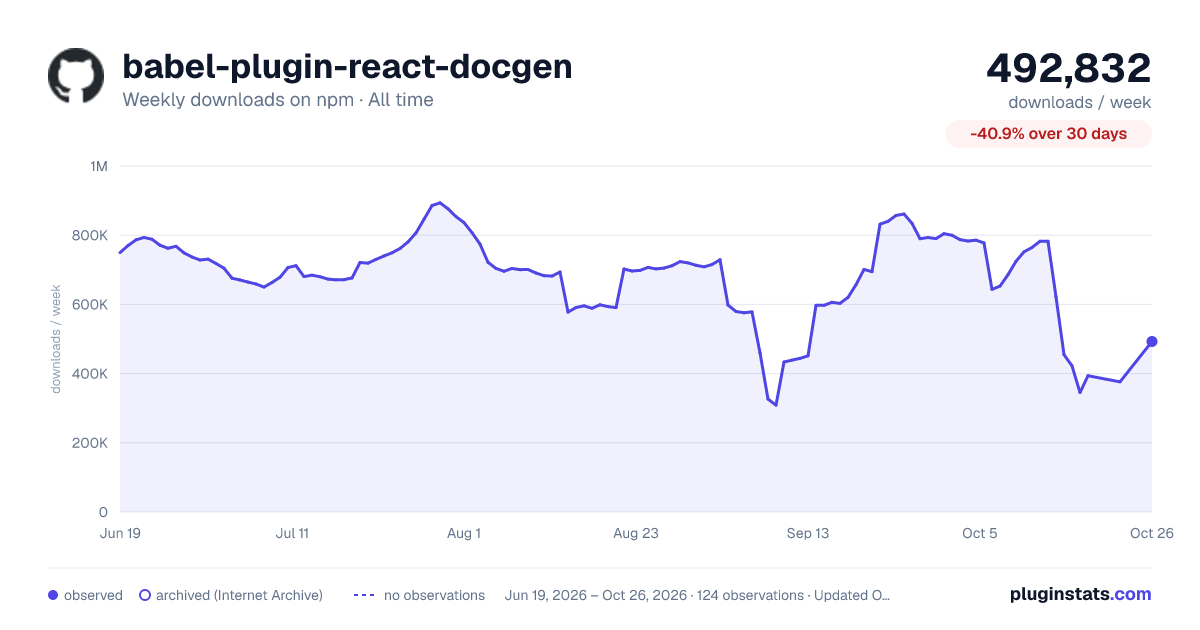

Adoption over time
7/30/90-day growth
Ranking history
Listing placement
Listing placement
Filled points are observed values; hollow points come from Internet Archive snapshots of the listing page. Dashed segments span periods with no observations — values between points are not interpolated.
Each band is one page of 20. Weekly downloads on a linear scale. Placement is projected from weekly downloads, so it can differ from the marketplace's own sort order. Hover a dot to see the listing.
Recent observations
Full history (122)Similar npm Babel plugins plugins
All 20 babel-plugin-react-docgen alternatives- 377.7K weekly downloads-36.2%
- 420.5K weekly downloads-47.7%
- 366.8K weekly downloads-35.4%
- 429.4K weekly downloads-47.5%
Data source
Weekly downloads (trailing 7 complete days) come from the official npm downloads API. Downloads include CI and mirrors and are not equivalent to installs or users. npm publishes no ratings.
Listing: https://www.npmjs.com/package/babel-plugin-react-docgen. First seen Oct 16, 2026; last successful collection Oct 20, 2026. See the methodology.