 PluginStats
@lo-fi/webauthn-local-client weekly downloads statistics
By lo-fi · npm · Webpack plugins
Browser-only utils for locally managing WebAuthn (passkey) API
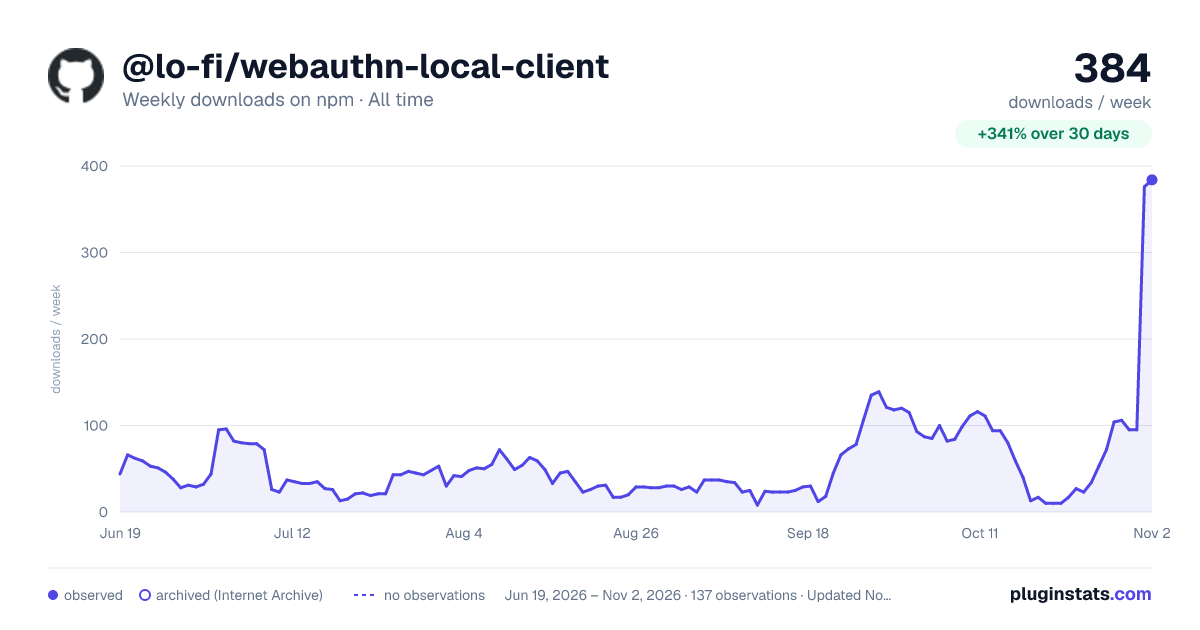
@lo-fi/webauthn-local-client has 17 recorded weekly downloads on npm, a decrease of 43.3% over the past 30 days, ranking #1960 of 2,322 tracked listings.
About @lo-fi/webauthn-local-client
WebAuthn Local Client


WebAuthn-Local-Client is a web (browser) client for locally managing the "Web Authentication" (WebAuthn) API.
Check out Passkey Garden for a demo of using this library for local-only (zero-server) authentication, via passkeys.
The WebAuthn API lets users of web applications avoid the long-troubled use of (often insecure) passwords, and instead present personal biometric factors (Touch-ID, Face-ID, etc) via their device to prove their identity for login/authentication, authorization, etc. Traditionally, this authentication process involves an application interacting with a FIDO2 Server to initiate, verify, and store responses to such WebAuthn API interactions.
However, the intended use-case for WebAuthn-Local-Client is to allow Local-First Web applications to handle user login locally on a device, without any server (FIDO2 or otherwise).
Note: This package may be used in combination with a traditional FIDO2 server application architecture, but does not include any specific functionality for that purpose. For server integration with WebAuthn, you may instead consider alternative libraries, like this one.
Deployment / Import
npm install @lo-fi/webauthn-local-client
The @lo-fi/webauthn-local-client npm package includes a dist/ directory with all files you need to deploy WebAuthn-Local-Client (and its dependencies) into your application/project.
Note: If you obtain this library via git instead of npm, you'll need to build dist/ manually before deployment.
-
USING A WEB BUNDLER? (Astro, Vite, Webpack, etc) Use the
dist/bundlers/*files and see Bundler Deployment for instructions. -
Otherwise, use the
dist/auto/*files and see Non-Bundler Deployment for instructions.
WebAuthn Supported?
To check if WebAuthn API and functionality is supported on the device:
import { supportsWebAuthn } from "..";

if (supportsWebAuthn) {
    // welcome to the future, without passwords!
}
else {
    // sigh, use fallback authentication, like
    // icky passwords :(
}
To check if passkey autofill (aka "Conditional Mediation") is supported on the device:
import { supportsConditionalMediation } from "..";

if (supportsConditionalMediation) {
    // provide an <input> and UX for user to
    // click on, to select their passkey
    // credential via autofill
}
else {
    // provide UX for user to trigger
    // authentication, where the browser will
    // provide a modal for the user to select
    // their credential
}
Registering a new credential
To register a new credential in a WebAuthn-exposed authenticator, use register():
import { regDefaults, register } from "..";

// optional:
var regOptions = regDefaults({
    // ..options..
});

var regResult = await register(regOptions);
register() returns a promise that will resolve to an object (regResult above) if successful. Otherwise, it will be rejected (await will throw).
Register Configuration
To configure the registration options, but include all the defaults for anything not being overridden, use regDefaults(..).
Typical register() configuration options:
-
relyingPartyName(string): the common name of your application (that a user will recognize), e.g. "Cool Notes App".Note:
relyingPartyID(string) is also available, defaulting to the origin hostname of your web application (e.g.,hostname.tld); unless you have an specific reason, you should generally leave that as default. -
user(object): specifies the user's identity (as it's defined in your application), including up to these 3 sub properties:-
name(string): the user's name -
displayName(string): a displayable version of the user's name (typically the same asname, but can be a shorter abbreviation/nickname ifnameis too long) -
id(Uint8Array): any application-defined value (string, integer, etc), but must be represented as aUint8Arraybyte array.Note: This value can be anything your application needs for its normal operation, but it can never be updated for a specific credential after registration; the user will have to
register()a new credential if your application ever needs to change this value. Also, be careful not to use a value with too many bytes, or some authenticators may reject it. Generally, 30-40 bytes is safe (and more than sufficient for most common use-cases), but you likely will not be able to use hundreds or thousands of bytes for this value. This is not a secret user-data storage location!
-
-
excludeCredentials(array): Defaults to an empty array, which allows subsequentregister()calls on the same authenticator, with the sameuser.idvalue, to overwrite a credential (regenerate its internal keypair).This is generally only useful in cases where a credential keypair needs to be reset (such as losing the originally returned public-key). As such,
excludeCredentialsshould only be left to its default empty array if there are no known credentials for the user, or the UX has clearly indicated to the user that a reset is being performed.…
Description from the npm listing.
- auth
- passkey
- webauthn
- biometric
- cryptography
- vite-plugin
- webpack-plugin
README badge
Show your rank in a README or on your website. The badge updates automatically.
Charts
Images: 30d · 1y · all time · 1600×900 dark



Adoption over time
7/30/90-day growth
Ranking history
Listing placement
Listing placement
Filled points are observed values; hollow points come from Internet Archive snapshots of the listing page. Dashed segments span periods with no observations — values between points are not interpolated.
Each band is one page of 20. Weekly downloads on a linear scale. Placement is projected from weekly downloads, so it can differ from the marketplace's own sort order. Hover a dot to see the listing.
Recent observations
Full history (122)Similar npm Webpack plugins plugins
All 20 @lo-fi/webauthn-local-client alternativesData source
Weekly downloads (trailing 7 complete days) come from the official npm downloads API. Downloads include CI and mirrors and are not equivalent to installs or users. npm publishes no ratings.
Listing: https://www.npmjs.com/package/@lo-fi/webauthn-local-client. First seen Oct 16, 2026; last successful collection Oct 20, 2026. See the methodology.