 PluginStats
@salesforce-ux/eslint-plugin-slds weekly downloads statistics
By salesforce-ux · npm · ESLint plugins
ESLint plugin provides custom linting rules specifically built for Salesforce Lightning Design System 2 (SLDS 2 beta)
@salesforce-ux/eslint-plugin-slds has 54,784 recorded weekly downloads on npm, a decrease of 39.2% over the past 30 days, ranking #573 of 2,391 tracked listings.
About @salesforce-ux/eslint-plugin-slds
@salesforce-ux/eslint-plugin-slds
ESLint plugin provides custom linting rules specifically built for Salesforce Lightning Design System 2 (SLDS 2 beta).
Requirements
- Node.js: 18.18.0 or higher
- ESLint: 8.0.0 or 9.0.0+
Install
npm install @salesforce-ux/eslint-plugin-slds --save-dev
Configure
ESLint v8 (Legacy Config)
// .eslintrc.js
module.exports = {
  plugins: ['@salesforce-ux/slds'],
  extends: ['plugin:@salesforce-ux/slds/recommended']
};
ESLint v9+ (Flat Config)
Basic Configuration
// eslint.config.js
const { defineConfig } = require('eslint/config');
const sldsPlugin = require('@salesforce-ux/eslint-plugin-slds');

module.exports = defineConfig([
  {
    plugins: {
      '@salesforce-ux/slds': sldsPlugin
    },
    extends: ['@salesforce-ux/slds/recommended']
  }
]);
Using with Other Plugins
To use the ESLint plugin with other plugins, add the sldsCssPlugin() helper function to the eslint.config.mjs configuration file. The sldsCssPlugin() function returns an object that contains the configurations for the ESLint plugin. This makes it easy to combine the ESLint plugin with other plugins while maintaining all the required dependencies.
For example, to use the ESLint plugin with the CSS plugin, add the CSS plugin configuration to the object containing the ESLint plugin configuration.
// eslint.config.mjs
import { defineConfig } from 'eslint/config';
import css from '@eslint/css';
import { sldsCssPlugin } from '@salesforce-ux/eslint-plugin-slds';

export default defineConfig([
  {
    files: ['**/*.css'],
    language: 'css/css',
    plugins: {
      css: css,
      ...sldsCssPlugin()
    },
    extends: ['@salesforce-ux/slds/recommended', 'css/recommended']
  }
]);
Migrate to the Latest Version
By default, the latest version of the plugin supports legacy and flat config systems.
Supported Rules
HTML/Component Rules
enforce-bem-usage: Identifies instances that use the double-dash (--) syntax for block-element-modifier (BEM) in classes.no-deprecated-classes-slds2: Identifies classes that aren't available in SLDS 2.modal-close-button-issue: Identifies instances where the CSS classes or component attributes for the modal close button must be changed to follow the modal component blueprint.
CSS Rules
no-hardcoded-values-slds2: Identifies static or hard-coded values that must be replaced with SLDS 2 styling hooks.no-slds-class-overrides: Identifies existing class names that must be replaced with new custom CSS classes, instead of overriding SLDS selectors.no-slds-var-without-fallback: Identifies SLDS styling hooks that are specified without fallback values and recommends suitable fallback values based on the SLDS metadata. The fallback values are used in Salesforce environments where styling hooks are unavailable.no-slds-namespace-for-custom-hooks: Identifies custom styling hooks that use the --slds or --sds namespaces, which are reserved for SLDS styling hooks. To differentiate custom styling hooks from SLDS styling hooks, create custom styling hooks in your namespace.no-slds-private-var: Identifies SLDS styling hooks that are reserved only for internal Salesforce use. Private SLDS styling hooks have prefixes --_slds- and --slds-s-.no-unsupported-hooks-slds2: Identifies styling hooks that aren't present in SLDS 2. They must be replaced with styling hooks that have a similar effect, or they must be removed.no-sldshook-fallback-for-lwctoken: Identifies instances where --slds styling hooks are provided as fallback values for --lwc tokens.enforce-sds-to-slds-hooks: Identifies Salesforce Design System (SDS) styling hooks that must be replaced with the suggested SLDS 2 styling hooks. For more information, see lightningdesignsystem.com.enforce-component-hook-naming-convention: Identifies --slds-c component-level styling hooks that use a deprecated naming convention.no-deprecated-slds-classes: Please replace the deprecated classes with a modern equivalent.reduce-annotations: Identifies annotations that must be removed from the code.lwc-token-to-slds-hook: Identifies the deprecated --lwc tokens that must be replaced with the latest --slds tokens. For more information, see lightningdesignsystem.com.
Closest Color Suggestion Logic
This plugin suggests SLDS styling hooks that are perceptually closest to a given hardcoded color. The logic lives in src/utils/color-lib-utils.ts and is used by no-hardcoded-values-slds2.
-
API surface
findClosestColorHook(color, supportedColors, cssProperty): string[]Returns up to 5 hook names, ordered by category priority and perceptual distance.isHardCodedColor(value): booleanDetects if a string likely represents a hardcoded color (excludes CSSvar(...)).
-
Perceptual metric
- Uses
chroma.deltaE(CIEDE2000) to compare the input color against known SLDS color values. - A threshold (
DELTAE_THRESHOLD = 25) controls how strict the matching is. - Exact hex matches short-circuit to distance
0to avoid float rounding differences.
- Uses
-
Category ordering
- Hooks are ranked by category, then by distance (ascending):
- Semantic hooks (e.g., surface, accent, error, success, etc.)
- System hooks
- Palette hooks
- Only the top 5 suggestions are returned.
- Hooks are ranked by category, then by distance (ascending):
-
Property awareness
- Suggestions consider the CSS property from rule context.
- Hooks declared for the same property (or
*) are prioritized if within the distance threshold.
-
CSS variables
- Values using
var(...)are not flagged as hardcoded colors and are excluded from matching.…
- Values using
Description from the npm listing.
- eslint
- eslint-plugin
- lightning-design-system
- slds2
README badge
Show your rank in a README or on your website. The badge updates automatically.
Charts
Images: 30d · 1y · all time · 1600×900 dark


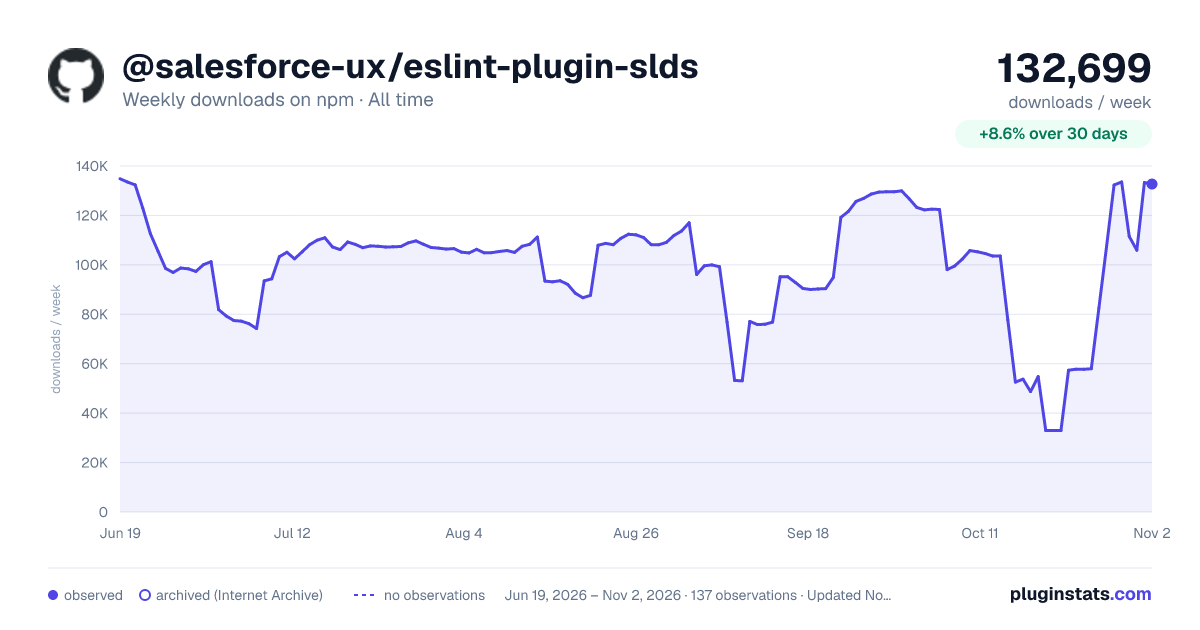

Adoption over time
7/30/90-day growth
Ranking history
Listing placement
Listing placement
Filled points are observed values; hollow points come from Internet Archive snapshots of the listing page. Dashed segments span periods with no observations — values between points are not interpolated.
Each band is one page of 20. Weekly downloads on a linear scale. Placement is projected from weekly downloads, so it can differ from the marketplace's own sort order. Hover a dot to see the listing.
Recent observations
Full history (122)Similar npm ESLint plugins plugins
All 20 @salesforce-ux/eslint-plugin-slds alternatives- 55.1K weekly downloads-21.1%
- 55.5K weekly downloads-51.8%
- 52.8K weekly downloads-52.5%
- 51.7K weekly downloads-42.4%
- 51.3K weekly downloads-19.9%
Data source
Weekly downloads (trailing 7 complete days) come from the official npm downloads API. Downloads include CI and mirrors and are not equivalent to installs or users. npm publishes no ratings.
Listing: https://www.npmjs.com/package/@salesforce-ux/eslint-plugin-slds. First seen Oct 16, 2026; last successful collection Oct 21, 2026. See the methodology.