 PluginStats
n8n-nodes-mcp has 48,340 recorded weekly downloads on npm, an increase of 123% over the past 30 days, ranking #595 of 2,322 tracked listings.
About n8n-nodes-mcp

n8n-nodes-mcp-client
Important Note: The Server-Sent Events (SSE) transport is deprecated and replaced by the new HTTP Streamable transport. SSE remains available for legacy compatibility, but HTTP Streamable is now the recommended method for all new implementations.
This is an n8n community node that lets you interact with Model Context Protocol (MCP) servers in your n8n workflows.
MCP is a protocol that enables AI models to interact with external tools and data sources in a standardized way. This node allows you to connect to MCP servers, access resources, execute tools, and use prompts.
n8n is a fair-code licensed workflow automation platform.
Installation Credentials Environment Variables Operations Using as a Tool Compatibility Resources
Getting Started
Official Quickstart Video:

Community Videos
Shoutout to all the creators of the following n8n community videos that are great resources for learning how to use this node:
- Is MCP the Future of N8N AI Agents? (Fully Tested!)
- Connect N8N AI Agents to EVERYTHING using MCP?
- Build an AI Agent That Can Use Any Tool (MCP in n8n Tutorial)
- The NEW N8N MCP is an Absolute Game-Changer (Brave Search MCP)
- MCP & n8n Automation: The Ultimate Guide for MCP AI Agents (2025)
- REVOLUÇÃO na criação de AGENTES no N8N com o MCP Server!!! (Portuguese)
If you have a great video that you'd like to share, please let me know and I'll add it to the list!
Interested a deeper dive into MCP?
Check out my YouTube Series MCP Explained for more information about the Model Context Protocol.
Security Assessment
Installation
Follow the installation guide in the n8n community nodes documentation.
Also pay attention to Environment Variables for using tools in AI Agents. It's mandatory to set the N8N_COMMUNITY_PACKAGES_ALLOW_TOOL_USAGE environment variable to true if you want to use the MCP Client node as a tool in AI Agents.
Credentials
The MCP Client node supports three types of credentials to connect to an MCP server:
Command-line Based Transport (STDIO)

- Command: The command to start the MCP server
- Arguments: Optional arguments to pass to the server command
- Environment Variables: Variables to pass to the server in NAME=VALUE format
HTTP Streamable Transport (Recommended)
- HTTP Streamable URL: The HTTP endpoint that supports streaming responses (e.g., http://localhost:3001/stream)
- Additional Headers: Optional headers to send with requests (format: name:value, one per line)
HTTP Streamable is the recommended and modern method for all new integrations, providing better efficiency and flexibility compared to SSE.
Example: Using a Local MCP Server with HTTP Streamable
This example shows how to connect to a locally running MCP server using HTTP Streamable:
-
Start a local MCP server that supports HTTP Streamable:
npx @modelcontextprotocol/server-example-streamable -
Configure MCP Client credentials:
- In the node settings, select Connection Type:
HTTP Streamable - Create new credentials of type MCP Client (HTTP Streamable) API
- Set HTTP Streamable URL:
http://localhost:3001/stream - Add any required headers for authentication
- In the node settings, select Connection Type:
-
Create a workflow using the MCP Client node:
- Add an MCP Client node
- Set the Connection Type to
HTTP Streamable - Select your HTTP Streamable credentials
- Execute the workflow to see the results
Server-Sent Events (SSE) Transport (Deprecated, still available for legacy use)
- SSE URL: The URL of the SSE endpoint (default: http://localhost:3001/sse)
- Messages Post Endpoint: Optional custom endpoint for posting messages if different from the SSE URL
- Additional Headers: Optional headers to send with requests (format: name:value, one per line)
Deprecated: SSE is deprecated and will not receive further updates, but remains available for legacy compatibility. For new projects, use HTTP Streamable.
Example: Using a Local MCP Server with SSE (legacy)
This example shows how to connect to a locally running MCP server using Server-Sent Events (SSE):
-
Start a local MCP server that supports SSE:
npx @modelcontextprotocol/server-example-sse -
Configure MCP Client credentials:
- In the node settings, select Connection Type:
Server-Sent Events (SSE) - Create new credentials of type MCP Client (SSE) API
- Set SSE URL:
http://localhost:3001/sse - Add any required headers for authentication
- In the node settings, select Connection Type:
-
Create a workflow using the MCP Client node:
- Add an MCP Client node
- Set the Connection Type to
Server-Sent Events (SSE) - Select your SSE credentials
- Execute the workflow to see the results
Note: For new projects, HTTP Streamable is strongly recommended.
Environment Variables
The MCP Client node supports passing environment variables to MCP servers using the command-line based transport in two ways:…
Description from the npm listing.
- n8n-community-node-package
- mcp
- mcp-client
- mcp-client-node
- mcp-client-n8n
- mcp-client-n8n-node
- mcp-client-n8n-node-package
README badge
Show your rank in a README or on your website. The badge updates automatically.
Charts
Images: 30d · 1y · all time · 1600×900 dark


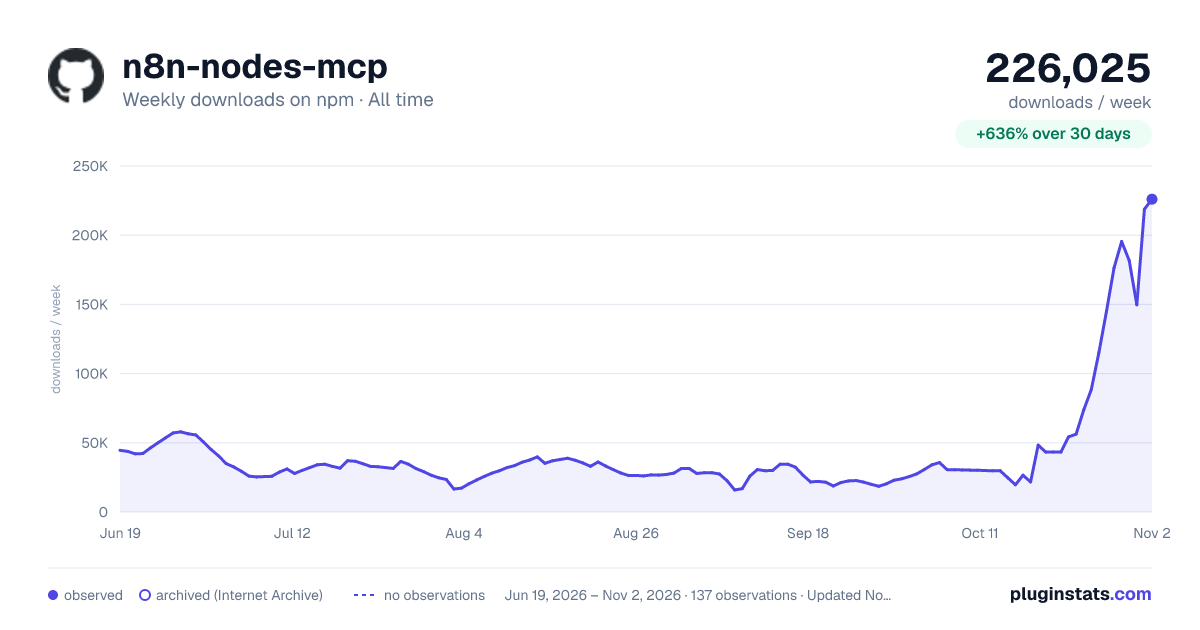

Adoption over time
7/30/90-day growth
Ranking history
Listing placement
Listing placement
Filled points are observed values; hollow points come from Internet Archive snapshots of the listing page. Dashed segments span periods with no observations — values between points are not interpolated.
Each band is one page of 20. Weekly downloads on a linear scale. Placement is projected from weekly downloads, so it can differ from the marketplace's own sort order. Hover a dot to see the listing.
Recent observations
Full history (122)Similar npm MCP servers plugins
All 20 n8n-nodes-mcp alternativesData source
Weekly downloads (trailing 7 complete days) come from the official npm downloads API. Downloads include CI and mirrors and are not equivalent to installs or users. npm publishes no ratings.
Listing: https://www.npmjs.com/package/n8n-nodes-mcp. First seen Oct 16, 2026; last successful collection Oct 20, 2026. See the methodology.