 PluginStats
@clerk/mcp-tools weekly downloads statistics
By clerk (4 listings) · npm · MCP servers
Tools for writing MCP clients and servers without pain
@clerk/mcp-tools has 140,698 recorded weekly downloads on npm, a decrease of 2.3% over the past 30 days, ranking #431 of 2,322 tracked listings.
About @clerk/mcp-tools
MCP Tools
A library built on top of the MCP TypeScript SDK that makes it easier to implement MCP with auth into your MCP client and/or server.
What is MCP?
It's a protocol that enables AI applications like Claude, ChatGPT, Cursor, etc to ask you for permission to access some of your private information that normally you'd need to sign in with your account to access. For example, your emails, or your private github repositories, etc.
This allows you to provide AI applications with context and abilities that it would normally not have access to. You could, for example, have an AI application use some code in a private repo as context to answer your questions, or have it write and send an email on your behalf, after you review it. It's kind of like this:

We think this is valuable because it enables people to use AI to access a bunch of extra information that it wasn't able to access before, and does so in a safe way where you as the user are in control over what it has access to and what it can do. We're excited to see what new AI use cases become possible as MCP adoption grows, and we built this library to try to help make it easier for people to integrate MCP into their applications.
Client vs Server usage
There are two parties involved in MCP:
- The client, which is the one that wants to get access to another service. In the above example would be Claude, which wants to get access to Gmail.
- The server, which is the one that has something that a client wants access to. In the above example, this would be Gmail. This is sometimes referred to as the "resource server" or "MCP server".
This library has tools for both of these parties, so step one is to be clear on whether you are building a client or server. We'll address each of these use cases separately.
NOTE: In web development, the terms "client" and "server" are often used to refer to the frontend (browser) and backend (web server). This is not the case in this situation, so try not to confuse them!
Framework-Specific Documentation
For detailed implementation guides and examples specific to your framework, see:
- Express.js Integration - Complete guide for building MCP servers with Express.js
- Hono Integration - Complete guide for building MCP servers with Hono and edge runtimes
- Next.js Integration - Complete guide for building both MCP servers and clients with Next.js
Table of Contents
Guide: building a server
If you are building a server that you'd like to introduce MCP support for, you will want to use the @clerk/mcp-tools/server import path.
Protected resource metadata
In order for the most up to date authentication flow in the MCP spec to work correctly, your server will need to expose a static metadata file called "protected resource metadata", which is defined by RFC 9728.
This library exposes a tool that can quickly generate such a metadata file for you. Here's an example of how to use it:
import { generateProtectedResourceMetadata } from '@clerk/mcp-tools/server';

const result = generateProtectedResourceMetadata({
  resourceUrl: 'https://myapp.com/current-route',
  authServerUrl: 'https://auth.example.com',
});
You will want to set up a route at .well-known/oauth-protected-resource and make sure to return this result from that route on your server.
If you are using Clerk for authentication in your app, we have a helper that makes this easier:
import { generateClerkProtectedResourceMetadata } from '@clerk/mcp-tools/server';

const result = generateClerkProtectedResourceMetadata({
  publishableKey: process.env.CLERK_PUBLISHABLE_KEY,
  resourceUrl: 'https://myapp.com/current-route',
});
For framework-specific implementations of protected resource metadata handlers, see:
Authorization server metadata
NOTE: This is not yet fully implemented
An older version of the MCP spec required MCP servers to publish a separate "authorization server metadata" document, defined by RFC 8414. Most deployments no longer need this endpoint when they publish protected resource metadata and use an authorization service with its own metadata endpoint. You may still need it for a custom or embedded authorization server or an older MCP client.
If you use Clerk for authentication, fetch the metadata from your Clerk Frontend API and return it from your authorization server metadata endpoint.
import { fetchClerkAuthorizationServerMetadata } from '@clerk/mcp-tools/server';

// Return this result from <your-app>/.well-known/oauth-authorization-server
const result = await fetchClerkAuthorizationServerMetadata({
  publishableKey: process.env.CLERK_PUBLISHABLE_KEY,
});
For framework-specific implementations, see:…
Description from the npm listing.
- auth
- clerk
- context
- mcp
- model
- protocol
README badge
Show your rank in a README or on your website. The badge updates automatically.
Charts
Images: 30d · 1y · all time · 1600×900 dark


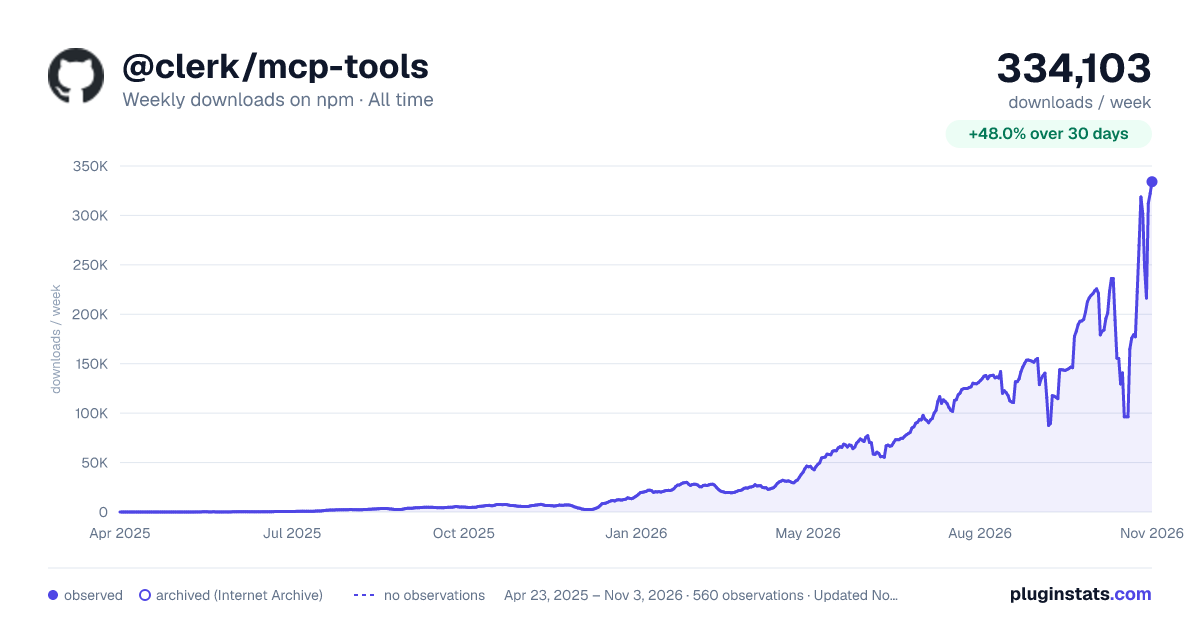

Adoption over time
7/30/90-day growth
Ranking history
Listing placement
Listing placement
Filled points are observed values; hollow points come from Internet Archive snapshots of the listing page. Dashed segments span periods with no observations — values between points are not interpolated.
Each band is one page of 20. Weekly downloads on a linear scale. Placement is projected from weekly downloads, so it can differ from the marketplace's own sort order. Hover a dot to see the listing.
Recent observations
Full history (544)Similar npm MCP servers plugins
All 20 @clerk/mcp-tools alternativesData source
Weekly downloads (trailing 7 complete days) come from the official npm downloads API. Downloads include CI and mirrors and are not equivalent to installs or users. npm publishes no ratings.
Listing: https://www.npmjs.com/package/@clerk/mcp-tools. First seen Oct 16, 2026; last successful collection Oct 20, 2026. See the methodology.