 PluginStats
rsbuild-plugin-vue-mcp weekly downloads statistics
By BrightX · npm · MCP servers
Rsbuild/Rspack MCP plugin based on Vue DevTools
rsbuild-plugin-vue-mcp has 781 recorded weekly downloads on npm, a decrease of 94.1% over the past 30 days, ranking #1440 of 2,314 tracked listings.
About rsbuild-plugin-vue-mcp
Rsbuild plugin VueDevtools MCP
Rsbuild/Rspack MCP plugin based on Vue DevTools.
Supports
Rsbuild 1.x/2.xandRspack 1.x/2.x.
Through the Model Context Protocol (MCP), AI tools (such as IDE assistants and agents) can read and manipulate your Vue application state in real time, truly enabling "AI that understands your application."
This plugin bridges your dev server and the Vue DevTools running inside your app page via birpc over WebSocket, exposing a set of MCP tools that let AI inspect components, router, and Pinia stores, and even edit component state directly.
Features
- 🔌 Zero-config MCP server — automatically mounted on your existing dev server (no separate process).
- 🌳 Inspect the component tree of the running app, in tree.
- 🧩 Read & edit Vue component state (reactive data, props, computed, refs…).
- 🔦 Highlight a component in the page to visually locate it.
- 🧭 Read the Vue Router info (current route, matched records, params, query…).
- 🗄️ Inspect Pinia — browse the store tree and read individual store state.
- ⚡️ Works with both Rsbuild and Rspack dev servers.
Usage
Install
# For npm
npm add rsbuild-plugin-vue-mcp -D

# For yarn
yarn add rsbuild-plugin-vue-mcp -D

# For pnpm
pnpm add rsbuild-plugin-vue-mcp -D
Rsbuild
// rsbuild.config.js
import { defineConfig } from '@rsbuild/core';
import { pluginVue } from '@rsbuild/plugin-vue';
import { pluginVueMcp } from "rsbuild-plugin-vue-mcp";

export default defineConfig({
    plugins: [
        pluginVue(),
        pluginVueMcp(),
    ],
});
Rspack
// rspack.config.js
import { defineConfig } from '@rspack/cli';
import { rspack } from "@rspack/core";
import { VueLoaderPlugin } from 'rspack-vue-loader';
import { VueMcpPlugin } from 'rsbuild-plugin-vue-mcp/rspack';

export default defineConfig({
    plugins: [
        new rspack.HtmlRspackPlugin(),
        new VueLoaderPlugin(),
        new VueMcpPlugin(),
    ],
    module: {
        rules: [
            {
                test: /\.vue$/,
                loader: 'rspack-vue-loader',
                options: {
                    experimentalInlineMatchResource: true,
                },
            },
        ],
    },
});
The MCP server (Streamable HTTP transport) will be available at http://localhost:[port]/__mcp/mcp.
Requirements: requires
@rsbuild/core >= 1.2.9(for Rsbuild) or@rspack/core >= 1.3.0(for Rspack) so the plugin can attach to the underlying HTTP server.
Connect an MCP client
Start the dev server (usually npm run dev). It prints the MCP service URL in the console, e.g.:
➜ MCP: Server is running at http://localhost:5173/__mcp/mcp
Add that URL to your client's MCP configuration (Cursor, Claude Desktop, VS Code, etc.):
{
  "mcpServers": {
    "vue-devtools": {
      "type": "streamable-http",
      "url": "http://localhost:<YourPort>/__mcp/mcp",
      "description": "Vue DevTools MCP - Rsbuild/Rspack MCP plugin based on Vue DevTools",
      "disabled": false
    }
  }
}
[!IMPORTANT] To actually call the MCP tools and debug your app, two things are required:
- The dev server is running (so the MCP server is up).
- You have opened your app page in a browser (e.g.
http://localhost:5173). The injectedoverlay.jsthen connects to the dev server via WebSocket and exposes the Vue DevTools runtime.The tools reach the live app through that WebSocket connection — if no app page is open, the tool calls will fail or time out.
Once the page is open, the AI assistant can call the tools listed below against your running dev app.
MCP Tools
The plugin registers the following tools on the MCP server. Each tool talks to the app page through birpc, so the data always reflects the live application. All tools return their results as JSON-formatted text (not markdown).…
Description from the npm listing.
- rsbuild-plugin
- rspack-plugin
- vue
- mcp
- modelcontextprotocol
README badge
Show your rank in a README or on your website. The badge updates automatically.
Charts
Images: 30d · 1y · all time · 1600×900 dark


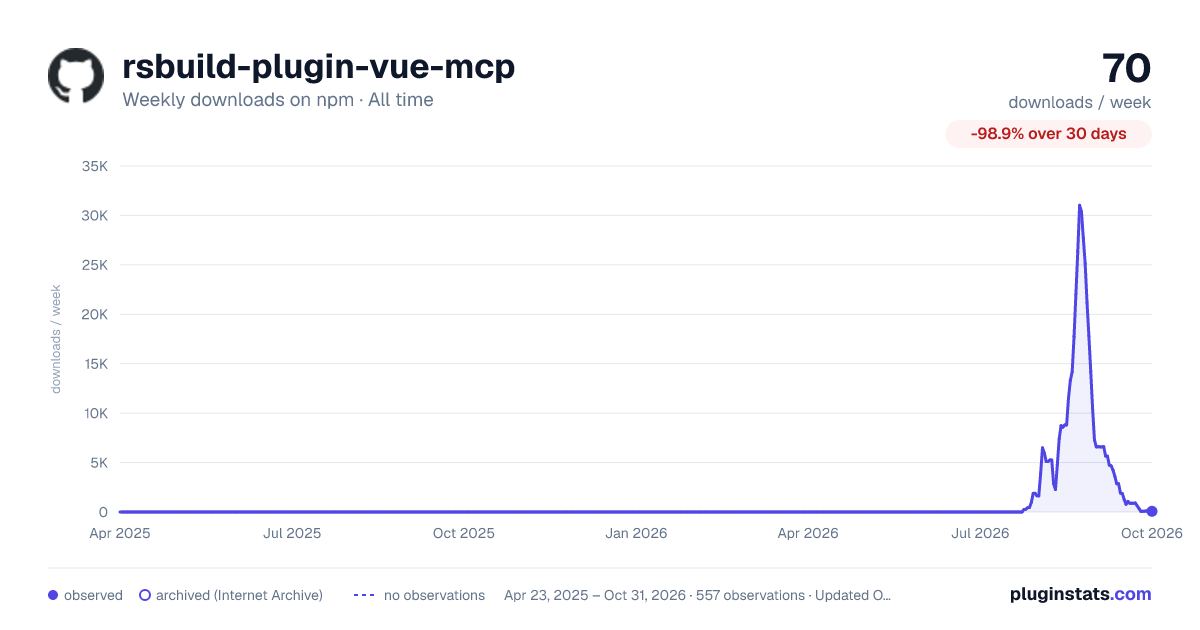

Adoption over time
7/30/90-day growth
Ranking history
Listing placement
Listing placement
Filled points are observed values; hollow points come from Internet Archive snapshots of the listing page. Dashed segments span periods with no observations — values between points are not interpolated.
Each band is one page of 20. Weekly downloads on a linear scale. Placement is projected from weekly downloads, so it can differ from the marketplace's own sort order. Hover a dot to see the listing.
Recent observations
Full history (544)Similar npm MCP servers plugins
All 20 rsbuild-plugin-vue-mcp alternativesData source
Weekly downloads (trailing 7 complete days) come from the official npm downloads API. Downloads include CI and mirrors and are not equivalent to installs or users. npm publishes no ratings.
Listing: https://www.npmjs.com/package/rsbuild-plugin-vue-mcp. First seen Oct 16, 2026; last successful collection Oct 20, 2026. See the methodology.