 PluginStats
tiny-stdio-mcp-server weekly downloads statistics
By poe-platform · npm · MCP servers
Minimal MCP server over stdio with typed tools and rich content helpers
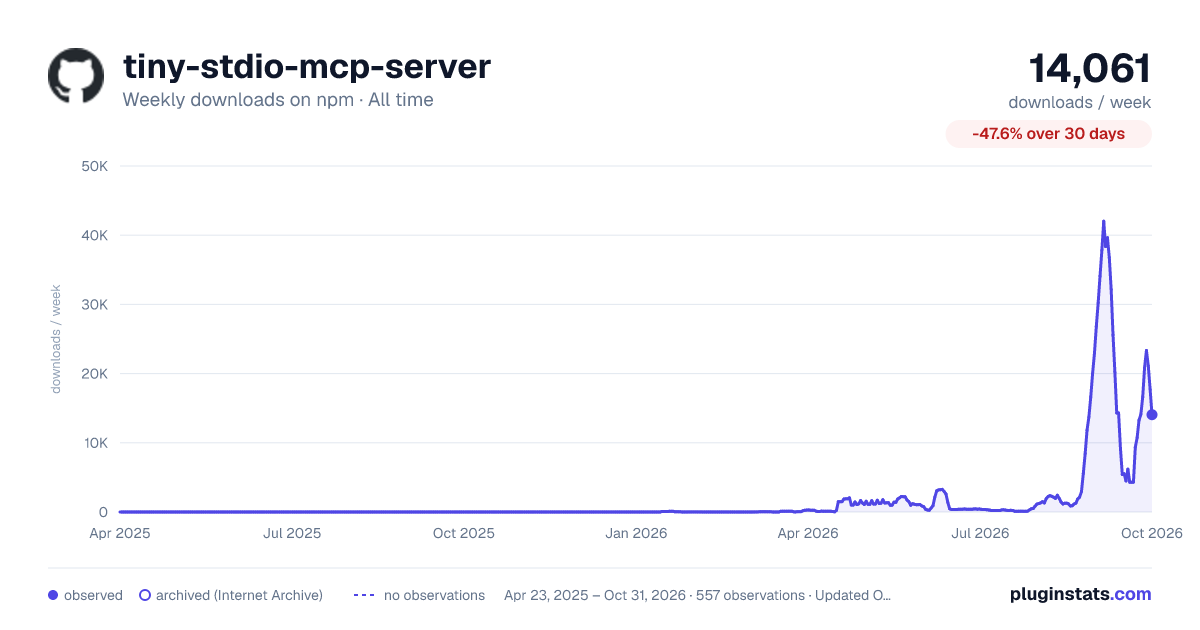
tiny-stdio-mcp-server has 6,193 recorded weekly downloads on npm, an increase of 588% over the past 30 days, ranking #1083 of 2,322 tracked listings.
About tiny-stdio-mcp-server
tiny-stdio-mcp-server
Minimal Model Context Protocol server for Node.js. Type-safe tool definitions, rich content helpers for images/audio/files.
Install
npm install tiny-stdio-mcp-server
Quick start
import { createServer, defineSchema } from "tiny-stdio-mcp-server";

const schema = defineSchema({
  text: { type: "string", description: "Text to reverse" }
});

createServer({ name: "my-server", version: "1.0.0" })
  .tool("reverse", "Reverse a string", schema, ({ text }) => {
    return text.split("").reverse().join("");
  })
  .listen();
Run it:
node my-server.js
Any MCP client (Claude Code, Codex, etc.) can connect to it over stdio.
API
createServer(options)
Creates a new MCP server.
const server = createServer({ name: "my-server", version: "1.0.0" });
.tool(name, description, schema, handler, outputSchema?)
Register a tool. The handler receives typed args matching the schema and returns a string, content helper, array of content, or a typed object when outputSchema is supplied.
const schema = defineSchema({
  query: { type: "string", description: "Search query" },
  limit: { type: "number", description: "Max results", optional: true }
});

server.tool("search", "Search for things", schema, async ({ query, limit }) => {
  // `query` is string, `limit` is number | undefined
  return `Found results for: ${query}`;
});
For structured-data tools, pass a root-object output schema. The server advertises it as MCP Tool.outputSchema, validates successful handler results, and returns them as CallToolResult.structuredContent. Plain object returns receive a JSON text backstop in content[] for older clients. Explicit CallToolResult values keep their handler-supplied content blocks; the JSON text backstop is added only when content is empty.
const input = defineSchema({
  query: { type: "string" }
});
const output = defineSchema({
  items: {
    type: "array",
    items: {
      type: "object",
      properties: {
        title: { type: "string" },
        score: { type: "number" }
      },
      required: ["title", "score"]
    }
  }
});

server.tool(
  "search",
  "Search",
  input,
  async ({ query }) => ({
    items: [{ title: query, score: 1 }]
  }),
  output
);
Object output schemas work across MCP versions; modern MCP also supports other JSON output types. Otherwise, supported JSON Schema keywords are accepted, including composition keywords, nullable type unions, and local $defs/$ref references. Input and output schemas compile synchronously during .tool() or .registerTool() registration, so malformed schemas throw immediately instead of failing on the first tool call.
Successful structured results must satisfy outputSchema. Validation failures use JSON-RPC -32602 for inputs and -32603 for outputs, with formatted validation details in the message and the issue array in error.data. Explicit handler results with isError: true are passed through unchanged and are exempt from structured-content and output-schema validation.
Tools whose natural result is prose, images, audio, files, or other content blocks should omit outputSchema and keep returning content.
Handlers can throw ToolError to return a JSON-RPC tool error with a specific code, message, and optional structured data payload. The server forwards that data field in the JSON-RPC error response so clients can inspect machine-readable failure details.
Standard schemas, including Zod
Pass schemas implementing Standard Schema v1 and Standard JSON Schema v1
straight to .tool() or .registerTool(). Toolcraft schemas and Zod 4.5.4
support both interfaces. Existing defineSchema and raw JSON Schema inputs
continue to work on the same server.
import { z } from "zod"; // Your application's existing dependency
import { createServer } from "tiny-stdio-mcp-server";

createServer({ name: "search", version: "1" }).tool(
  "search",
  "Search",
  z.object({ query: z.string(), limit: z.number().default(10) }),
  ({ query, limit }) => `${query}: ${limit}`
);
Tiny MCP has no Zod dependency, peer dependency, imports, or adapter setup. Detection uses the standard interfaces. Older libraries exposing validation without JSON Schema conversion fail clearly during registration.
Discovery uses the schema's input JSON Schema and, when supplied, its output JSON Schema. Runtime parsing uses the original library, preserving defaults, coercions, transforms, refinements, and asynchronous validation. Handler arguments are inferred from parsed output; a handler's return value is checked against the output schema's accepted input. Output parsing runs once before structured content and fallback text are produced. Explicit error results skip output parsing.
Input wire schemas must describe objects. Output schemas may describe any JSON
value for modern MCP; older clients receive object structured content or text
fallbacks for other values. Conversion failures occur at registration. Custom
refinements remain runtime checks and cannot always appear in discovery JSON
Schema. Async parsing shares the tool timeout and concurrency limits.
validateToolArguments: false disables input parsing, including defaults and
transforms; handlers then receive the original arguments.
.listen()
Start listening on stdin/stdout (standard MCP stdio transport).
await server.listen();
.connect(transport)
Connect to a custom readable/writable stream pair.
await server.connect({ readable: process.stdin, writable: process.stdout });
.connectSDK(transport)
Connect using an SDK-compatible in-memory transport (for testing).
await server.connectSDK(sdkTransport);
.removeTool(name) / .notifyToolsChanged()
Dynamically add/remove tools at runtime and notify connected clients.
Configuration Options…
Description from the npm listing.
- mcp
- model-context-protocol
- stdio
- server
README badge
Show your rank in a README or on your website. The badge updates automatically.
Charts
Images: 30d · 1y · all time · 1600×900 dark



Adoption over time
7/30/90-day growth
Ranking history
Listing placement
Listing placement
Filled points are observed values; hollow points come from Internet Archive snapshots of the listing page. Dashed segments span periods with no observations — values between points are not interpolated.
Each band is one page of 20. Weekly downloads on a linear scale. Placement is projected from weekly downloads, so it can differ from the marketplace's own sort order. Hover a dot to see the listing.
Recent observations
Full history (544)Similar npm MCP servers plugins
All 20 tiny-stdio-mcp-server alternativesData source
Weekly downloads (trailing 7 complete days) come from the official npm downloads API. Downloads include CI and mirrors and are not equivalent to installs or users. npm publishes no ratings.
Listing: https://www.npmjs.com/package/tiny-stdio-mcp-server. First seen Oct 16, 2026; last successful collection Oct 20, 2026. See the methodology.