 PluginStats
@codemieai/code weekly downloads statistics
By codemieai · npm · Claude Code
Unified AI coding assistant CLI - Manage Claude Code, Gemini & custom agents. Multi-provider support (OpenAI, Azure, LiteLLM, SSO). Built-in LangGraph agent with file operations & git integration.
@codemieai/code has 3,979 recorded weekly downloads on npm, an increase of 22.7% over the past 30 days, ranking #1191 of 2,322 tracked listings.
About @codemieai/code
AI/Run CodeMie CLI









Unified AI Coding Assistant CLI - Manage Claude Code, OpenAI Codex, GitHub Copilot CLI, Google Gemini, OpenCode, Pi, Kimi Code, and custom AI agents from one powerful command-line interface. Multi-provider support (CodeMie SSO, Bearer Auth, LiteLLM, AWS Bedrock, Ollama, Anthropic Subscription, Moonshot Subscription). Built-in native agent with file operations, command execution, planning mode, and plugins. Cross-platform support for Windows, Linux, and macOS.

Why CodeMie CLI?
CodeMie CLI is the all-in-one AI coding assistant for developers.
- ✨ One CLI, Multiple AI Agents - Switch between Claude Code, OpenAI Codex, GitHub Copilot CLI, Gemini, OpenCode, Pi, Kimi Code, and built-in agent.
- 🔄 Multi-Provider Support - CodeMie SSO, Bearer Authorization, LiteLLM, AWS Bedrock, Ollama, Anthropic Subscription, and Moonshot Subscription.
- 🚀 Built-in Agent -
codemie-codeships with the CLI: file operations, command execution, planning mode, and native plugins. - 🖥️ Cross-Platform - Full support for Windows, Linux, and macOS with platform-specific optimizations.
- 🔗 MCP Proxy - Connect to remote MCP servers with automatic OAuth authorization.
- 🔐 Enterprise Ready - SSO and JWT authentication, audit logging, and role-based access.
- ⚡ Productivity Boost - Code review, refactoring, test generation, and bug fixing.
- 🎯 Profile Management - Manage work, personal, and team configurations separately.
- 🧩 CodeMie Assistants in Claude - Connect your available CodeMie assistants as Claude subagents or skills.
- 🛠️ CodeMie Platform Skills - Install CodeMie platform skills directly as Claude Code slash commands with auto-sync.
- 📊 Usage Analytics - Track and analyze AI usage across all agents with detailed insights.
- 🔧 CI/CD Workflows - Automated code review, fixes, and feature implementation.
Perfect for developers seeking a powerful alternative to GitHub Copilot or Cursor.
Quick Start
Install CodeMie using the instructions for your shell, then run:
codemie setup
codemie doctor
codemie install claude --supported
codemie install codex --supported
codemie install copilot
codemie-claude "Review my API code"
codemie-codex "Refactor this service"
codemie-copilot --task "Summarize this module"
codemie --task "Generate unit tests"
codemie skills find pdf                    # discover agent skills (EPAM internal + skills.sh)
claude mcp add my-server -- codemie-mcp-proxy "https://mcp-server.example.com/sse"
Prefer not to install globally? Use npx with the full package name:
npx @codemieai/code setup
npx @codemieai/code doctor
npx @codemieai/code install claude --supported
# Note: Agent shortcuts require global installation
Installation
System Requirements
Before installing, verify the following:
| Requirement | Details |
|---|---|
| Node.js | >=20.0.0 |
| npm | Required for the npm fallback and local/project installation methods; ships with Node.js |
| Operating System | Windows, macOS, Linux, or WSL |
| Network access | Access to registry.npmjs.org (or an enterprise npm mirror that exposes the @codemieai scope) and to GitHub Releases (github.com, objects.githubusercontent.com) — some native dependencies (e.g. keytar) fetch prebuilt binaries from there via prebuild-install |
| npm permissions | A user-writable global npm prefix is recommended for npm install -g; when global npm is not writable, the bootstrap installers configure a user-local prefix automatically |
Confirm the installed Node.js version with node --version before proceeding. Agent shortcuts (codemie-claude, codemie-codex, codemie-opencode, codemie-pi, codemie-kimi, etc.) additionally require a global installation — see Local/Project npm Installation.
Native Bootstrap Installers
For Windows and macOS, CodeMie ships two installer options:
-
CodeMie Connect — a signed desktop app for macOS (Apple Silicon) that sets up Node.js and the CodeMie CLI on first launch, so there is nothing to install first. It runs a guided setup (sign in, pick a model, install a tool) and then opens to a Home screen, a Tools screen for installing or removing coding tools, and a Health screen that runs
codemie doctor.
-
Script installers — plain shell/PowerShell scripts stored in this repo that install via npm. Prefer these for CI, headless machines, or when CodeMie Connect is unavailable.…
Description from the npm listing.
- ai
- artificial-intelligence
- coding-assistant
- code-generation
- cli
- command-line
- claude
- claude-code
- openai
- gemini
- anthropic
- gpt
- chatgpt
- ai-agents
- coding-agents
- langgraph
- langchain
- code-review
- refactoring
- test-generation
README badge
Show your rank in a README or on your website. The badge updates automatically.
Charts
Images: 30d · 1y · all time · 1600×900 dark


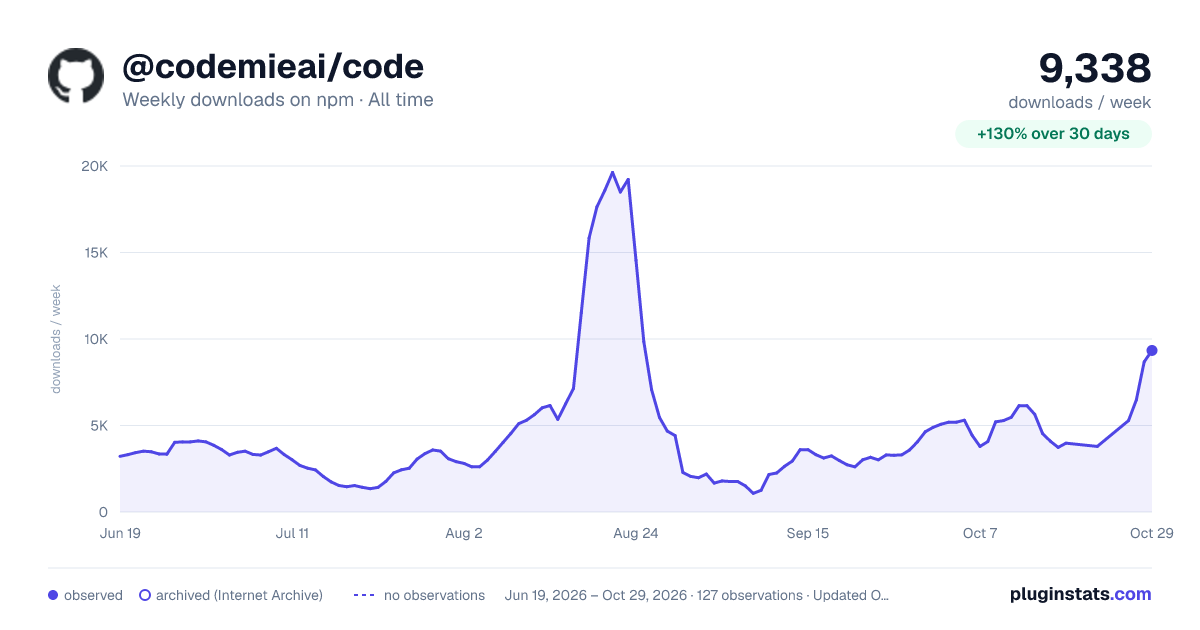

Adoption over time
7/30/90-day growth
Ranking history
Listing placement
Listing placement
Filled points are observed values; hollow points come from Internet Archive snapshots of the listing page. Dashed segments span periods with no observations — values between points are not interpolated.
Each band is one page of 20. Weekly downloads on a linear scale. Placement is projected from weekly downloads, so it can differ from the marketplace's own sort order. Hover a dot to see the listing.
Recent observations
Full history (122)Similar npm Claude Code plugins
All 20 @codemieai/code alternativesData source
Weekly downloads (trailing 7 complete days) come from the official npm downloads API. Downloads include CI and mirrors and are not equivalent to installs or users. npm publishes no ratings.
Listing: https://www.npmjs.com/package/@codemieai/code. First seen Oct 16, 2026; last successful collection Oct 20, 2026. See the methodology.