 PluginStats
@gongrzhe/server-gmail-autoauth-mcp weekly downloads statistics
By gongrzhe · npm · MCP servers
Gmail MCP server with auto authentication support
@gongrzhe/server-gmail-autoauth-mcp has 13,845 recorded weekly downloads on npm, a decrease of 32.2% over the past 30 days, ranking #935 of 2,644 tracked listings.
About @gongrzhe/server-gmail-autoauth-mcp
Gmail AutoAuth MCP Server
A Model Context Protocol (MCP) server for Gmail integration in Claude Desktop with auto authentication support. This server enables AI assistants to manage Gmail through natural language interactions.
Features
- Send emails with subject, content, attachments, and recipients
- Full attachment support - send and receive file attachments
- Download email attachments to local filesystem
- Support for HTML emails and multipart messages with both HTML and plain text versions
- Full support for international characters in subject lines and email content
- Read email messages by ID with advanced MIME structure handling
- Enhanced attachment display showing filenames, types, sizes, and download IDs
- Search emails with various criteria (subject, sender, date range)
- Comprehensive label management with ability to create, update, delete and list labels
- List all available Gmail labels (system and user-defined)
- List emails in inbox, sent, or custom labels
- Mark emails as read/unread
- Move emails to different labels/folders
- Delete emails
- Batch operations for efficiently processing multiple emails at once
- Full integration with Gmail API
- Simple OAuth2 authentication flow with auto browser launch
- Support for both Desktop and Web application credentials
- Global credential storage for convenience
Installation & Authentication
Installing via Smithery
To install Gmail AutoAuth for Claude Desktop automatically via Smithery:
npx -y @smithery/cli install @gongrzhe/server-gmail-autoauth-mcp --client claude
Installing Manually
-
Create a Google Cloud Project and obtain credentials:
a. Create a Google Cloud Project:
- Go to Google Cloud Console
- Create a new project or select an existing one
- Enable the Gmail API for your project
b. Create OAuth 2.0 Credentials:
- Go to "APIs & Services" > "Credentials"
- Click "Create Credentials" > "OAuth client ID"
- Choose either "Desktop app" or "Web application" as application type
- Give it a name and click "Create"
- For Web application, add
http://localhost:3000/oauth2callbackto the authorized redirect URIs - Download the JSON file of your client's OAuth keys
- Rename the key file to
gcp-oauth.keys.json
-
Run Authentication:
You can authenticate in two ways:
a. Global Authentication (Recommended):
# First time: Place gcp-oauth.keys.json in your home directory's .gmail-mcp folder
mkdir -p ~/.gmail-mcp
mv gcp-oauth.keys.json ~/.gmail-mcp/

# Run authentication from anywhere
npx @gongrzhe/server-gmail-autoauth-mcp auth
b. Local Authentication:
# Place gcp-oauth.keys.json in your current directory
# The file will be automatically copied to global config
npx @gongrzhe/server-gmail-autoauth-mcp auth
The authentication process will:
- Look for
gcp-oauth.keys.jsonin the current directory or~/.gmail-mcp/ - If found in current directory, copy it to
~/.gmail-mcp/ - Open your default browser for Google authentication
- Save credentials as
~/.gmail-mcp/credentials.json
Note:
- After successful authentication, credentials are stored globally in
~/.gmail-mcp/and can be used from any directory - Both Desktop app and Web application credentials are supported
- For Web application credentials, make sure to add
http://localhost:3000/oauth2callbackto your authorized redirect URIs
- Look for
-
Configure in Claude Desktop:
{
  "mcpServers": {
    "gmail": {
      "command": "npx",
      "args": [
        "@gongrzhe/server-gmail-autoauth-mcp"
      ]
    }
  }
}
Docker Support
If you prefer using Docker:
- Authentication:
docker run -i --rm \
  --mount type=bind,source=/path/to/gcp-oauth.keys.json,target=/gcp-oauth.keys.json \
  -v mcp-gmail:/gmail-server \
  -e GMAIL_OAUTH_PATH=/gcp-oauth.keys.json \
  -e "GMAIL_CREDENTIALS_PATH=/gmail-server/credentials.json" \
  -p 3000:3000 \
  mcp/gmail auth
- Usage:
{
  "mcpServers": {
    "gmail": {
      "command": "docker",
      "args": [
        "run",
        "-i",
        "--rm",
        "-v",
        "mcp-gmail:/gmail-server",
        "-e",
        "GMAIL_CREDENTIALS_PATH=/gmail-server/credentials.json",
        "mcp/gmail"
      ]
    }
  }
}
Cloud Server Authentication
For cloud server environments (like n8n), you can specify a custom callback URL during authentication:
npx @gongrzhe/server-gmail-autoauth-mcp auth https://gmail.gongrzhe.com/oauth2callback
Setup Instructions for Cloud Environment
-
Configure Reverse Proxy:
- Set up your n8n container to expose a port for authentication
- Configure a reverse proxy to forward traffic from your domain (e.g.,
gmail.gongrzhe.com) to this port
-
DNS Configuration:
- Add an A record in your DNS settings to resolve your domain to your cloud server's IP address
-
Google Cloud Platform Setup:
- In your Google Cloud Console, add your custom domain callback URL (e.g.,
https://gmail.gongrzhe.com/oauth2callback) to the authorized redirect URIs list
- In your Google Cloud Console, add your custom domain callback URL (e.g.,
-
Run Authentication:
npx @gongrzhe/server-gmail-autoauth-mcp auth https://gmail.gongrzhe.com/oauth2callback -
Configure in your application:
{
  "mcpServers": {
    "gmail": {
      "command": "npx",
      "args": [
        "@gongrzhe/server-gmail-autoauth-mcp"
      ]
    }
  }
}
```…
Description from the npm listing.
- gmail
- mcp
- cursor
- ai
- oauth
- model-context-protocol
- google-gmail
- claude
- auto-auth
README badge
Show your rank in a README or on your website. The badge updates automatically.
Charts
Images: 30d · 1y · all time · 1600×900 dark


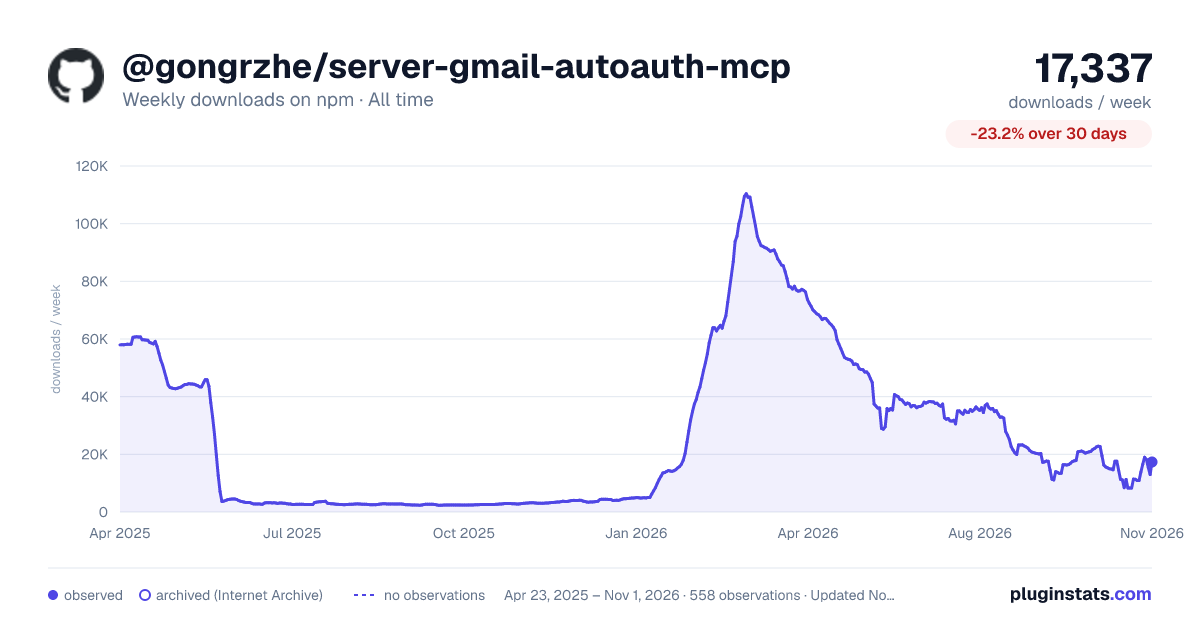

Adoption over time
7/30/90-day growth
Ranking history
Listing placement
Listing placement
Filled points are observed values; hollow points come from Internet Archive snapshots of the listing page. Dashed segments span periods with no observations — values between points are not interpolated.
Each band is one page of 20. Weekly downloads on a linear scale. Placement is projected from weekly downloads, so it can differ from the marketplace's own sort order. Hover a dot to see the listing.
Recent observations
Full history (546)Similar npm MCP servers plugins
All 20 @gongrzhe/server-gmail-autoauth-mcp alternatives- 13.5K weekly downloads-8.8%
Data source
Weekly downloads (trailing 7 complete days) come from the official npm downloads API. Downloads include CI and mirrors and are not equivalent to installs or users. npm publishes no ratings.
Listing: https://www.npmjs.com/package/@gongrzhe/server-gmail-autoauth-mcp. First seen Oct 16, 2026; last successful collection Oct 28, 2026. See the methodology.