 PluginStats
vitepress-plugin-llms weekly downloads statistics
By okineadev · npm · Vite plugins
📜 A VitePress plugin for generating LLM-friendly documentation
vitepress-plugin-llms has 47,821 recorded weekly downloads on npm, a decrease of 29.4% over the past 30 days, ranking #601 of 2,322 tracked listings.
About vitepress-plugin-llms
📜 vitepress-plugin-llms





🐛 Report bug • Request feature ✨
</div> <!-- markdownlint-restore --> <!-- prettier-ignore-end -->📦 Installation
npm install vitepress-plugin-llms --save-dev
🛠️ Usage
Add the Vite plugin to your VitePress configuration (.vitepress/config.ts):
import { defineConfig } from 'vitepress'
import llmstxt from 'vitepress-plugin-llms'

export default defineConfig({
  vite: {
    plugins: [llmstxt()],
  },
})
Now, thanks to this plugin, the LLM version of the website documentation is automatically generated
[!NOTE]
For repositories with documentation in other languages: Please do not use this plugin, only English documentation is enough for LLMs.
<!-- markdownlint-capture --> <!-- markdownlint-disable no-inline-html -->
<!-- markdownlint-restore -->[!TIP] You can add <kbd>📋 Copy as Markdown</kbd> and <kbd>📥 Download as Markdown</kbd> buttons for each page so that visitors can copy the page in Markdown format with just one click!
<img src="./assets/copy-as-markdown-buttons-screenshot.png" width="400" alt="Screenshot">
First, register a global component with buttons in docs/.vitepress/theme/index.ts:
import DefaultTheme from 'vitepress/theme'
import type { Theme } from 'vitepress'
import CopyOrDownloadAsMarkdownButtons from 'vitepress-plugin-llms/vitepress-components/CopyOrDownloadAsMarkdownButtons.vue'

export default {
  extends: DefaultTheme,
  enhanceApp({ app }) {
    app.component('CopyOrDownloadAsMarkdownButtons', CopyOrDownloadAsMarkdownButtons)
  },
} satisfies Theme
And tell VitePress to use an additional Markdown plugin that will insert them:
import { defineConfig } from 'vitepress'
import { copyOrDownloadAsMarkdownButtons } from 'vitepress-plugin-llms'

export default defineConfig({
  // ...
  markdown: {
    config(md) {
      md.use(copyOrDownloadAsMarkdownButtons)
    },
  },
})
If you want to build your own UI instead of using the bundled Vue component, you can consume the shared composable directly:
import { useCopyOrDownloadAsMarkdownButtons } from 'vitepress-plugin-llms/vitepress-components'
Localizing the buttons
The bundled CopyOrDownloadAsMarkdownButtons component reads its labels from VitePress's themeConfig.llms. Add this configuration to .vitepress/config.ts after setting up the component above.
All properties are optional strings:
| Property | Default value | Purpose |
|---|---|---|
copyText | Copy page | Main copy button |
copiedText | Copied | Confirmation after a successful copy |
viewMarkdownText | View as Markdown | Dropdown item for viewing raw Markdown |
openInAIText | Open in {provider} | Dropdown items for opening an AI provider |
Keep the literal {provider} placeholder in openInAIText: the component replaces it with the provider name, such as ChatGPT or Claude.
For a single-language site, set themeConfig.llms at the top level. For a multilingual site, set locales.<locale>.themeConfig.llms for each language using VitePress's internationalization configuration. For example:
import { defineConfig } from 'vitepress'…
Description from the npm listing.
- ai
- documentation
- llms
- plugin
- vite-plugin
- vitepress
- vitepress-plugin
README badge
Show your rank in a README or on your website. The badge updates automatically.
Charts
Images: 30d · 1y · all time · 1600×900 dark


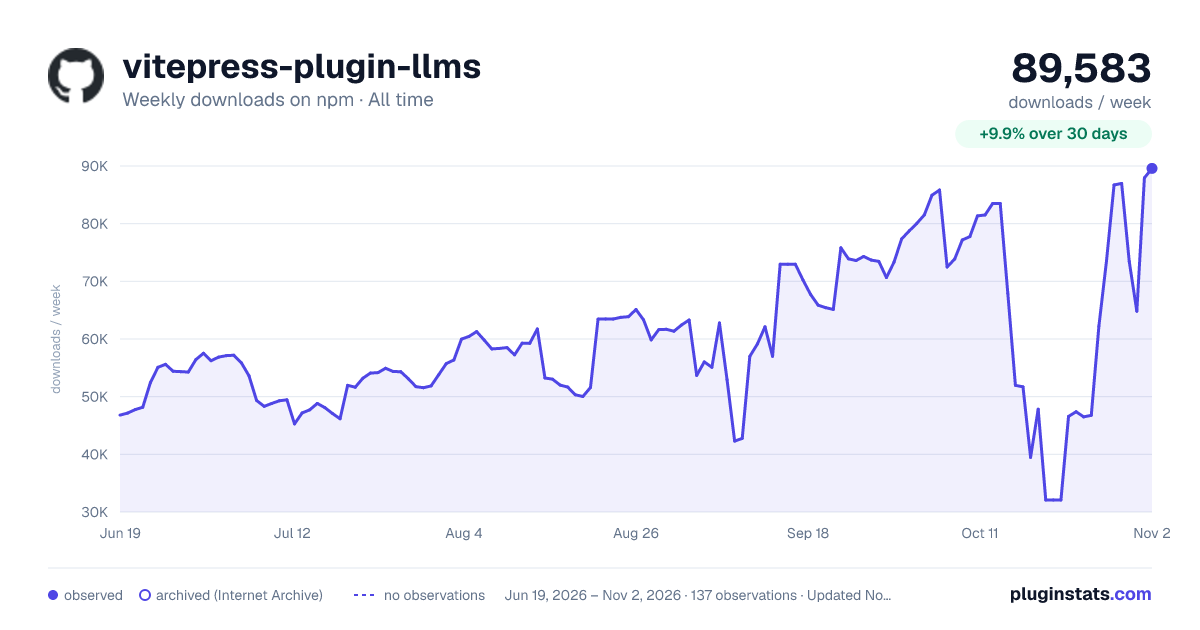

Adoption over time
7/30/90-day growth
Ranking history
Listing placement
Listing placement
Filled points are observed values; hollow points come from Internet Archive snapshots of the listing page. Dashed segments span periods with no observations — values between points are not interpolated.
Each band is one page of 20. Weekly downloads on a linear scale. Placement is projected from weekly downloads, so it can differ from the marketplace's own sort order. Hover a dot to see the listing.
Recent observations
Full history (122)Similar npm Vite plugins plugins
All 20 vitepress-plugin-llms alternativesData source
Weekly downloads (trailing 7 complete days) come from the official npm downloads API. Downloads include CI and mirrors and are not equivalent to installs or users. npm publishes no ratings.
Listing: https://www.npmjs.com/package/vitepress-plugin-llms. First seen Oct 16, 2026; last successful collection Oct 20, 2026. See the methodology.