 PluginStats
prettier-plugin-class-breaker weekly downloads statistics
By FrancisGregori · npm · Prettier plugins
A Prettier plugin for JSX that formats long CSS class strings into multiple lines. It optimizes class name readability in JSX, supporting TypeScript and standard syntax.
prettier-plugin-class-breaker has 7 recorded weekly downloads on npm, a decrease of 41.7% over the past 30 days, ranking #2146 of 2,391 tracked listings.
About prettier-plugin-class-breaker
Prettier Class Breaker Plugin
Overview
The Prettier Class Breaker Plugin is a simple yet effective custom Prettier plugin designed to improve the formatting of JSX class names within your codebase. Specifically, it preprocesses className attributes in JSX, converting them into template literals when necessary. This approach allows the plugin to break long strings of CSS classes into multiple lines, thereby enhancing the readability and maintainability of your code. The plugin is straightforward in its current implementation, with ample scope for future enhancements and support for additional features.
Features
- Custom Line Breaks: Configure after how many classes a new line should be inserted.
- Indentation Control: Choose between tabs or spaces for indentation, and set the desired size.
- Integration with Existing Tools: Works seamlessly with existing Prettier configurations.
Installation
First, install the plugin via npm:
npm install prettier-class-breaker-plugin --save-dev
or
yarn add -D prettier-class-breaker-plugin
Adding the Plugin to Prettier Configuration
After installing the Prettier Class Breaker Plugin, you need to add it to your Prettier configuration. This step ensures that Prettier uses the plugin when formatting your code. Here's how you can do it:
-
Open your Prettier configuration file (
.prettierrc,.prettierrc.js, orprettier.config.js). -
Add the plugin to the
pluginsarray in the configuration. It's important to add this plugin as the last one in the list to ensure it works correctly with other plugins.
Example using .prettierrc.js:
module.exports = {
  // ... your other Prettier configuration options ...
  plugins: [
    // ... other plugins ...
    'prettier-class-breaker-plugin'
  ],
};
Note: Make sure to list the prettier-class-breaker-plugin as the last plugin in the plugins array. This order is crucial for the plugin to function properly.
Configuration
To configure the plugin, create a .classbreakerrs file in your project root. Below are the available configuration options:
| Option | Description | Required | Default Value |
|---|---|---|---|
classesPerLine | Number of classes per line before breaking | No | 1 |
lineBreakAfterClasses | Number of classes after which a line break is inserted | No | 5 |
indentStyle | Indentation style ('tab' or 'space') | No | 'space' |
indentSize | Size of the indentation | No | 4 |
Here's an example of the .classbreakerrs file:
{
  "classesPerLine": 3,
  "lineBreakAfterClasses": 10,
  "indentStyle": "space",
  "indentSize": 2
}
classesPerLine: Number of classes per line before breaking.lineBreakAfterClasses: Number of classes after which a line break is inserted.indentStyle: Indentation style ('tab' or 'space').indentSize: Size of the indentation.
These settings can be customized to fit your coding style and preferences.
Usage
After installation and configuration, run Prettier as you normally would:
prettier --write .
Example Usage
Before Formatting:
<div className="bg-white shadow-md rounded px-8 pt-6 pb-8 mb-4 flex flex-col my-2">
    <img className="h-64 w-full object-cover" src="image.jpg" alt="Card Image" />
    <div className="text-gray-700 text-base px-4 py-2 m-2">Lorem ipsum dolor sit amet...</div>
    <button className="bg-blue-500 hover:bg-blue-700 text-white font-bold py-2 px-4 rounded">Button</button>
</div>
After Formatting with Class Breaker Plugin:
<div
    className={`
          bg-white
          shadow-md
          rounded
          px-8
          pt-6
          pb-8
          mb-4
          flex
          flex-col
          my-2
      `}>
    <img
        className="h-64 w-full object-cover"
        src="image.jpg"
        alt="Card Image"
    />
    <div className="text-gray-700 text-base px-4 py-2 m-2">
        Lorem ipsum dolor sit amet...
    </div>
    <button
        className={`
          bg-blue-500
          hover:bg-blue-700
          text-white
          font-bold
          py-2
          px-4
          rounded
       `}>
        Button
    </button>
</div>
Configuration used in the example
{
  "classesPerLine": 1,
  "lineBreakAfterClasses": 6,
  "indentStyle": "space",
  "indentSize": 4
}
Contributing
Contributions to the Prettier Class Breaker Plugin are welcome. Feel free to open issues or submit pull requests.
License
This plugin is released under the MIT License.
Description from the npm listing.
- prettier
- prettier-plugin
- jsx
- css-classes
- formatting
- typescript
- react
- code-style
- code-readability
- linting
README badge
Show your rank in a README or on your website. The badge updates automatically.
Charts
Images: 30d · 1y · all time · 1600×900 dark


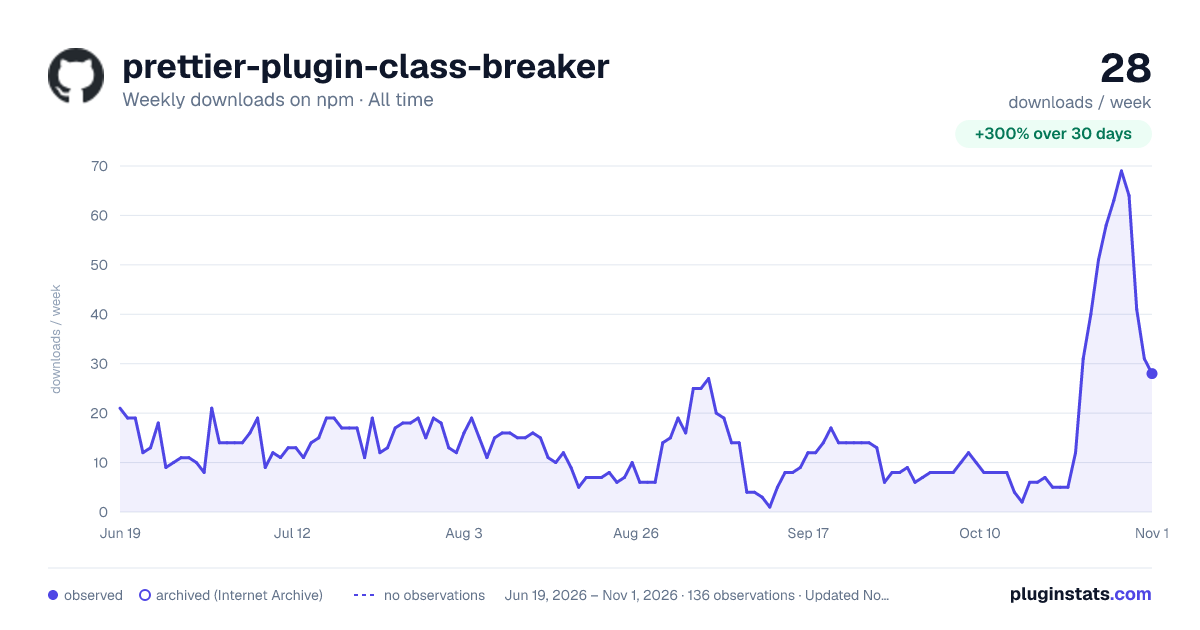

Adoption over time
7/30/90-day growth
Ranking history
Listing placement
Listing placement
Filled points are observed values; hollow points come from Internet Archive snapshots of the listing page. Dashed segments span periods with no observations — values between points are not interpolated.
Each band is one page of 20. Weekly downloads on a linear scale. Placement is projected from weekly downloads, so it can differ from the marketplace's own sort order. Hover a dot to see the listing.
Recent observations
Full history (122)Similar npm Prettier plugins plugins
All 20 prettier-plugin-class-breaker alternatives- 7 weekly downloads-68.2%
- 7 weekly downloads-68.2%
Data source
Weekly downloads (trailing 7 complete days) come from the official npm downloads API. Downloads include CI and mirrors and are not equivalent to installs or users. npm publishes no ratings.
Listing: https://www.npmjs.com/package/prettier-plugin-class-breaker. First seen Oct 16, 2026; last successful collection Oct 21, 2026. See the methodology.