 PluginStats
tidewave weekly downloads statistics
By tidewave-ai · npm · MCP servers
Tidewave for JavaScript (TanStack, Vite)
tidewave has 9,852 recorded weekly downloads on npm, an increase of 2.2% over the past 30 days, ranking #965 of 2,391 tracked listings.
About tidewave
Tidewave
Tidewave JS is an MCP server that provides runtime-level tools for developing JS apps using coding agents. This project supports:
- TanStack Start with React
- Vite with React/Vue (which includes Astro, VitePress, etc)
Your agent will be able to use this MCP server to talk to your running app in development to:
- execute code in the context of the running app (like an terminal session for agents)
- read the app's live logs
- get source locations of modules and functions
- read documentation pinned to the exact package versions your project depends on
This MCP server is an open-source component of Tidewave.
You can use this project as a standalone MCP server or integrated with the Tidewave product by following the installation instructions below.
This project can also be used through the CLI or as a standalone Model Context Protocol server.
Installation
If you are using Vite (with React/Vue) or TanStack Start with React, install Tidewave with:
$ npx tidewave install
# or
$ yarn dlx tidewave install
# or
$ pnpm dlx tidewave install
# or
$ bunx tidewave install
And you are almost there! Now make sure to add the Tidewave MCP server to your
editor or MCP client configuration as the type "http" (streamable), pointing to
the /tidewave/mcp path and port your web application is running at.
We also have specific instructions for:
In case the command above does not work, you can toggle the manual installation instructions below.
Manual installation
<details> <summary>Show manual installation steps for TanStack Start</summary><br />1. Add Tidewave as a dependency
$ npm install -D tidewave
# or
$ yarn add -D tidewave
# or
$ pnpm add --save-dev tidewave
# or
$ bun add --dev tidewave
2. Configure Vite
Configure your vite.config.js (also works for .ts and .mjs):
import { defineConfig } from 'vite';
import tidewave from 'tidewave/vite-plugin';

export default defineConfig({
  plugins: [tidewave()],
});
3. Configure TanStack Start
Finally, create or modify src/start.ts to import Tidewave in development:
import { createStart } from '@tanstack/react-start';

// Import Tidewave only in development.
if (process.env.NODE_ENV === 'development' && typeof window === 'undefined') {
  import('tidewave/tanstack');
}

export const startInstance = createStart(() => {
  return {};
});
1. Add Tidewave as a dependency
$ npm install -D tidewave
# or
$ yarn add -D tidewave
# or
$ pnpm add --save-dev tidewave
# or
$ bun add --dev tidewave
2. Configure Vite
Configure your vite.config.js (also works for .ts and .mjs):
import { defineConfig } from 'vite';
import tidewave from 'tidewave/vite-plugin';

export default defineConfig({
  plugins: [tidewave()],
});
Configuration
Vite's tidewave plugin accepts the configuration options below:
allowRemoteAccess: Tidewave only allows requests from localhost by default, even if your server listens on other interfaces, for security purposes. Read our security guidelines for more information and when to allow remote access (if you know what you are doing)allowedOrigins: a list of values matched against theOriginheader to prevent cross origin and DNS rebinding attacks. Each value must be a string of shape[scheme:]//host[:port], where both scheme and port are optional. The host may also start with*. Example:["//localhost:8000", "//*.test"]. By default, Tidewave allows Vite's configured server host and port, usinglocalhostwhen Vite uses its implicit hosttmpDir: temporary directory Tidewave uses for screenshots and recordings. Defaults totmp, storing files undertmp/tidewave/screenshotsandtmp/tidewave/recordingsteam: enable Tidewave Web for teamstoolbar: controls whether the Tidewave toolbar is injected into your HTML pages. Defaults totrue
Available tools
-
get_docs- get the documentation for a given module/namespace or a class/interface/enum/type in that namespace. It consults the exact versions used by the project, ensuring you always get correct information -
get_source_location- get the source location for a given module/namespace or a class/interface/enum/type in that namespace, so an agent can directly read the source skipping search -
get_logs- reads console log written by the server -
project_eval- evaluates code within the runtime itself, giving the agent access to dependencies, server code, and all in-memory data
CLI
Tidewave.js also comes with a CLI for developers who want to use it as a standalone MCP or query its functionality directly. Note this functionality is separate from Tidewave Web.
STDIO MCP
Configure your editor to run tidewave in the same directory as your
package.json as a STDIO MCP Server:
npx tidewave mcp
# or with Bun
bunx tidewave mcp
# or with Deno
deno run npm:tidewave mcp
Available options:
--prefix path- Specify the directory to find thepackage.jsonfile
Get docs / get source
Fetch docs or retrieve the source location for classes, types, methods, etc:
# Extract documentation for a symbol
npx tidewave docs <module-path>

# Get source file location for a module
npx tidewave source <module-path>
```…
Description from the npm listing.
- typescript
- documentation
- mcp
- cli
- tidewave
- vite
- tanstack
README badge
Show your rank in a README or on your website. The badge updates automatically.
Charts
Images: 30d · 1y · all time · 1600×900 dark


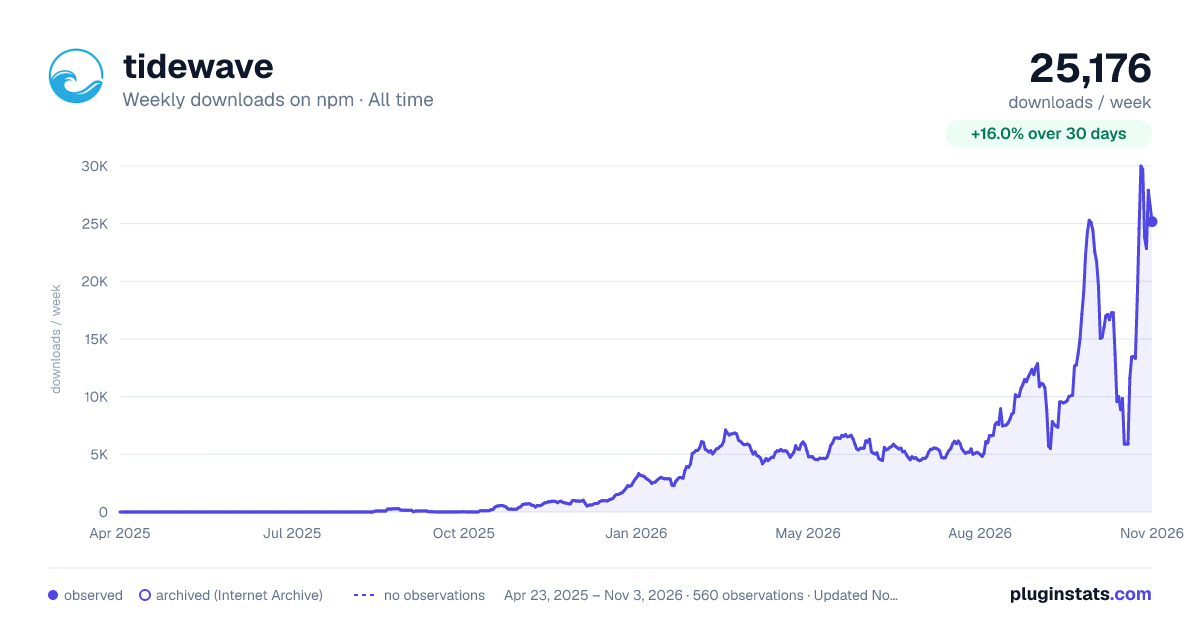

Adoption over time
7/30/90-day growth
Ranking history
Listing placement
Listing placement
Filled points are observed values; hollow points come from Internet Archive snapshots of the listing page. Dashed segments span periods with no observations — values between points are not interpolated.
Each band is one page of 20. Weekly downloads on a linear scale. Placement is projected from weekly downloads, so it can differ from the marketplace's own sort order. Hover a dot to see the listing.
Recent observations
Full history (544)Similar npm MCP servers plugins
All 20 tidewave alternativesData source
Weekly downloads (trailing 7 complete days) come from the official npm downloads API. Downloads include CI and mirrors and are not equivalent to installs or users. npm publishes no ratings.
Listing: https://www.npmjs.com/package/tidewave. First seen Oct 16, 2026; last successful collection Oct 21, 2026. See the methodology.