 PluginStats
@langchain/mcp-adapters weekly downloads statistics
By langchain · npm · MCP servers
LangChain.js adapters for Model Context Protocol (MCP)
@langchain/mcp-adapters has 162,652 recorded weekly downloads on npm, a decrease of 35.9% over the past 30 days, ranking #417 of 2,322 tracked listings.
About @langchain/mcp-adapters
LangChain.js MCP Adapters


Give your LangChain agents access to tools from Model Context Protocol (MCP)
servers. @langchain/mcp-adapters manages connections and converts MCP tools
and results into LangChain formats, ready to use with createAgent or a custom
LangGraph workflow.
- Connect your tools: discover tools from multiple local or remote servers.
- Control tool execution: authenticate connections, customize arguments and results with hooks, and receive progress updates.
- Choose what the model sees: use text and multimodal results as model input, or keep outputs in artifacts for your application to process.
- Ask for user input: pause an agent when a modern MCP server requests a form response or a URL visit, then resume with the user's response.
Read the MCP guide for concepts, configuration, and advanced usage.
Install
Requires Node.js 20.10 or later. Install the adapter and its LangChain peers:
npm install @langchain/mcp-adapters @langchain/core @langchain/langgraph
The adapter requires @langchain/core ^1.2.6 and @langchain/langgraph ^1.4.13.
It includes the MCP SDK client; install the SDK separately only if your application
imports it directly.
Quickstart: give an agent MCP tools
This example connects an agent to the public LangChain docs MCP server so it can look up documentation. You do not need to run a server or configure authentication for this MCP endpoint.
Install LangChain and the model integration used below:
npm install langchain @langchain/openai
Set OPENAI_API_KEY in your environment, then run:
import { createAgent } from "langchain";
import { ChatOpenAI } from "@langchain/openai";
import { MCPAdapter } from "@langchain/mcp-adapters";

const adapter = new MCPAdapter({
  servers: {
    docs: { url: "https://docs.langchain.com/mcp" },
  },
});

try {
  const tools = await adapter.listTools();
  const agent = createAgent({
    model: new ChatOpenAI({ model: "gpt-4.1-mini" }),
    tools,
  });

  const result = await agent.invoke({
    messages: [
      {
        role: "user",
        content: "How do I add short-term memory to a LangChain agent?",
      },
    ],
  });
  console.log(result.messages.at(-1)?.content);
} finally {
  await adapter.close();
}
Keep the adapter open while your agent uses its tools, then call close() when
finished. Connections open as needed. listTools() returns executable LangChain
tools, which you can also invoke directly without a model or use in a custom
LangGraph workflow.
Tools that request user input
MCP tools can ask users to complete a form or visit a URL before continuing. For modern MCP servers, the adapter pauses the agent through a LangGraph interrupt so your application can collect a response and resume the run.
Configure a checkpointer for these workflows. Tools that do not request input can run without one. See the tools guide for handling requests and resuming execution.
Documentation and examples
| I want to… | Start here |
|---|---|
| Connect local or remote servers, manage connections, or select tools | Connections |
| Authenticate with tokens or OAuth | Authentication |
| Customize tool calls, handle results, or collect user input | Tools |
| Modify tool arguments and results | Hooks example |
| Work with multimodal content and artifacts | Content example |
| Receive server messages and tool progress | Notifications example |
| Run a local example without model credentials | Example setup and walkthroughs |
If you already manage an MCP SDK client, use loadMcpTools() to adapt its tools
without handing connection management to MCPAdapter.
Upgrading from 1.x
Use MCPAdapter, { servers: { ... } }, and listTools() for new code.
MultiServerMCPClient, mcpServers, and getTools() remain available as
deprecated compatibility APIs.
Version 2 also changes tool-name defaults, configuration, connection behavior, and tool results. Review the migration guide before upgrading, including any approval rules that refer to tool names.
Acknowledgements…
Description from the npm listing.
- langchain
- mcp
- model-context-protocol
- ai
- tools
README badge
Show your rank in a README or on your website. The badge updates automatically.
Charts
Images: 30d · 1y · all time · 1600×900 dark


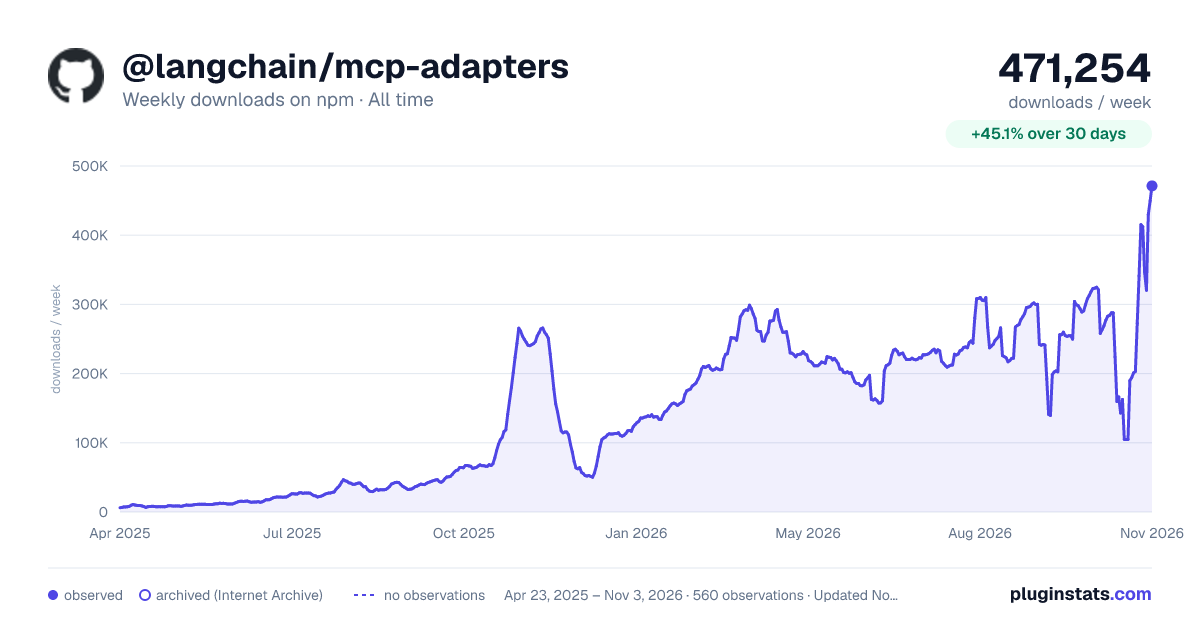

Adoption over time
7/30/90-day growth
Ranking history
Listing placement
Listing placement
Filled points are observed values; hollow points come from Internet Archive snapshots of the listing page. Dashed segments span periods with no observations — values between points are not interpolated.
Each band is one page of 20. Weekly downloads on a linear scale. Placement is projected from weekly downloads, so it can differ from the marketplace's own sort order. Hover a dot to see the listing.
Recent observations
Full history (544)Similar npm MCP servers plugins
All 20 @langchain/mcp-adapters alternativesData source
Weekly downloads (trailing 7 complete days) come from the official npm downloads API. Downloads include CI and mirrors and are not equivalent to installs or users. npm publishes no ratings.
Listing: https://www.npmjs.com/package/@langchain/mcp-adapters. First seen Oct 16, 2026; last successful collection Oct 20, 2026. See the methodology.