 PluginStats
webpack-babel-multi-target-plugin weekly downloads statistics
By DanielSchaffer · npm · Webpack plugins
A Webpack plugin that works with Babel to allow differential loading - production deployment of ES2015 builds targeted to modern browsers, with an ES5 fallback for legacy browsers.
webpack-babel-multi-target-plugin has 2,187 recorded weekly downloads on npm, a decrease of 64.2% over the past 30 days.
It ranks #1268 of 2,256 tracked npm listings by weekly downloads.
Over 90 days, weekly downloads changed by -62.1%.
PluginStats has 121 daily observations since Jun 19, 2026; the latest is from Oct 17, 2026.
About webpack-babel-multi-target-plugin
webpack-babel-multi-target-plugin
This project, inspired by Phil Walton's article Deploying es2015 Code in Production Today, adds tooling to simplify the additional configuration with a Webpack plugin, BabelMultiTargetPlugin.
Setup and Configuration
Using the plugin requires making a few small changes to your existing webpack configuration:
• Replace any instances of 'babel-loader' with BabelMultiTargetPlugin.loader() • Do not use a Loader configuration object here - see Options Reference below for information on customizing options for 'babel-loader' • Add a loader rule for .js files if there isn't one already:
_Note:_ The above example intentionally does not exclude _node\_modules_.
• Set resolve.mainFields to favor modern ES modules, which allows webpack to load the most modern source possible. There are several intersecting de-facto standards flying around, so this should cover as much as possible: • Add an instance of BabelMultiTargetPlugin to the webpack configuration's plugins property • BabelMultiTargetPlugin does not require any configuration - but can be customized (see Options Reference below) • Remove any .babelrc - see Options Reference below for setting preset options • Remove any references to babel-loader from your package.json - it is a direct dependency of webpack-babel-multi-target-plugin, and may cause unexpected issues if there are duplicate instances due to a version mismatch • Remove any path or pattern matching _node\_modules_ from the exclude property of any rules using BabelMultiTargetPlugin.loader() • TypeScript • Loader rules must use BabelMultiTargetPlugin.loader() after your compiler loader (remember, loaders are run bottom to top) • Set tsconfig to target es6 or higher • Vue • Replace 'vue-loader' with BabelMultiTargetPlugin.loader('vue-loader') • expose-loader • Rules using expose-loader must be defined _before_ rules using BabelMultiTargetPlugin.loader() • Do not import/require libraries exposed with expose-loader - either reference them from the global scope, or do not use expose-loader. You may also need to use Webpack's ProvidePlugin.
Upgrading from v1.x
• Change usages of BabelMultiTargetPlugin.loader to BabelMultiTargetPlugin.loader()
Usage with ES6 Dynamic Imports (including Angular "Lazy" Routes)
When using ES6's import(...) syntax, you may use Webpack's built-in chunk naming syntax to control the naming of the resulting chunk:
When working with imports that use an expression within the import syntax, BabelMultiTargetPlugin adds the [resource] tag to allow better control over the naming of the resulting chunk. The [resource] tag will be replaced by the relative path of the imported module, minus the file extension.
In the above example, the resulting chunks for the plugin files would be (depending on the target configuration): • a-plugin.js (legacy bundle for ./src/plugins/a/plugin.js) • a-plugin.modern.js (modern bundle for ./src/plugins/a/plugin.js) • b-plugin.js (legacy bundle for ./src/plugins/b/plugin.js) • b-plugin.modern.js (modern bundle for ./src/plugins/b/plugin.js)
Naming Angular Lazy Routes
Adding the included NamedLazyChunksPlugin will allow similar human-friendly chunk naming for Angular lazy routes:
NamedLazyChunkPlugin can also be used with plain ES6 Dynamic Imports as an alternative to Webpack's chunk naming syntax.
Configuration Defaults
BabelMultiTargetPlugin does not require any options to be set. The default behavior is:
• Generate "modern" and "legacy" bundles. • The "modern" bundle assets will have their filenames appended with .modern, while the "legacy" bundle assets will remain the same. This enables these assets to be deployed without breaking anything since it will still have the required polyfills. • "modern" browsers are the last 2 versions of each browser, excluding versions that don't support
Options Reference…
Description from the npm listing.
- webpack
- webpack-plugin
- babel
- babel-loader
- differential-loading
- esnext
- esmodules
- es2015
- es2016
- es2017
- es6
- es7
Where webpack-babel-multi-target-plugin sits in the listing
Each band is one page of 20. Weekly downloads on a log scale. Placement is projected from weekly downloads, so it can differ from the marketplace's own sort order. Hover a dot to see the listing.


Charts
Images: 30d · 1y · all time · 1600×900 dark


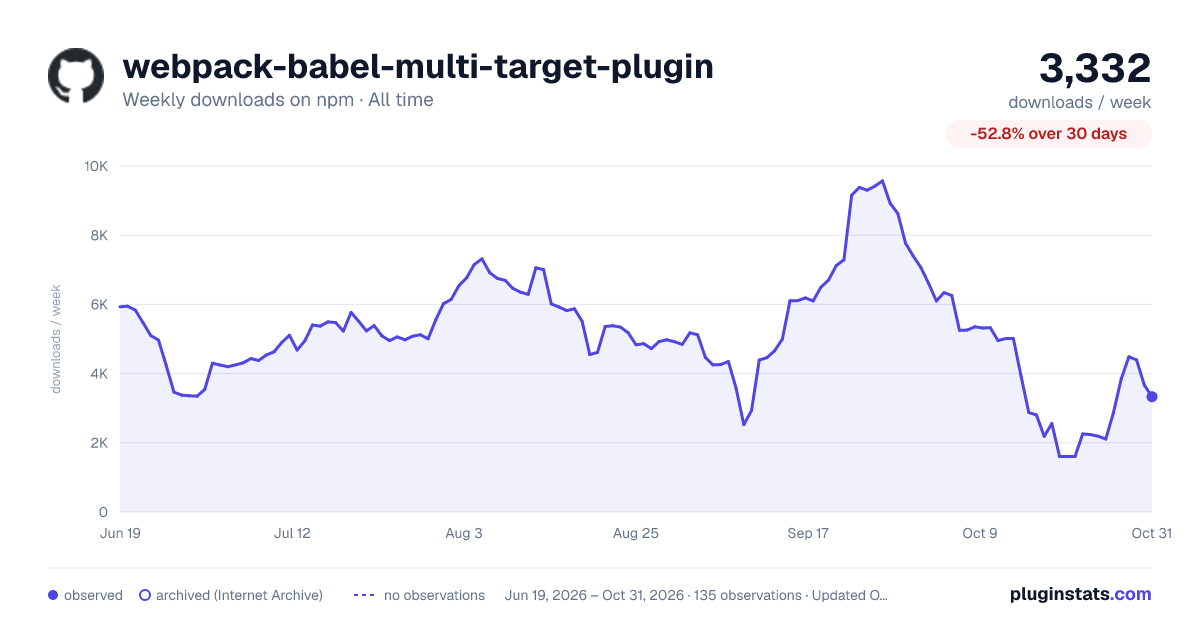

Adoption over time


7/30/90-day growth


Filled points are observed values; hollow points come from Internet Archive snapshots of the listing page. Dashed segments span periods with no observations — values between points are not interpolated.
Recent observations
Full history (121)Similar npm Webpack plugins plugins
Data source
Weekly downloads (trailing 7 complete days) come from the official npm downloads API. Downloads include CI and mirrors and are not equivalent to installs or users. npm publishes no ratings.
Listing: https://www.npmjs.com/package/webpack-babel-multi-target-plugin. First seen Oct 16, 2026; last successful collection Oct 19, 2026. See the methodology.