 PluginStats
@stripe/mcp weekly downloads statistics
By stripe (7 listings) · npm · MCP servers
A command line tool for setting up Stripe MCP server
@stripe/mcp has 8,110 recorded weekly downloads on npm, a decrease of 37.3% over the past 30 days.
It ranks #974 of 2,256 tracked npm listings by weekly downloads.
Over 90 days, weekly downloads changed by -38.5%.
PluginStats has 121 daily observations since Jun 19, 2026; the latest is from Oct 17, 2026.
About @stripe/mcp
Stripe Model Context Protocol
The Stripe Model Context Protocol server allows you to integrate with Stripe APIs through function calling. This protocol supports various tools to interact with different Stripe services.
Setup
Stripe hosts a remote MCP server at https://mcp.stripe.com. View the docs here.
Local
To run the Stripe MCP server locally using npx, use the following command:
Make sure to replace YOUR_STRIPE_SECRET_KEY with your actual Stripe secret key. Alternatively, you could set the STRIPE_SECRET_KEY in your environment variables.
Note: Tool permissions are controlled by your Restricted API Key (RAK). Create a RAK with the desired permissions at https://dashboard.stripe.com/apikeys
Usage with Claude Desktop
Add the following to your claude_desktop_config.json. See here for more details.
or if you're using Docker
Usage with Gemini CLI
1. Install Gemini CLI through your preferred method. 2. Install the Stripe MCP extension: gemini extensions install https://github.com/stripe/ai. 3. Start Gemini CLI: gemini. 4. Go through the OAUTH flow: /mcp auth stripe.
Available tools
See the Stripe MCP documentation for a list of tools.
Debugging the Server
To debug your server, you can use the MCP Inspector.
First build the server
Run the following command in your terminal:
Build using Docker
First build the server
Run the following command in your terminal:
Instructions
1. Replace YOUR_STRIPE_SECRET_KEY with your actual Stripe API secret key. 2. Run the command to start the MCP Inspector. 3. Open the MCP Inspector UI in your browser and click Connect to start the MCP server. 4. You can see the list of tools you selected and test each tool individually.
Description from the npm listing.
- mcp
- modelcontextprotocol
- stripe
Charts
Images: 30d · 1y · all time · 1600×900 dark


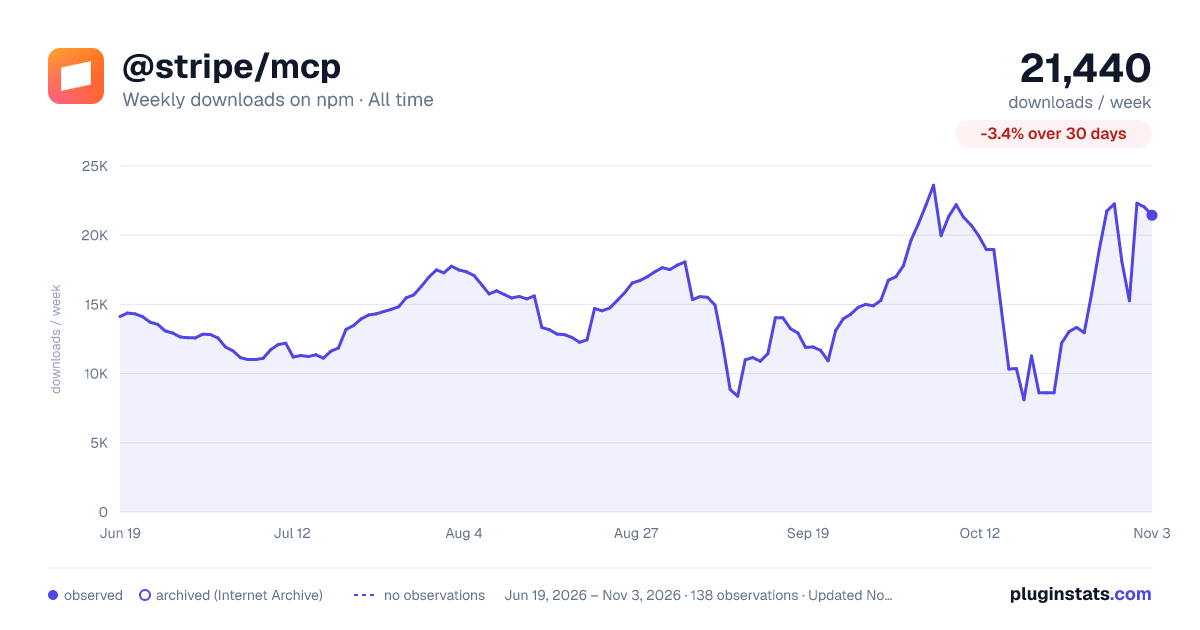

Adoption over time


7/30/90-day growth


Listing placement


Filled points are observed values; hollow points come from Internet Archive snapshots of the listing page. Dashed segments span periods with no observations — values between points are not interpolated.
Each band is one page of 20. Weekly downloads on a log scale. Placement is projected from weekly downloads, so it can differ from the marketplace's own sort order. Hover a dot to see the listing.
Recent observations
Full history (121)Similar npm MCP servers plugins
All 20 @stripe/mcp alternativesData source
Weekly downloads (trailing 7 complete days) come from the official npm downloads API. Downloads include CI and mirrors and are not equivalent to installs or users. npm publishes no ratings.
Listing: https://www.npmjs.com/package/@stripe/mcp. First seen Oct 16, 2026; last successful collection Oct 19, 2026. See the methodology.