 PluginStats
@promptbook/color weekly downloads statistics
By promptbook (28 listings) · npm · AI SDKs
Promptbook: Create persistent AI agents that turn your company's scattered knowledge into action
@promptbook/color has 220 recorded weekly downloads on npm, a decrease of 85.6% over the past 30 days, ranking #1661 of 2,322 tracked listings.
About @promptbook/color
🐙 Promptbook: Invisible AI Agents
Create persistent AI agents that turn your company's scattered knowledge into action - powered by the Agents Server





🚀 Quick deploy
Run the standalone VPS installer (for example on DigitalOcean) only on a fresh server. Interactive mode asks for the installation values:
sudo curl -fsSL https://raw.githubusercontent.com/webgptorg/promptbook/refs/heads/main/install.sh | bash
Non-interactive mode takes defaults from command-line options. Use --env live, --env preview, --env production, or --env lts to pick the installed environment; the default is preview. When --openai-api-key is provided with the default OpenAI Codex runner, the installer installs and configures Codex automatically; other runner authentication can be configured later from the UI or SSH:
sudo curl -fsSL https://raw.githubusercontent.com/webgptorg/promptbook/refs/heads/main/install.sh | bash -s -- \
    --non-interactive \
    --yes-i-understand-that-script-should-be-run-on-fresh-server \
    --env preview \
    --domain my-server.com \
    --openai-api-key sk-proj-xxx \
    --admin-password xxx
📦 Package @promptbook/color
- Promptbooks are divided into several packages, all are published from single monorepo.
- This package
@promptbook/coloris one part of the promptbook ecosystem.
To install this package, run:
# Install entire promptbook ecosystem
npm i ptbk

# Install just this package to save space
npm install @promptbook/color
🎨 Core Features
Color Creation and Parsing
Create colors from various formats including hex, RGB, HSL, and CSS color names:
import { Color } from '@promptbook/color';

// From hex values
const blue = Color.fromHex('#009edd');
const shortHex = Color.fromHex('#09d');

// From RGB values
const red = Color.fromValues(255, 0, 0);
const transparentRed = Color.fromValues(255, 0, 0, 128); // 50% alpha

// From CSS color names
const navy = Color.get('midnightblue');

// From various string formats
const color1 = Color.fromString('#ff0000');
const color2 = Color.fromString('rgb(255, 0, 0)');
const color3 = Color.fromString('red');
Color Manipulation
Transform colors using various operators:
import { Color, darken, lighten, grayscale, negative } from '@promptbook/color';

const originalColor = Color.fromHex('#009edd');

// Darken and lighten colors
const darker = darken(originalColor, 0.2);
const lighter = lighten(originalColor, 0.3);

// Convert to grayscale
const gray = grayscale(originalColor);

// Create negative/inverted color
const inverted = negative(originalColor);

// Adjust alpha channel
const transparent = withAlpha(originalColor, 0.5);
Color Analysis
Analyze color properties and relationships:
import { colorDistance, colorLuminance, colorHue, colorSaturation, areColorsEqual } from '@promptbook/color';

const color1 = Color.fromHex('#ff0000');
const color2 = Color.fromHex('#00ff00');

// Calculate distance between colors
const distance = colorDistance(color1, color2);

// Get color properties
const luminance = colorLuminance(color1);
const hue = colorHue(color1);
const saturation = colorSaturation(color1);

// Compare colors
const areEqual = areColorsEqual(color1, color2);
Color Mixing and Blending
Mix colors and find optimal color combinations:
import { mixColors, mixWithColor, nearest, furthest, textColor } from '@promptbook/color';

const red = Color.fromHex('#ff0000');
const blue = Color.fromHex('#0000ff');

// Mix two colors
const purple = mixColors(red, blue, 0.5); // 50/50 mix

// Mix with a specific color
const tinted = mixWithColor(red, Color.fromHex('#ffffff'), 0.2); // Add 20% white

// Find nearest color from a palette
const palette = [Color.get('red'), Color.get('green'), Color.get('blue')];
const closest = nearest(Color.fromHex('#ff3333'), palette);

// Find furthest color for maximum contrast
const contrast = furthest(red, palette);…
Description from the npm listing.
- ai
- ai-agents
- ai-application-framework
- ai-assistant
- ai-automation
- ai-development
- ai-framework
- ai-ops
- ai-orchestration
- ai-pipeline
- ai-platform
- ai-scripting
- ai-sdk
- ai-workflow
- api-integration
- automation-framework
- book-language
- browser
- chatbot
- content-generation
README badge
Show your rank in a README or on your website. The badge updates automatically.
Charts
Images: 30d · 1y · all time · 1600×900 dark


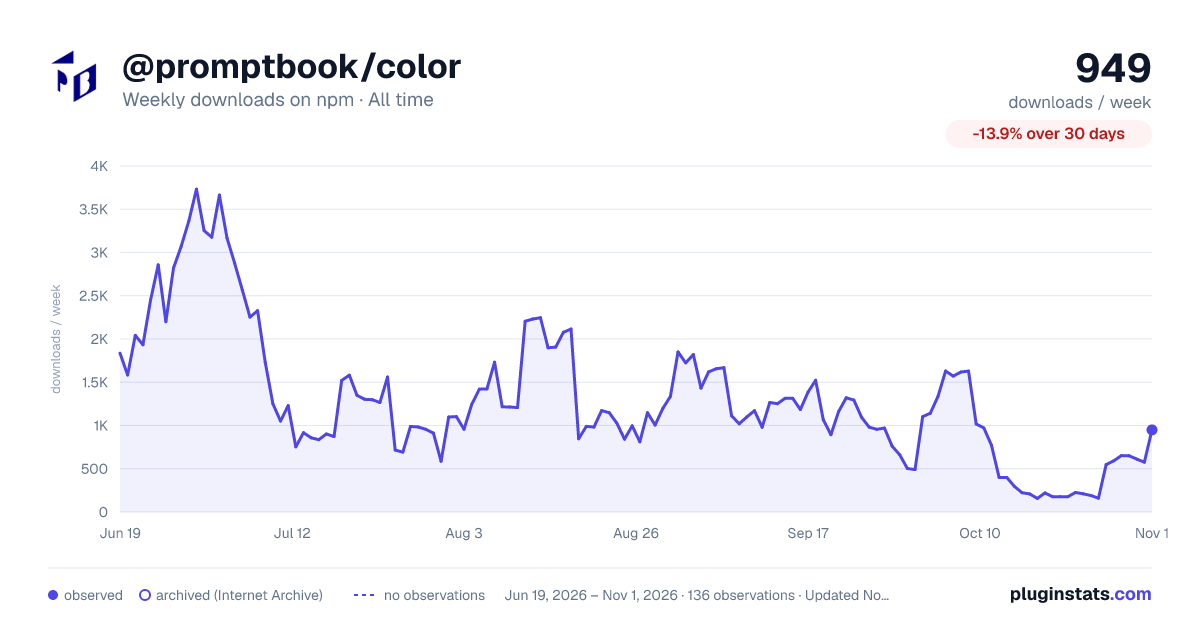

Adoption over time
7/30/90-day growth
Ranking history
Listing placement
Listing placement
Filled points are observed values; hollow points come from Internet Archive snapshots of the listing page. Dashed segments span periods with no observations — values between points are not interpolated.
Each band is one page of 20. Weekly downloads on a linear scale. Placement is projected from weekly downloads, so it can differ from the marketplace's own sort order. Hover a dot to see the listing.
Recent observations
Full history (122)Similar npm AI SDKs plugins
All 20 @promptbook/color alternativesData source
Weekly downloads (trailing 7 complete days) come from the official npm downloads API. Downloads include CI and mirrors and are not equivalent to installs or users. npm publishes no ratings.
Listing: https://www.npmjs.com/package/@promptbook/color. First seen Oct 16, 2026; last successful collection Oct 20, 2026. See the methodology.