 PluginStats
tailwindcss-unimportant weekly downloads statistics
By mwnciau · npm · Tailwind plugins
Adds lower specificity tailwindcss utility classes to be used in components
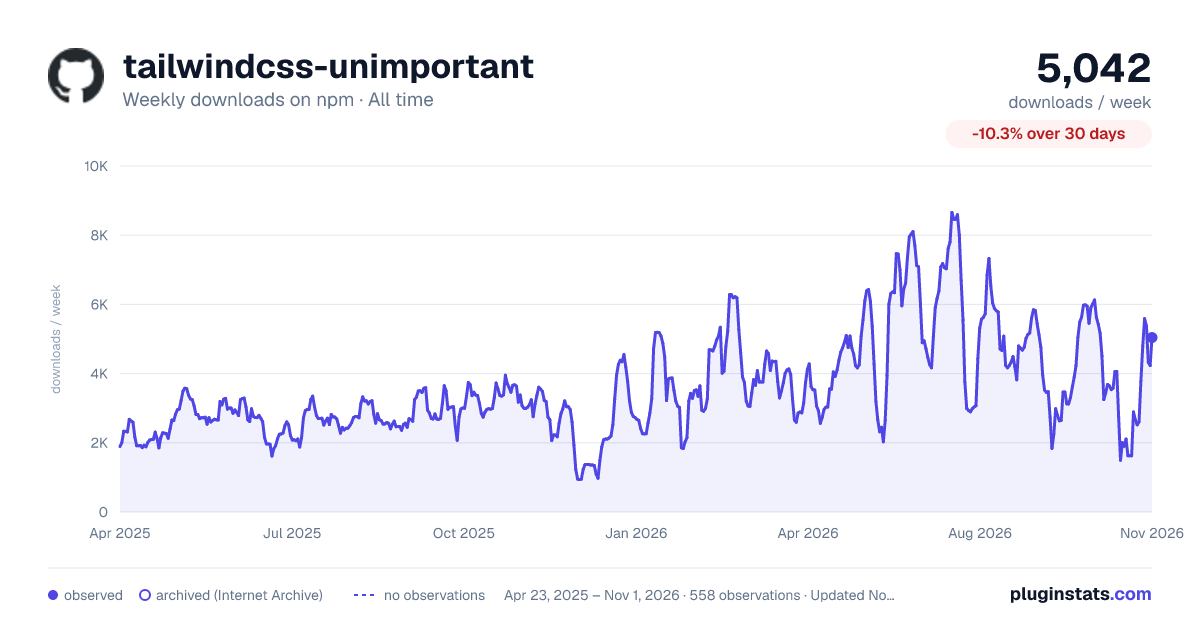
tailwindcss-unimportant has 1,899 recorded weekly downloads on npm, a decrease of 39.2% over the past 30 days, ranking #1294 of 2,256 tracked listings.
About tailwindcss-unimportant
tailwindcss-unimportant
A [Tailwind CSS] plugin that creates lower-specificity utility classes that can be used to create components with overridable defaults.
Installation
Add the tailwindcss-unimportant plugin to your tailwind.config.js file.
Note: if you need to specify the important option in your tailwind configuration, you will need to pass it in as an option to the plugin.
Getting started
To make a class unimportant, use the -: variant.
These classes will always have lower precedence than classes without the variant.
This is useful when making components where you want to be able to override the default classes.
Making classes even more unimportant
Sometimes it's useful to extend components within other components, and you can run into the same problem of clashing Tailwind classes.
This plugin provides additional class variants for up to 10 levels of unimportance: --:, ---:, ----:, etc.
As the variants become larger, you may prefer to use the number variants, where the lowest number takes precedence: --1:, --2:, --3:, etc. The number and symbol variants can be used interchangeably.
Arbitrary values are also supported. For example, --[5]: is equivalent to -----:. Zero and negative values can be used to make classes of higher precedence.
| Unimportance | Symbolic variant | Numberic variant |
| 1 | -: | --1: | | 2 | --: | --2: | | 3 | ---: | --3: | | 4 | ----: | --4: | | 5 | -----: | --5: | | 6 | ------: | --6: | | 7 | -------: | --7: | | 8 | --------: | --8: | | 9 | ---------: | --9: | | 10 | ----------: | --10: | | n | n/a | --[n]: |
How it works
The -: variant wraps the selector for a given class in the css :where() function, reducing its [specificity] to 0-0-0. This means classes you use without the unimportant variant will be applied preferentially.
However, having a specificity of 0-0-0 means that the default tailwind base rules and any base rules you create will take precedence over the unimportant classes. In many cases, this makes the unimportant classes useless.
To fix this problem, the plugin sets the important Tailwind configuration option to :root. This increases the specificity of all Tailwind classes by 0-1-0, meaning our unimportant classes now have a higher specificity than the base rules.
Levels of unimportance
Classes with greater levels of unimportance are output first in the generated CSS file so that the less unimportant classes take precedence.
Description from the npm listing.
- tailwind
- tailwindcss
- tailwindcss-plugin
- css
- javascript
README badge
Show your rank in a README or on your website. The badge updates automatically.
Charts
Images: 30d · 1y · all time · 1600×900 dark



Adoption over time
7/30/90-day growth
Ranking history
Listing placement
Listing placement
Filled points are observed values; hollow points come from Internet Archive snapshots of the listing page. Dashed segments span periods with no observations — values between points are not interpolated.
Each band is one page of 20. Weekly downloads on a linear scale. Placement is projected from weekly downloads, so it can differ from the marketplace's own sort order. Hover a dot to see the listing.
Recent observations
Full history (543)Similar npm Tailwind plugins plugins
All 20 tailwindcss-unimportant alternativesData source
Weekly downloads (trailing 7 complete days) come from the official npm downloads API. Downloads include CI and mirrors and are not equivalent to installs or users. npm publishes no ratings.
Listing: https://www.npmjs.com/package/tailwindcss-unimportant. First seen Oct 16, 2026; last successful collection Oct 19, 2026. See the methodology.