 PluginStats
eslint-plugin-json weekly downloads statistics
By azeemba · npm · ESLint plugins
eslint plugin for JSON files
eslint-plugin-json has 394,307 recorded weekly downloads on npm, a decrease of 46.8% over the past 30 days.
It ranks #274 of 2,255 tracked npm listings by weekly downloads.
Over 90 days, weekly downloads changed by -52.2%.
PluginStats has 543 daily observations since Apr 23, 2025; the latest is from Oct 17, 2026.
About eslint-plugin-json
eslint-plugin-json
Eslint plugin for JSON files
:warning: If you are using eslint v10 or newer, use eslint-plugin-json v5 or newer.
Installation
Install eslint-plugin-json along eslint:
Note: If you installed ESLint globally (using the -g flag) then you must also install eslint-plugin-json globally.
Usage
Basic configuration (Flat Config ESLint Format)
The json plugin ship with two recommended config you can use to easily activate it via the extends key. It comes in two flavor: one strict (recommended) and one allowing comments recommended-with-comments.
Basic configuration (Legacy ESLint Format)
The json plugin ship with two recommended config you can use to easily activate it via the extends key. It comes in two flavor: one strict (recommended-legacy) and one allowing comments recommended-with-comments-legacy.
You can run ESLint on individual JSON files or you can use the --ext flag to add JSON files to the list.
Custom Configuration (Flat Config ESLint Format)
If you want more granular control over which rules, and which severity you want.
If you want them all, add the json/json rule (or its alias json/*). (this is what the recommended config does)
Global rules
The global rules (json/json or its alias json/*) activate all the rules. Note it can be configured to ignore errors cause by comments. To do so, add option 'allowComments' or {allowComments: true}
For instance:
Custom Configuration (Legacy ESLint Format)
If you want more granular control over which rules, and which severity you want.
Add json to the list of plugins (You can omit the eslint-plugin- prefix) Then pick your rules.
If you want them all, add the json/json rule (or its alias json/*). (this is what the recommended-legacy config does)
Global rules
The global rules (json/json or its alias json/*) activate all the rules. Note it can be configured to ignore errors cause by comments. To do so, add option 'allowComments' or {allowComments: true}
For instance:
Individual Rules
Here is the list of individual rules (with name in kebab-case)in case you want granular error/warning level: • json/undefined • json/enum-value-mismatch • json/unexpected-end-of-comment • json/unexpected-end-of-string • json/unexpected-end-of-number • json/invalid-unicode • json/invalid-escape-character • json/invalid-character • json/property-expected • json/comma-expected • json/colon-expected • json/value-expected • json/comma-or-close-backet-expected • json/comma-or-close-brace-expected • json/trailing-comma • json/duplicate-key • json/comment-not-permitted • json/schema-resolve-error • json/unknown (error that does not match previous ones)
FAQs
How does eslint-plugin-json work?
Starting from version 1.3, this plugin relies on what VSCode uses for its implementation of JSON validation.
Originaly this plugin used to use JSHint, however due to heavy dependencies, it was replaced.
Why doesn't this plugin use eslint itself or just JSON.parse?
eslint's parser is a JavaScript parser. JSON is a stricter subset and things that are valid JavaScript are not valid JSON. This is why something more specific is more appropriate.
While JSON.parse seems ideal, it is not designed to continue after the first error. So if you have a missing trailing comma in the start of the file, the rest of the file will go unlinted. A smarter parser that can self-correct after seeing errors is needed which the VSCode implementation provides by leveraging the jsonc-parser module.
Will this plugin provide more configuration?
It is now possible as you can see in the Configuration section.
Additionally, support for autofixing common errors could be added in the feature.
Is eslint really the best tool to lint my JSON?
Not really. eslint plugin interface wasn't designed to lint a completely different language but its interface is flexible enough to allow it. So this plugin is certainly unusual.
Ideally, your editor would natively supports linting JSON. If it doesn't though, then might as well use this plugin. Hacky linting is better than no linting :).
Description from the npm listing.
- eslint
- eslintplugin
- eslint-plugin
- json
- eslint-plugin-json
Where eslint-plugin-json sits in the listing
Each band is one page of 20. Weekly downloads on a log scale. Placement is projected from weekly downloads, so it can differ from the marketplace's own sort order. Hover a dot to see the listing.


Charts
Images: 30d · 1y · all time · 1600×900 dark


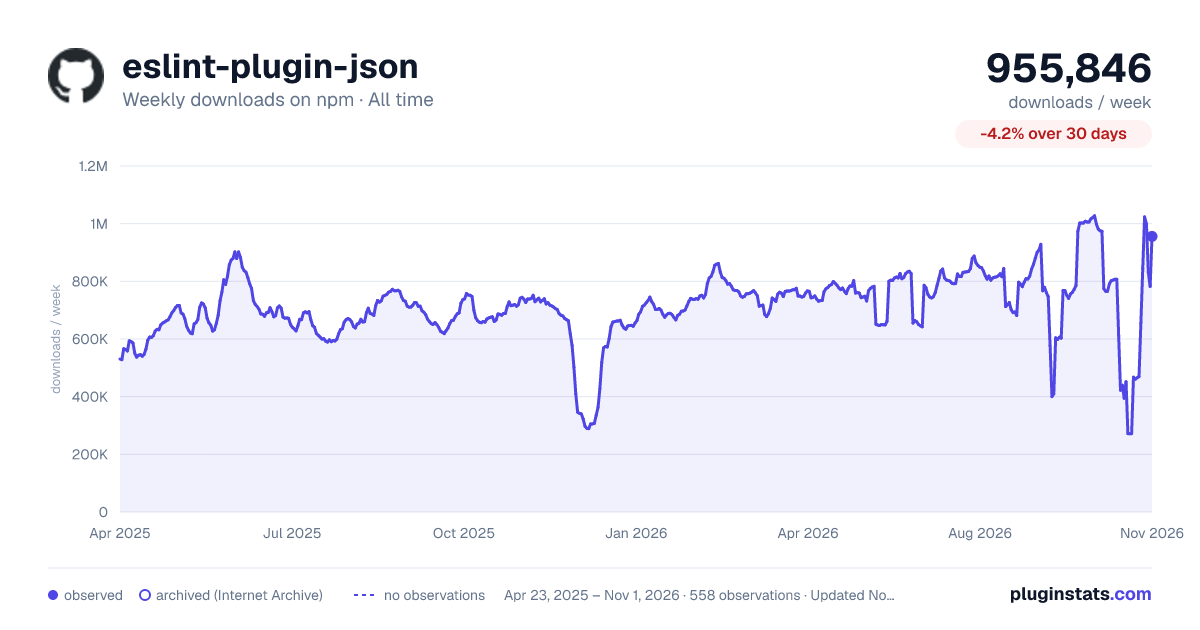

Adoption over time


7/30/90-day growth


Filled points are observed values; hollow points come from Internet Archive snapshots of the listing page. Dashed segments span periods with no observations — values between points are not interpolated.
Recent observations
Full history (543)Similar npm ESLint plugins plugins
Data source
Weekly downloads (trailing 7 complete days) come from the official npm downloads API. Downloads include CI and mirrors and are not equivalent to installs or users. npm publishes no ratings.
Listing: https://www.npmjs.com/package/eslint-plugin-json. First seen Oct 16, 2026; last successful collection Oct 19, 2026. See the methodology.