 PluginStats
tailwindcss-capsize weekly downloads statistics
By stormwarning (3 listings) · npm · Tailwind plugins
TailwindCSS leading-trim utility classes.
tailwindcss-capsize has 3,247 recorded weekly downloads on npm, a decrease of 32.0% over the past 30 days.
It ranks #1187 of 2,251 tracked npm listings by weekly downloads.
Over 90 days, weekly downloads changed by -87.3%.
PluginStats has 121 daily observations since Jun 19, 2026; the latest is from Oct 17, 2026.
About tailwindcss-capsize
tailwindcss-capsize
[![npm version][npm-img]][npm-url]
A TailwindCSS plugin that generates text-box-trim utility classes using [Capsize].
text-box-trim?
Formerly known as leading-trim, a [proposed CSS property] to remove the extra space from text bounding boxes, which affects optical alignment. This [article from Microsoft Design] outlines the problem and how the proposed solution works.
Configuration
A JavaScript config file is required due to the values needed by the plugin.
Other Tailwind settings can be configured through CSS directives or included in the config file.
This plugin requires a fontMetrics key added to your Tailwind theme. It should be an object with keys matching those in your fontFamily definitions, and each key should have an object of the following shape:
These values can be determined by using the [Capsize website], [fontkit], [FontDrop!], or some other means.
A full example
Usage
The new .capsize utility class should be applied to the _direct parent_ element surrounding a text node. This class requires font-family, font-size, and line-height utilities to be applied at some point above it in the cascade in order for the required custom properties to be available.
Options
rootSize
type: number (optional, default: 16)
The plugin assumes a root font-size of 16px when converting from rem values. To use a different value, pass it in (without units) to the plugin options.
className
type: string (optional, default: 'capsize')
The default .capsize utility class can be replaced with a custom class name if preferred.
Tips and tricks
Text truncation and line clamping
Sometimes an interface calls for truncating text to a single line or clamping text to a specified number of lines. Applying these methods to the same element that the default .capsize class is applied to will cause issues since the class assigns pseudo ::before and ::after elements to that element.
To solve this, a child element to the element with the .capsize class should wrap the text. This element should receive the styling to truncate or line clamp.
Related
[🔡 tailwindcss-opentype] — Utility classes for advanced typographic features.
Description from the npm listing.
- tailwindcss
- tailwindcss-plugin
- capsize
- leading-trim
- text-box
- text-box-trim
- typography
- whitespace
Where tailwindcss-capsize sits in the listing
Each band is one page of 20. Weekly downloads on a log scale. Placement is projected from weekly downloads, so it can differ from the marketplace's own sort order. Hover a dot to see the listing.


Charts
Images: 30d · 1y · all time · 1600×900 dark


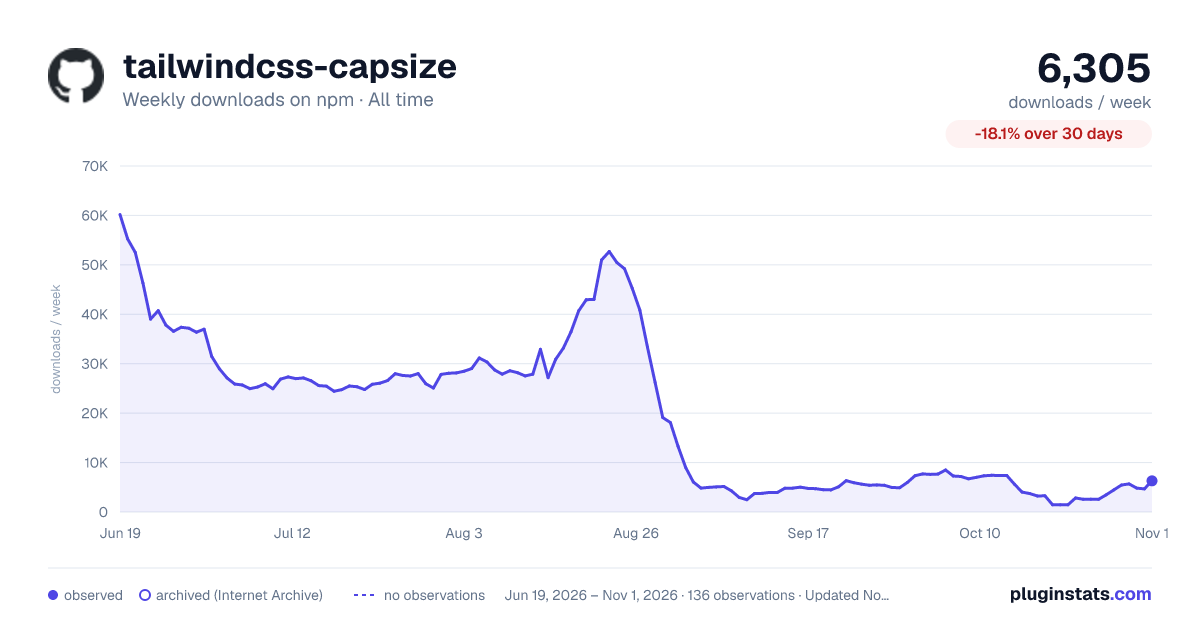

Adoption over time


7/30/90-day growth


Filled points are observed values; hollow points come from Internet Archive snapshots of the listing page. Dashed segments span periods with no observations — values between points are not interpolated.
Recent observations
Full history (121)Similar npm Tailwind plugins plugins
Data source
Weekly downloads (trailing 7 complete days) come from the official npm downloads API. Downloads include CI and mirrors and are not equivalent to installs or users. npm publishes no ratings.
Listing: https://www.npmjs.com/package/tailwindcss-capsize. First seen Oct 16, 2026; last successful collection Oct 18, 2026. See the methodology.