 PluginStats
mcp-use weekly downloads statistics
By mcp-use (3 listings) · npm · MCP servers
MCP framework and CLI built on the official v2 SDK
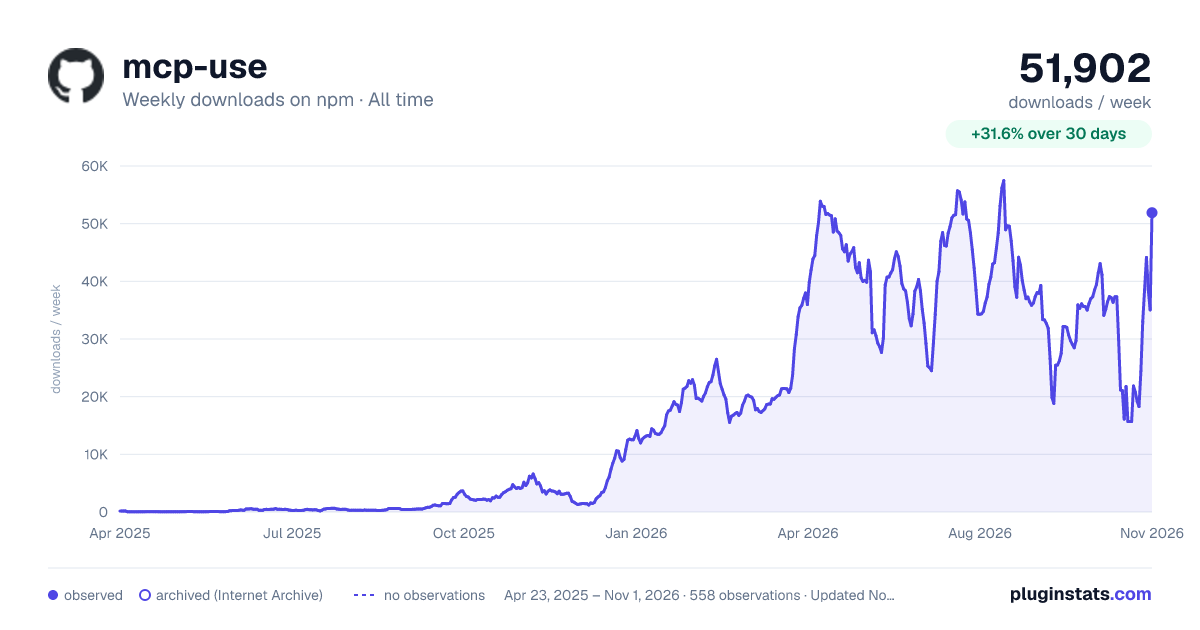
mcp-use has 21,761 recorded weekly downloads on npm, a decrease of 26.8% over the past 30 days, ranking #768 of 2,322 tracked listings.
About mcp-use
[!NOTE] Migrating from v1? Give it to your agent:
Migrate this mcp-use project to v2 following
https://docs.mcp-use.com/v2/typescript/server/migration
Get started
Start with your agent
Build an MCP server: https://mcp-use.com/prompt.md
Start with code
npx -y create-mcp-use-app@latest
Run npm run dev in the generated project · open http://localhost:3000/mcp/inspector
Everything you need to ship MCP
<table> <tr> <td width="50%" valign="top"> <h3>Fully typed</h3> <p>Zod schemas flow from tools to structured results, View props, and tool calls.</p> </td> <td width="50%" valign="top"> <h3>Native Views</h3> <p>Bind React Views directly to tools and ship interactive apps without custom extension wiring.</p> </td> </tr> <tr> <td width="50%" valign="top"> <h3>Agent-first and headless</h3> <p>Scaffold, invoke, inspect, screenshot, and deploy through your agent.</p> </td> <td width="50%" valign="top"> <h3>Built-in debugging tools</h3> <p>Inspect tools and Views in the browser or headlessly through the CLI.</p> </td> </tr> </table>Quickstart
The scaffold gives you the server, TypeScript configuration, development scripts, Inspector, and a React view pipeline. Start it once and the MCP endpoint also serves a client-ready landing page with its connection URL and setup instructions.
Replace its index.ts with a view-bound tool like this:
import { MCPServer } from "mcp-use";
import { z } from "zod";

const server = new MCPServer({
  name: "weather-app",
  title: "Weather App",
  version: "1.0.0",
});

const weatherInput = z.object({
  city: z.string().describe("City to look up"),
});

const weatherOutput = z.object({
  city: z.string(),
  temperature: z.number(),
  conditions: z.string(),
});

export const getWeather = server.tool(
  {
    name: "get-weather",
    title: "Get weather",
    description: "Get the current weather for a city",
    inputSchema: weatherInput,
    outputSchema: weatherOutput,
    view: { name: "weather-card" },
    annotations: {
      readOnlyHint: true,
      destructiveHint: false,
      openWorldHint: true,
    },
  },
  async ({ city }) => {
    const weather = {
      city,
      temperature: 22,
      conditions: "Sunny",
    };

    return {
      content: [
        {
          type: "text",
          text: `Weather in ${city}: ${weather.conditions}, ${weather.temperature}°C`,
        },
      ],
      structuredContent: weather,
    };
  },
);

export default server;
Add Views to your tools
Create views/weather-card/view.tsx. The directory name matches view.name on the tool:
import { useCallTool, useToolContext } from "mcp-use/react";

export default function WeatherCard() {
  const { status, toolOutput, toolInput } =
    useToolContext<"get-weather">();
  const refresh = useCallTool("get-weather");

  if (status === "pending") {
    return <p>Checking the weather in {toolInput?.city ?? "your city"}…</p>;
  }
  if (status === "error") return <p>Could not load the weather.</p>;

  const weather = refresh.data?.structuredContent ?? toolOutput;…
Description from the npm listing.
- mcp
- model-context-protocol
- server
- typescript
README badge
Show your rank in a README or on your website. The badge updates automatically.
Charts
Images: 30d · 1y · all time · 1600×900 dark



Adoption over time
7/30/90-day growth
Ranking history
Listing placement
Listing placement
Filled points are observed values; hollow points come from Internet Archive snapshots of the listing page. Dashed segments span periods with no observations — values between points are not interpolated.
Each band is one page of 20. Weekly downloads on a linear scale. Placement is projected from weekly downloads, so it can differ from the marketplace's own sort order. Hover a dot to see the listing.
Recent observations
Full history (544)Similar npm MCP servers plugins
All 20 mcp-use alternativesData source
Weekly downloads (trailing 7 complete days) come from the official npm downloads API. Downloads include CI and mirrors and are not equivalent to installs or users. npm publishes no ratings.
Listing: https://www.npmjs.com/package/mcp-use. First seen Oct 16, 2026; last successful collection Oct 20, 2026. See the methodology.