 PluginStats
vite-plugin-storybook-nextjs weekly downloads statistics
By storybookjs (2 listings) · npm · Vite plugins
Vite plugin that enables Next.js features in Vite and Storybook
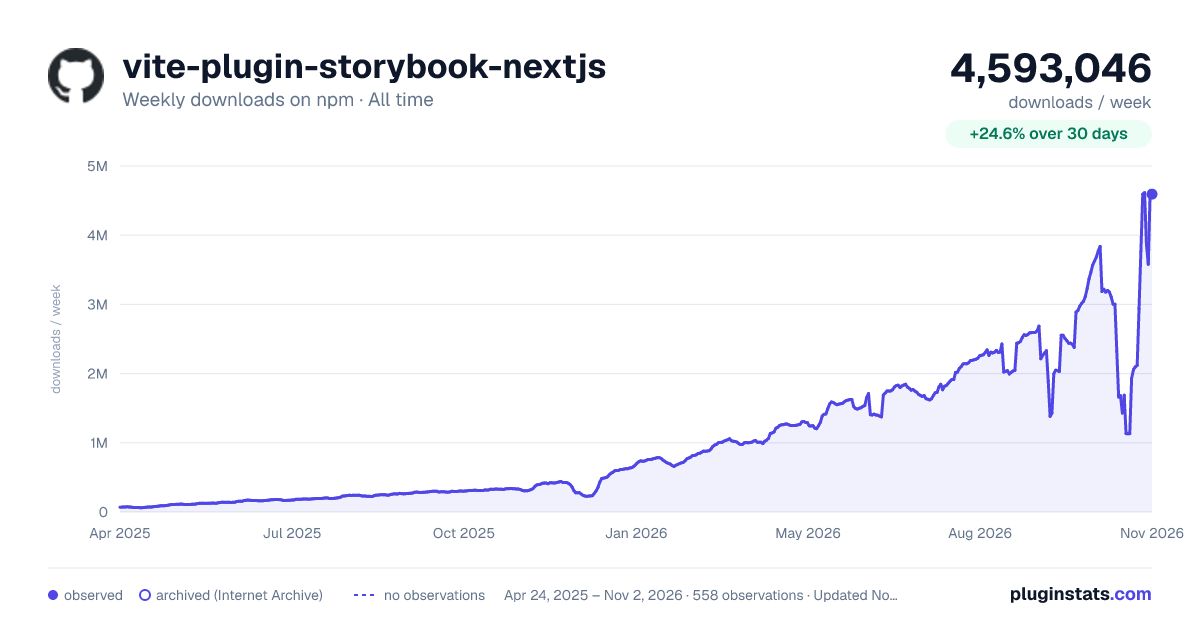
vite-plugin-storybook-nextjs has 1,687,883 recorded weekly downloads on npm, a decrease of 30.8% over the past 30 days, ranking #171 of 2,322 tracked listings.
About vite-plugin-storybook-nextjs
vite-plugin-storybook-nextjs
This is a Vite plugin that allows you to use Next.js features in Vite. It is the basis for @storybook/nextjs-vite and should be used when running portable stories in Vitest.
Features
- Next.js Integration: Seamlessly integrate Next.js features into your Vite project.
- Storybook Compatibility: Acts as the foundation for the
@storybook/nextjs-viteframework, enabling you to use Storybook with Next.js in a Vite environment. - Portable Stories: Ideal for running portable stories in Vitest, ensuring your components are tested in an environment that closely mirrors production.
Requirements
- Next.js v14.1.0 or higher
- Storybook 10 or higher
Installation
Install the plugin using your preferred package manager:
npm install vite-plugin-storybook-nextjs
# or
yarn add vite-plugin-storybook-nextjs
# or
pnpm add vite-plugin-storybook-nextjs
Usage
Set up Vitest
To use the plugin, you need to set up Vitest in your project. You can do this by following the instructions in the Vitest documentation.
Add the plugin to your Vitest configuration
Add the plugin to your Vitest configuration file. This ensures that Vitest is aware of the Next.js features provided by the plugin.
// vitest.config.ts
import { defineConfig } from "vite";
import nextjs from "vite-plugin-storybook-nextjs";

export default defineConfig({
  plugins: [nextjs()],
});
If you are using @storybook/nextjs-vite you don't have to install vite-plugin-storybook-nextjs, since @storybook/nextjs-vite already re-exports it.
// vitest.config.ts
import { defineConfig } from "vite";
import { storybookNextJsPlugin } from "@storybook/nextjs-vite/vite-plugin";

export default defineConfig({
  plugins: [storybookNextJsPlugin()],
});
Configuration Options
You can configure the plugin using the following options:
type FilterPattern = ReadonlyArray<string | RegExp> | string | RegExp | null

type VitePluginOptions = {
  /**
   * Provide the path to your Next.js project directory
   * @default process.cwd()
   */
  dir?: string
  /**
   * Control which image files are handled by the Next Image plugin
   * (Rollup-style include/exclude patterns)
   */
  image?: {
    include?: FilterPattern
    exclude?: FilterPattern
  }
}
FAQ: Including/Excluding images
When you also use the SVG-to-React plugin vite-plugin-svgr, you may want SVGs imported with the ?react query to be handled by SVGR, while all other images (including plain SVGs) are handled by this plugin's Next Image processing. By default, the plugin already handles the **/*.svg?react case. But if you have custom configuration, you must configure the filters yourself.
You can achieve this by adding include/exclude patterns as plugin options. The patterns follow Rollup's FilterPattern semantics (micromatch).
1. When using Storybook
// .storybook/main.ts
export default {
  framework: {
    name: '@storybook/nextjs-vite',
    options: {
      image: {
        // Default image glob patterns are already applied; this is optional
        // include: ['**/*.{png,jpg,jpeg,gif,webp,avif,ico,bmp,svg}'],
        // Ensure SVGR takes precedence for React components from SVGs
        exclude: ['**/*.svg?react'],
      },
    }
  }
}
2. When not using Storybook
// vite.config.ts or vitest.config.ts
import { defineConfig } from 'vite'
import nextjs from 'vite-plugin-storybook-nextjs'
import svgr from 'vite-plugin-svgr'

export default defineConfig({
  plugins: [
    svgr({ include: '**/*.svg?react' }),
    nextjs({
      image: {
        // Default image glob patterns are already applied; this is optional
        // include: ['**/*.{png,jpg,jpeg,gif,webp,avif,ico,bmp,svg}'],
        // Ensure SVGR takes precedence for React components from SVGs
        exclude: ['**/*.svg?react'],
      },
    }),
  ],
})
Notes:
- If you do not customize
image.include, the plugin defaults to common image extensions. - Excluding
**/*.svg?reactprevents collisions so thatimport Icon from "./icon.svg?react"is compiled by SVGR, whileimport iconUrl from "./icon.svg"is handled by Next Image.
Usage with portable stories
Portable stories are Storybook stories which can be used in external environments, such as Vitest.
This plugin is necessary to run portable stories in Vitest, as it provides the necessary Next.js features to ensure that your components are tested in an environment that closely mirrors production.
Automatic story transformation
The addon @storybook/addon-vitest can be used to automatically transform your stories at Vitest runtime to in-memory test files. This allows you to run your stories in a Vitest environment without needing to manually transform your stories. Please visit https://storybook.js.org/docs/8.3/writing-tests/test-runner-with-vitest for more information.
Limitations and differences to the Webpack5-based integration of Next.js in Storybook
next/font staticDir mapping obsolete
You don't need to map your custom font directory in Storybook's staticDir configuration. Instead, Vite will automatically serve the files in the public directory and provide assets during production builds.
CSS/SASS
The sassOptions property in next.config.js is not supported. Please use Vite's configuration options to configure the Sass compiler:
css: {
  preprocessorOptions: {
    scss: {
      quietDeps: true
    },
  }
},
Next.js: Server Actions
When testing components that rely on Next.js Server Actions, you need to ensure that your story files are set up to use the jsdom environment in Vitest. This can be done in two ways:…
Description from the npm listing.
- vite-plugin
- nextjs
- storybook
- vitest
README badge
Show your rank in a README or on your website. The badge updates automatically.
Charts
Images: 30d · 1y · all time · 1600×900 dark



Adoption over time
7/30/90-day growth
Ranking history
Listing placement
Listing placement
Filled points are observed values; hollow points come from Internet Archive snapshots of the listing page. Dashed segments span periods with no observations — values between points are not interpolated.
Each band is one page of 20. Weekly downloads on a linear scale. Placement is projected from weekly downloads, so it can differ from the marketplace's own sort order. Hover a dot to see the listing.
Recent observations
Full history (543)Similar npm Vite plugins plugins
All 20 vite-plugin-storybook-nextjs alternatives- 1.2M weekly downloads-24.1%
Data source
Weekly downloads (trailing 7 complete days) come from the official npm downloads API. Downloads include CI and mirrors and are not equivalent to installs or users. npm publishes no ratings.
Listing: https://www.npmjs.com/package/vite-plugin-storybook-nextjs. First seen Oct 16, 2026; last successful collection Oct 20, 2026. See the methodology.