 PluginStats
tailwindcss-calc weekly downloads statistics
By oswaldohuillca · npm · Tailwind plugins
A Tailwind CSS v4 plugin built entirely with CSS that provides responsive utilities using `calc()` and `clamp()` based on viewport width.
tailwindcss-calc has 27 recorded weekly downloads on npm, a decrease of 46.0% over the past 30 days.
It ranks #1799 of 2,251 tracked npm listings by weekly downloads.
Over 90 days, weekly downloads changed by +286%.
PluginStats has 121 daily observations since Jun 19, 2026; the latest is from Oct 17, 2026.
About tailwindcss-calc
Tailwind CSS v4 Calc Plugin
A Tailwind CSS v4 plugin built entirely with CSS that provides responsive utilities using calc() and clamp() based on viewport width.
Write the pixel values from your mockup — w-100, p-20, text-32 — and every one of them scales with the viewport. One breakpoint, two design references, no JavaScript.
🚀 Features
• ✅ 100% CSS - No JavaScript required • ✅ Tailwind CSS v4 - Compatible with the latest version • ✅ Viewport-based Scaling - All utilities scale responsively using calc() and clamp() • ✅ Comprehensive Utilities - Width, height, padding, margin, typography, positioning, and more • ✅ One breakpoint - md swaps the base reference; no md: ladder for sizing • ✅ Customizable - Set the base widths to match your own mockups
📦 Installation
🚀 Quick Start
After installation, create your CSS file:
Then use the utilities in your HTML:
The defaults are already 375 / 1440, so you can skip the @layer theme block entirely if those match your mockups.
🛠️ Development
To run the example locally:
Development
Open your browser at http://localhost:5173 to see the demo.
Build
Preview
🎨 How It Works
All utilities use this formula to scale based on viewport width:
The formula is centralized in a single --calc-ratio variable, so every utility multiplies its numeric value by the same viewport-based factor.
Default configuration (mobile-first): • Base width: 375px • Max width: 375px • At the md breakpoint (≥48rem) the base scales up to 1440px
This means w-100 will be: • On a 320px screen: ~85px • At 375px (design base): 100px • Above 375px: 100px (capped) until the md breakpoint • At md, base becomes 1440, so 768px → ~53px and 1440px → 100px • Above 1440px: 100px (capped)
📚 Available Utilities
Width & Height
Padding
Margin
Typography
Gap (Flexbox & Grid)
Border Radius
Positioning
Transform
Borders
Outline
Container
📁 Project Structure
🔧 How to Use in Your Project
Option 1: Install from npm (Recommended)
1. Install the package:
2. Import in your CSS file:
That's it! All utilities are now available.
Option 2: Import from node_modules
Option 3: Copy the source
Copy the content from src/plugin.css and paste it into your main CSS file after @import "tailwindcss".
Important: Use @import for CSS files, not @plugin. The @plugin directive is only for JavaScript files in Tailwind CSS v4.
⚙️ Customization
Override --window-width in your own stylesheet, after the import — there's no need to edit src/plugin.css. Set it once for mobile and once at md:
Match these to the artboard widths in your design file. Every utility recalculates automatically — there is nothing else to configure.
Use @variant md, not a raw media query
@variant md inherits your theme's --breakpoint-md, so the two stay in sync if you ever change it. A hard-coded 768px drifts — and because `max-width: 768px and min-width: 48rem both match at exactly 768px`, which one wins comes down to source order rather than intent.
Sizing vs. layout
Reach for md: variants only where the layout changes (a column becomes a row, an element appears). Sizing is already handled by the base-width swap, so text-32 needs no md:text-52 companion.
One caveat worth knowing
Viewport-scaled font sizes ignore the reader's browser font-size preference. Use the scaled text-* utilities for display type, headings and UI chrome — where matching the mockup matters — and keep long-form body copy in rem.
You can also add new utilities following the same pattern:
--calc-ratio already holds `clamp(0px, 100vw, var(--window-max-width)) / var(--window-width)`, so reuse it rather than repeating the formula.
💡 Use Cases
Perfect for: • Fixed designs that need to scale to different screen sizes • Design-to-code workflows where you want pixel-perfect scaling • Responsive layouts driven by a single breakpoint instead of a md:/lg:/xl: ladder • Prototyping with design specs that use a fixed reference width
🌟 Advantages
1. Simplicity - No JavaScript configuration needed 2. Performance - Pure CSS, no runtime overhead 3. Maintainability - Easy to understand and modify 4. Consistency - All values scale proportionally 5. Flexibility - Works with any design reference width
📚 Resources
• Tailwind CSS v4 Documentation • CSS calc() Function • CSS clamp() Function • Vite
📄 License
MIT
🚀 Publishing & Releases
This project uses changelogen for automatic changelog generation, and a GitHub Action for npm publishing and GitHub releases.
Publishing is handled entirely by CI. The local release command only bumps the version, updates the changelog, and pushes the commit + tag. Pushing a v* tag triggers the workflow, which publishes to npm and creates the GitHub release. This keeps the npm token in GitHub secrets only — never on your machine.
Release Workflow
1. Make changes following conventional commits 2. Run the release command — bumps version, updates CHANGELOG.md, commits chore(release), creates the git tag, and pushes both to GitHub 3. GitHub Action (triggered by the v* tag) creates the GitHub release and publishes to npm
Release Commands
What Happens on Release
Locally (bun run release / npm run release):
1. ✅ Analyzes commits since last release 2. ✅ Determines version bump (semver) 3. ✅ Updates CHANGELOG.md 4. ✅ Updates version in package.json 5. ✅ Creates git commit chore(release): vX.Y.Z 6. ✅ Creates git tag (e.g., v1.0.0) 7. ✅ Pushes commit + tag to GitHub
Then, automatically in CI (on the pushed v* tag):
8. ✅ GitHub Action creates the GitHub release 9. ✅ GitHub Action publishes to npm (using the NPM_TOKEN secret)
Commit Convention
Use conventional commits for automatic changelog generation:
Setup Requirements
For npm Publishing
Publishing runs in CI, so no local npm login is needed. You only need the token configured once in GitHub:…
Description from the npm listing.
- tailwindcss
- tailwindcss-plugin
- css
- utility-classes
- responsive
- viewport-based
- calc
- clamp
Where tailwindcss-calc sits in the listing
Each band is one page of 20. Weekly downloads on a log scale. Placement is projected from weekly downloads, so it can differ from the marketplace's own sort order. Hover a dot to see the listing.


Charts
Images: 30d · 1y · all time · 1600×900 dark


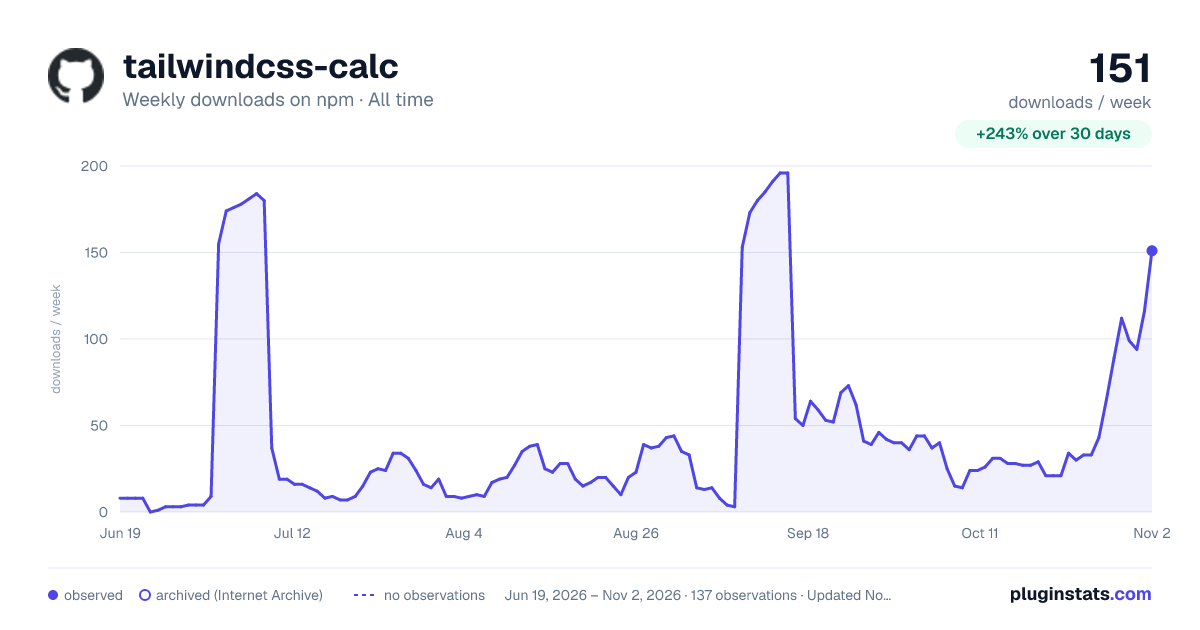

Adoption over time


7/30/90-day growth


Filled points are observed values; hollow points come from Internet Archive snapshots of the listing page. Dashed segments span periods with no observations — values between points are not interpolated.
Recent observations
Full history (121)Similar npm Tailwind plugins plugins
Data source
Weekly downloads (trailing 7 complete days) come from the official npm downloads API. Downloads include CI and mirrors and are not equivalent to installs or users. npm publishes no ratings.
Listing: https://www.npmjs.com/package/tailwindcss-calc. First seen Oct 16, 2026; last successful collection Oct 18, 2026. See the methodology.