 PluginStats
expo-ai-kit weekly downloads statistics
On-device AI for React Native and Expo: LLMs, speech-to-text, vision, and embeddings. Each capability is opt-in at build time. No API key. Zero runtime JavaScript dependencies.
expo-ai-kit has 3,453 recorded weekly downloads on npm, an increase of 127% over the past 30 days, ranking #1214 of 2,322 tracked listings.
About expo-ai-kit
expo-ai-kit
On-device AI for React Native. Generate text, transcribe speech, work with images, and search by meaning. Supports Expo apps and React Native apps with Expo modules installed. Inference runs on the device, with no API key.
Documentation · Examples · npm · Changelog
Install
npx expo install expo-ai-kit
All features are off by default. Nothing native is compiled into your app until you turn a feature on in your app config and make a native build. To use text generation:
{
  "expo": {
    "plugins": [["expo-ai-kit", { "llm": true }]]
  }
}
Requires Expo SDK 54+ (or compatible Expo modules in an existing React Native app) and a native development or production build. Expo Go is not supported. Follow Get Started for native setup and a working app example. Device and OS requirements vary by feature; see platform support.
First request
With llm enabled, on a device with a supported built-in text model:
import { isAvailable, prepareBuiltInModel, sendMessage } from 'expo-ai-kit';

async function ask(question: string) {
  if (!(await isAvailable())) {
    return 'The built-in text model is unavailable on this device.';
  }
  await prepareBuiltInModel();
  const { text } = await sendMessage([{ role: 'user', content: question }]);
  return text;
}

const answer = await ask('Explain gravity in one sentence.');
The built-in text model requires Apple Intelligence on iOS 26+ or a supported Android device. Android may download its model during preparation. You can also download a model such as Gemma, Qwen, or Phi.
LLM
Generate and stream text,
return structured JSON, or
let the model call your functions.
Pass the full message history on each call. One generation runs at a time. Enable the llm
option and rebuild.
Speech
Transcribe microphone audio or recorded files
with streamTranscription and transcribe. Enable the speech plugin option and rebuild.
iOS requires 26+; Android requires 12+ and processes file audio at real-time rate.
Vision
Remove backgrounds, label images, and read text
with removeBackground, labelImage, and recognizeText.
Find faces with detectFaces:
import { detectFaces } from 'expo-ai-kit';

const { width, height, faces } = await detectFaces({ uri: photo.uri });
// faces[0].bounds (normalized 0–1) and faces[0].pixelBounds, largest face first
Enable vision on Android and rebuild, or name only the features you use, for example
{ "vision": ["face-detection"] }, so the app ships only that detector. Face detection uses a
bundled model and needs no download; rules such as "exactly one face" are a few lines in your app.
Embeddings
Semantic search and retrieval with
embed, chunkText, and createVectorStore. iOS uses the system embedding model;
Android requires the androidEmbeddings option and an explicit model download.
Build options
Every option is off by default. Each one compiles a single feature into the app; leave it off
and that feature's native code, models, and permissions stay out of the build, and its functions
throw a typed *_NOT_ENABLED error. Changing an option requires a new native build.
| Option | Enables | Adds to the app |
|---|---|---|
llm | Text generation, JSON output, tool calling, model downloads, the AI SDK provider | LiteRT-LM runtime (about 30 MB of iOS arm64 code, 21 MB on Android); Android minSdkVersion 26 |
speech | transcribe, streamTranscription | Android ML Kit speech and microphone permission; iOS microphone usage string |
vision | Android removeBackground, labelImage, recognizeText, detectFaces | true adds every ML Kit vision client and bundled model; an array such as ["face-detection"] adds only those features. iOS needs no option |
androidEmbeddings | Android embed | MediaPipe TextEmbedder (about 25 MB); the model downloads at runtime |
The config reference covers bare React Native setup and every option in detail.
More
- Vercel AI SDK: use
expo-ai-kit/aiwith the AI SDK. - API reference: functions, options, results, and typed errors.
- Troubleshooting and GitHub issues.
- llms.txt: documentation index and essential contracts for coding agents.
Zero runtime JavaScript dependencies. MIT © Said Kaban.
Description from the npm listing.
- react-native
- expo
- gemma
- gemma-4
- qwen
- qwen3
- phi-4
- on-device-ai
- llm
- litert
- apple-foundation-models
- ml-kit
- local-inference
- structured-output
- tool-calling
- function-calling
- json-schema
- embeddings
- rag
- semantic-search
README badge
Show your rank in a README or on your website. The badge updates automatically.
Charts
Images: 30d · 1y · all time · 1600×900 dark


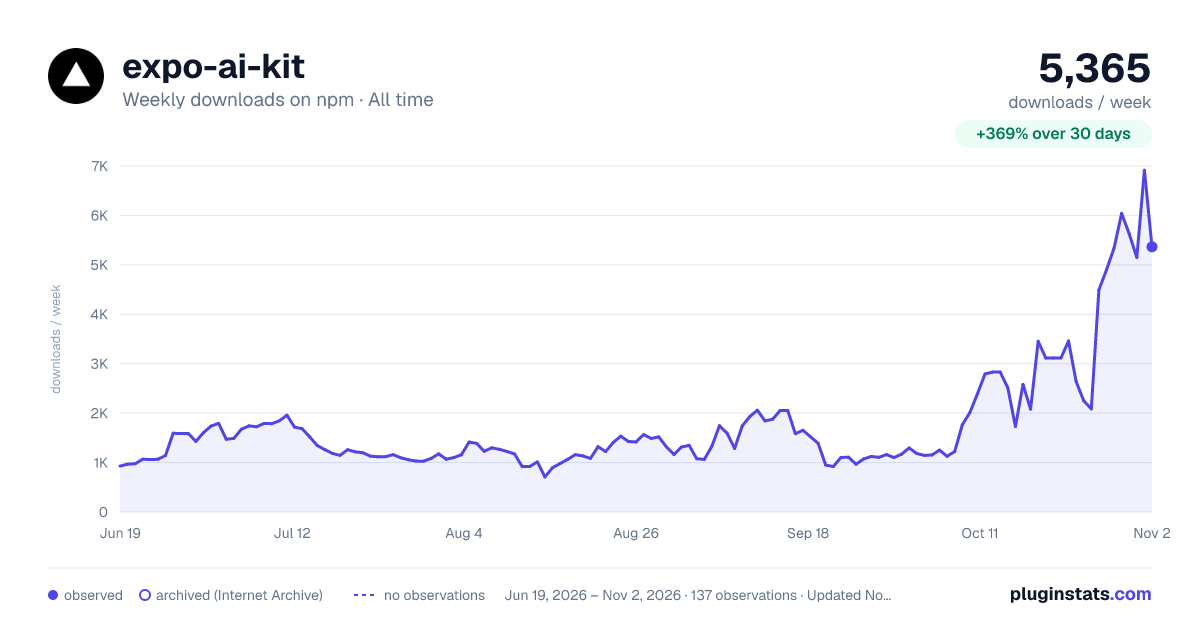

Adoption over time
7/30/90-day growth
Ranking history
Listing placement
Listing placement
Filled points are observed values; hollow points come from Internet Archive snapshots of the listing page. Dashed segments span periods with no observations — values between points are not interpolated.
Each band is one page of 20. Weekly downloads on a linear scale. Placement is projected from weekly downloads, so it can differ from the marketplace's own sort order. Hover a dot to see the listing.
Recent observations
Full history (122)Similar npm AI SDKs plugins
All 20 expo-ai-kit alternativesData source
Weekly downloads (trailing 7 complete days) come from the official npm downloads API. Downloads include CI and mirrors and are not equivalent to installs or users. npm publishes no ratings.
Listing: https://www.npmjs.com/package/expo-ai-kit. First seen Oct 16, 2026; last successful collection Oct 20, 2026. See the methodology.