 PluginStats
@beardcoder/prettier-plugin-fluid weekly downloads statistics
By beardcoder · npm · Prettier plugins
Prettier plugin for TYPO3 Fluid templates that plays nicely with other HTML plugins
@beardcoder/prettier-plugin-fluid has 25 recorded weekly downloads on npm, a change of -64.8% over the past 7 days, ranking #1810 of 2,256 tracked listings.
About @beardcoder/prettier-plugin-fluid
@beardcoder/prettier-plugin-fluid
Prettier plugin for TYPO3 Fluid templates.
• Plays nicely with other plugins. The HTML structure is formatted by Prettier's own html parser, so plugins that hook into it keep working, such as attribute sorting and Tailwind class sorting. • Never touches your Fluid code. Shorthand syntax like {item.title -> f:format.crop(maxCharacters: 20)} is kept byte-for-byte, including arbitrarily nested inline syntax and escaped quotes: {f:if(condition: '{a}', then: '{f:translate(key: 'x')}')}. • Understands ViewHelpers. Structural tags (f:if, f:for, f:section, …) are laid out as blocks. Inline ones (f:link.*, f:translate, …) behave like . Custom ViewHelpers are configurable. • Formats inline assets. The content of and is formatted as CSS and JavaScript, just like and . • Safe by design. Some parts are kept verbatim: content (its lines only move with the comment's indentation), CDATA sections, conditional wrappers like , and // blocks that contain Fluid code. If formatting would ever drop Fluid code, the plugin fails instead of writing the file. • Helpful errors. When a template is invalid HTML, the error points at the line and column in your template.
Installation
Requires Prettier 3 and Node.js 20 or later, or Bun.
Fluid templates are usually plain .html files, so assign the fluid parser to them in your Prettier config (.prettierrc.json):
These are the same locations the Fluid extension for VS Code treats as Fluid templates. Files ending in .fluid or .fluid.html are detected automatically (.fluid.html from Prettier 3.6 on; older versions treat it as .html, so assign the parser via overrides there).
Only HTML templates are supported. Plain-text templates (e.g. *.fluid.txt for text emails) are not formatted: an HTML formatter would change their line breaks.
VS Code
Install the Prettier extension and the Fluid extension. The Fluid extension marks HTML templates with the language html-fluid, which this plugin registers for. Prettier then formats them on save:
Sorting attributes
Use prettier-plugin-organize-attributes. It sorts attributes on HTML tags and on ViewHelper tags. This order suits Fluid templates: the attributes that identify a ViewHelper call come first, then everything else alphabetically.
organize-attributes matches namespaced attributes by their local name only: xmlns:ce is sorted as ce, so it would end up before data-namespace-typo3-fluid. That is why data-namespace-typo3-fluid needs a group of its own at the start. A ^xmlns group only matches a plain xmlns attribute.
Tailwind CSS
Add prettier-plugin-tailwindcss as the last plugin. It chains organize-attributes internally:
Tailwind treats Fluid expressions inside class as unknown classes and moves them to the front.
Options
| Option | Default | Description |
| fluidBlockViewHelpers | [] | Additional ViewHelpers laid out as blocks. Supports * wildcards. | | fluidInlineViewHelpers | [] | ViewHelpers laid out inline even if they are blocks by default. Takes precedence. | | fluidVerbatimViewHelpers | [] | Custom ViewHelpers kept exactly as written, like f:comment, f:spaceless, f:variable. Wildcards ok. | | fluidIndentRoot | true | Indent the content of the root tag. See root tag. | | fluidRootAttributePerLine | false | With fluidIndentRoot: false: put every attribute of the root tag on its own line. | | fluidFinalNewline | true | End the file with a line break. false omits it, e.g. for projects whose templates have none. | | fluidArraySpacing | "preserve" | Spaces inside Fluid arrays: "always" → { a: 1 }, "never" → {a: 1}. See arrays. | | fluidArraySpacingInStrings | false | With fluidArraySpacing: also format arrays in quoted strings of ViewHelper arguments. |
All standard Prettier options apply, such as printWidth, tabWidth, bracketSameLine and singleAttributePerLine.
The package ships TypeScript declarations. In a prettier.config.ts, the plugin's options are typed with FluidOptions:
Root tag
TYPO3 recommends as the root of a template. Many projects do not indent its content. With "fluidIndentRoot": false, the root tag is formatted on its own and its content is not indented. An empty line follows the opening tag and precedes the closing tag:
This applies to and to any root tag with data-namespace-typo3-fluid="true", such as . A DOCTYPE and comments before the root tag are kept as written. Add "fluidRootAttributePerLine": true to always put the root tag's attributes on separate lines, as above.
Arrays
By default, Fluid expressions are kept exactly as written. With "fluidArraySpacing": "always" or "never", single-line Fluid arrays get one space after each comma and spaces inside the braces, or none:
Like Fluid itself, the plugin only sees arrays in ViewHelper arguments: in attribute values of ViewHelper tags and in the arguments of inline ViewHelpers. Elsewhere, Fluid outputs {a: 1} as text, so it is never changed, e.g. in {a: 1}
or Alpine's x-data="{open: false}". Nested arrays are formatted the same way. Keys, values and the space around : stay as written, as do strings and multi-line arrays.
Quoted strings in ViewHelper arguments are parsed by Fluid as well, so then: '{a: 1}' also contains an array. Such strings are kept as written by default; add "fluidArraySpacingInStrings": true to format their arrays, too:
Content that must not change
Some ViewHelpers produce strings instead of markup, e.g. a class list built with inside , or the value of given as its content. Added line breaks or indentation would end up in that string. The content of f:spaceless and f:variable is therefore kept exactly as written, like f:comment. Add your own ViewHelpers of this kind:
Custom ViewHelpers
Every tag of the form is recognized as a ViewHelper, including your own () and third-party ones (). Only these core ViewHelpers (and those of EXT:form, with its usual formvh prefix) are blocks by default:…
Description from the npm listing.
- fluid
- fluid-templates
- formatter
- prettier
- prettier-plugin
- typo3
README badge
Show your rank in a README or on your website. The badge updates automatically.
Charts
Images: 30d · 1y · all time · 1600×900 dark


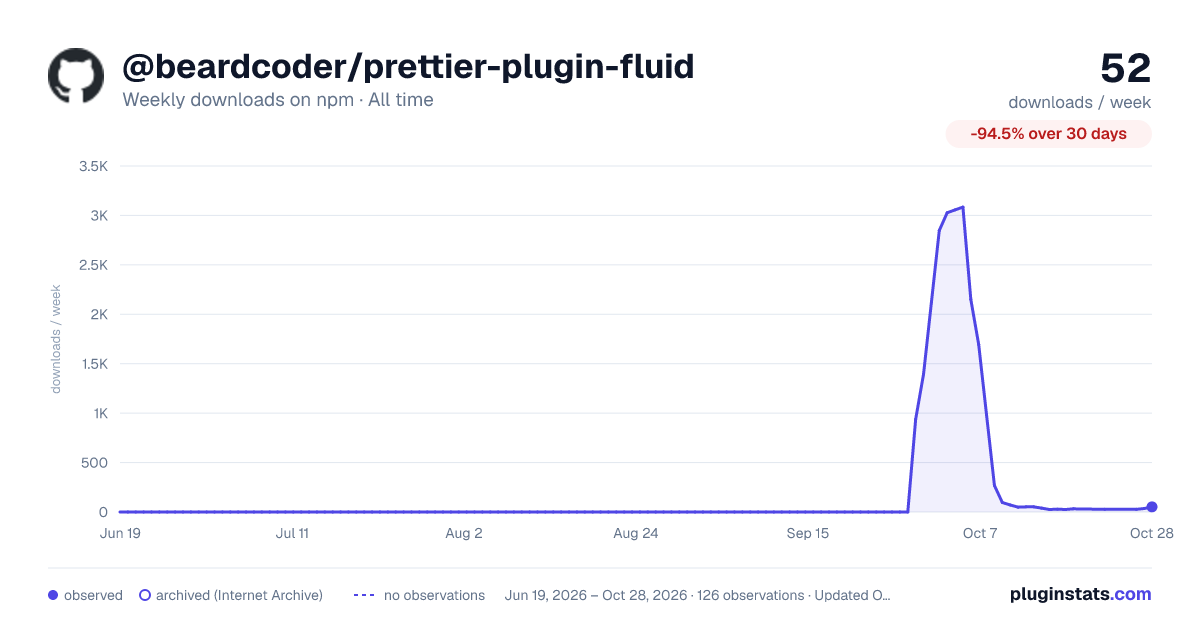

Adoption over time
7/30/90-day growth
Ranking history
Listing placement
Listing placement
Filled points are observed values; hollow points come from Internet Archive snapshots of the listing page. Dashed segments span periods with no observations — values between points are not interpolated.
Each band is one page of 20. Weekly downloads on a linear scale. Placement is projected from weekly downloads, so it can differ from the marketplace's own sort order. Hover a dot to see the listing.
Recent observations
Full history (121)Similar npm Prettier plugins plugins
All 20 @beardcoder/prettier-plugin-fluid alternatives- 25 weekly downloads-59.0%
- 28 weekly downloads-54.1%
- 22 weekly downloads+37.5%
- 22 weekly downloads-15.4%
Data source
Weekly downloads (trailing 7 complete days) come from the official npm downloads API. Downloads include CI and mirrors and are not equivalent to installs or users. npm publishes no ratings.
Listing: https://www.npmjs.com/package/@beardcoder/prettier-plugin-fluid. First seen Oct 16, 2026; last successful collection Oct 19, 2026. See the methodology.