 PluginStats
@hasna/connectors weekly downloads statistics
By hasna (9 listings) · npm · MCP servers
Open source connector library - Install API connectors with a single command
@hasna/connectors has 7,233 recorded weekly downloads on npm, a decrease of 37.6% over the past 30 days, ranking #1002 of 2,256 tracked listings.
About @hasna/connectors
@hasna/connectors
Open-source connector platform for enabling, authenticating, and running API connectors from one package.
Install
What It Is
@hasna/connectors is a single-product runtime:
• connectors stay inside this repo and package • projects enable the connectors they want through .connectors/manifest.json • credentials live in the connectors data home (resolved by the in-package resolver; ~/.hasna/connectors/ until the XDG data home is adopted) • CLI, MCP, REST, and the local API/OAuth server all use the same connector registry
Local or remote
Connectors runs locally by default, with nothing to configure: the CLI, the MCP server and the SDK run the connector engine in-process and keep connections in the local store.
To use a server instead (one you run yourself, or any service that speaks the /v1 API), point the client at it:
Settings resolve in this order: the --api-url / --api-key-stdin flags, then CONNECTORS_API_URL / CONNECTORS_API_KEY, then /config.json (mode 0600, written by connectors login), then local mode. A saved key is only sent to the server it was saved for, a server URL without a key is an error rather than a silent fall back to local mode, and plain http:// is refused for anything but loopback unless CONNECTORS_ALLOW_INSECURE_HTTP=1.
Service connectors work the same way in both modes:
The shipped service connectors are anthropic, brandsight, cloudflare, cursor, godaddy, openai, opencode, stable and youtrust (Youtrust, formerly Yousign: signature requests, documents, recipients, audit trails and webhooks; see docs/providers/youtrust.md). A Youtrust connection picks its environment with a plain field:
Secret connection fields are never accepted as arguments (--field refuses them); use --secret-env key=ENV_NAME, --secrets-stdin or the hidden prompt. Any operation that is not a read (write, billable, destructive, credential) needs --confirm. A credential result, such as a newly minted key, is shown once and never stored.
CLI
Typical flow:
Key commands:
• connectors install writes project enablement to .connectors/manifest.json • connectors list and connectors search browse the shared catalog • connectors docs reads connector docs from the internal registry • connectors auth stores credentials in the connectors data home (resolved by the in-package resolver) • connectors auth --key-stdin reads an API key or bearer token from stdin, and --key-env reads it from the named environment variable. connectors setup and connectors llm set take the same two flags. Do not pass a key as a command-line value: it lands in shell history and the process list. • connectors run executes connector commands from the one-product runtime • connectors status and connectors doctor verify setup and auth state
Compact Output Defaults
CLI output is compact by default so agent terminals do not fill with huge catalogs, README sections, credential status tables, or API records.
• connectors list shows a compact page. Use --cursor or --offset for the next page, --limit to change page size, --verbose for wider rows, or --all --verbose for the full human catalog. --json now returns a minified 20-row envelope with truthful total, limit, cursor, next_cursor, and has_more; use --json --verbose for full fields within that bounded page, or --json --full / --json --all for the legacy bare array. Bounded JSON limits above 100 are refused with full-output guidance. • connectors docs shows a summary. Use --verbose for full parsed sections, --essential for auth/env vars only, --raw for raw markdown, or --json for structured docs. • connectors status, connectors doctor, connectors jobs list, connectors workflows list, connectors whoami, and dry-run install output page or truncate human rows by default. Use --verbose, show/inspect, or --json when full detail is needed. • connectors run preserves JSON-style command output, but truncates very large human stdout. Use connectors run --verbose ... for full stdout.
MCP Server
MCP tools also use compact defaults. list_connectors, list_jobs, list_workflows, and list_agents return paged objects with count, total, limit, cursor, nextCursor, and hasMore; pass cursor to continue, limit to change page size, and verbose: true for full records. list_connectors page receipts bypass optional probabilistic output stripping, so continuation metadata cannot be removed. connector_docs and operation discovery return summaries unless verbose: true or a specific detail path is requested.
Service-connector tools run through the same backend as the CLI (local, or the server from CONNECTORS_API_URL / connectors login): connectors_service_list, connectors_service_describe, connections_list, connections_check, connectors_call (pass confirm: true for anything that is not a read) and runs_list. No tool accepts a secret value; connections are created with the CLI or the API, so raw keys never pass through an agent's tool arguments. When connectors_call runs a credential operation (one that mints a key), the secret values in its result (key, token, secret, api_key, access_token, refresh_token, client_secret, value, at any depth) come back as [redacted: pass reveal_secret=true to return it] unless the call sets reveal_secret: true. The CLI's connectors call still prints the value, once, with a warning.
HTTP mode
Health: GET http://127.0.0.1:8808/health. MCP is also mounted on connectors-serve at /mcp.
Run your own server
connectors-serve serves the /v1 API that the CLI, MCP server and SDK use in remote mode.…
Description from the npm listing.
- connectors
- api
- cli
- typescript
- bun
- figma
- stripe
- github
- openai
- mcp
- model-context-protocol
README badge
Show your rank in a README or on your website. The badge updates automatically.
Charts
Images: 30d · 1y · all time · 1600×900 dark


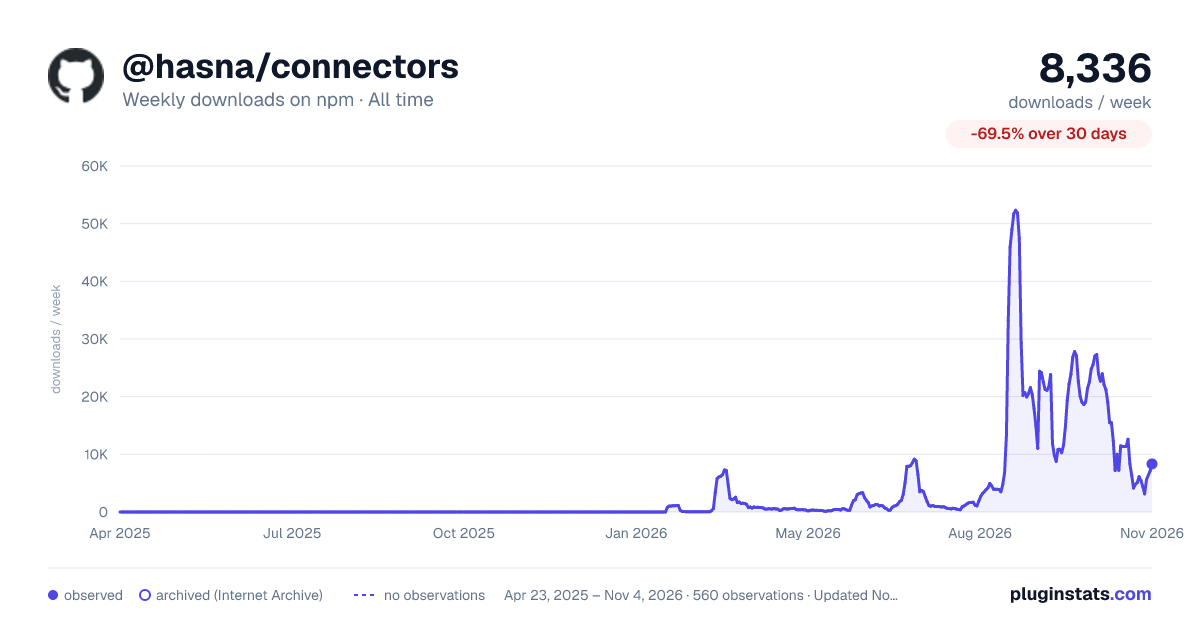

Adoption over time
7/30/90-day growth
Ranking history
Listing placement
Listing placement
Filled points are observed values; hollow points come from Internet Archive snapshots of the listing page. Dashed segments span periods with no observations — values between points are not interpolated.
Each band is one page of 20. Weekly downloads on a linear scale. Placement is projected from weekly downloads, so it can differ from the marketplace's own sort order. Hover a dot to see the listing.
Recent observations
Full history (543)Similar npm MCP servers plugins
All 20 @hasna/connectors alternativesData source
Weekly downloads (trailing 7 complete days) come from the official npm downloads API. Downloads include CI and mirrors and are not equivalent to installs or users. npm publishes no ratings.
Listing: https://www.npmjs.com/package/@hasna/connectors. First seen Oct 16, 2026; last successful collection Oct 19, 2026. See the methodology.