 PluginStats
@wonderwhy-er/desktop-commander weekly downloads statistics
By wonderwhy-er · npm · MCP servers
MCP server for terminal operations and file editing
@wonderwhy-er/desktop-commander has 195,946 recorded weekly downloads on npm, a decrease of 2.1% over the past 30 days, ranking #392 of 2,322 tracked listings.
About @wonderwhy-er/desktop-commander
Desktop Commander MCP
Search, update, manage files and run terminal commands with AI



Work with code and text, run processes, and automate tasks, going far beyond other AI editors - while using host client subscriptions instead of API token costs.
<a href="https://glama.ai/mcp/servers/zempur9oh4"> <img width="380" height="200" src="https://glama.ai/mcp/servers/zempur9oh4/badge" alt="Desktop Commander MCP" /> </a>Table of Contents
- Features
- How to install
- Getting Started
- Usage
- File Preview UI & Markdown Editor
- Handling Long-Running Commands
- Work in Progress and TODOs
- Sponsors and Supporters
- Website
- Media
- Testimonials
- Frequently Asked Questions
- Contributing
- License
All of your AI development tools in one place. Desktop Commander puts all dev tools in one chat. Execute long-running terminal commands on your computer and manage processes through Model Context Protocol (MCP). Built on top of MCP Filesystem Server to provide additional search and replace file editing capabilities.
Features
- Remote AI Control - Use Desktop Commander from ChatGPT, Claude web, and other AI services via Remote MCP
- File Preview UI - Visual file previews in Claude Desktop with rendered markdown, inline images, expandable content, built-in markdown editor, and quick "Open in folder" access
- Enhanced terminal commands with interactive process control
- Execute code in memory (Python, Node.js, R) without saving files
- Instant data analysis - just ask to analyze CSV/JSON/Excel files
- Native Excel file support - Read, write, edit, and search Excel files (.xlsx, .xls, .xlsm) without external tools
- PDF support - Read PDFs with text extraction, create new PDFs from markdown, modify existing PDFs
- DOCX support - Read, create, edit, and search Word documents (.docx) with surgical XML editing and markdown-to-DOCX conversion
- Interact with running processes (SSH, databases, development servers)
- Execute terminal commands with output streaming
- Command timeout and background execution support
- Process management (list and kill processes)
- Session management for long-running commands
- Process output pagination - Read terminal output with offset/length controls to prevent context overflow
- Server configuration management:
- Get/set configuration values
- Update multiple settings at once
- Dynamic configuration changes without server restart
- Full filesystem operations:
- Read/write files (text, Excel, PDF, DOCX)
- Create/list directories
- Recursive directory listing with configurable depth and context overflow protection for large folders
- Move files/directories
- Search files and content (including Excel content)
- Get file metadata
- Negative offset file reading: Read from end of files using negative offset values (like Unix tail)
- Code editing capabilities:
- Surgical text replacements for small changes
- Full file rewrites for major changes
- Multiple file support
- Pattern-based replacements
- vscode-ripgrep based recursive code or text search in folders
- Local tool-call history and audit logs:
- Tool calls and arguments are recorded locally on the machine running Desktop Commander
- Recent call history with bounded output previews is available through
get_recent_tool_calls - Size-based rotation/trimming keeps the active history files bounded
- Safety guardrails (not a sandbox — see SECURITY.md):
- Symlink traversal prevention on file operations
- Command blocklist for accidental execution
- Docker isolation for complete isolation
How to install
Install in Claude Desktop
Desktop Commander offers multiple installation methods for Claude Desktop.
<details> <summary><b>Option 1: Install through npx ⭐ Auto-Updates (Requires Node.js)</b></summary>📋 Update & Uninstall Information: Options 1, 2, 3, 4, and 6 have automatic updates. Option 5 requires manual updates. See below for details.
Just run this in terminal:
npx @wonderwhy-er/desktop-commander@latest setup
For debugging mode (allows Node.js inspector connection):
npx @wonderwhy-er/desktop-commander@latest setup --debug
Command line options during setup:
--debug: Enable debugging mode for Node.js inspector--no-onboarding: Disable onboarding prompts for new users
Restart Claude if running.
✅ Auto-Updates: Yes - automatically updates when you restart Claude
🔄 Manual Update: Run the setup command again
🗑️ Uninstall: Run npx @wonderwhy-er/desktop-commander@latest remove
Description from the npm listing.
- mcp
- model-context-protocol
- terminal
- claude
- ai
- command-line
- process-management
- file-editing
- code-editing
- diff
- patch
- block-editing
- file-system
- text-manipulation
- code-modification
- surgical-edits
- file-operations
README badge
Show your rank in a README or on your website. The badge updates automatically.
Charts
Images: 30d · 1y · all time · 1600×900 dark


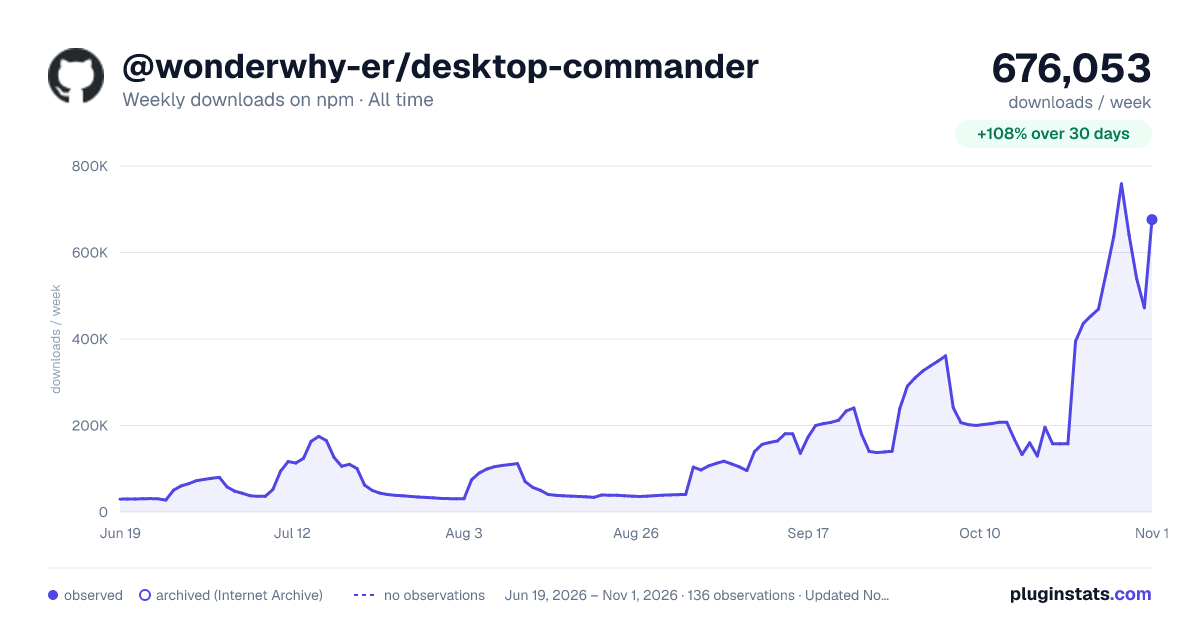

Adoption over time
7/30/90-day growth
Ranking history
Listing placement
Listing placement
Filled points are observed values; hollow points come from Internet Archive snapshots of the listing page. Dashed segments span periods with no observations — values between points are not interpolated.
Each band is one page of 20. Weekly downloads on a linear scale. Placement is projected from weekly downloads, so it can differ from the marketplace's own sort order. Hover a dot to see the listing.
Recent observations
Full history (122)Similar npm MCP servers plugins
All 20 @wonderwhy-er/desktop-commander alternativesData source
Weekly downloads (trailing 7 complete days) come from the official npm downloads API. Downloads include CI and mirrors and are not equivalent to installs or users. npm publishes no ratings.
Listing: https://www.npmjs.com/package/@wonderwhy-er/desktop-commander. First seen Oct 16, 2026; last successful collection Oct 20, 2026. See the methodology.