 PluginStats
@chat-adapter/discord weekly downloads statistics
By chat-adapter (14 listings) · npm · AI SDKs
Discord adapter for Chat SDK — HTTP interactions, Gateway events, slash commands, and embeds
@chat-adapter/discord has 147,948 recorded weekly downloads on npm, an increase of 12.6% over the past 30 days, ranking #428 of 2,322 tracked listings.
About @chat-adapter/discord
@chat-adapter/discord
npm package:
@chat-adapter/discord


Discord adapter for Chat SDK. Configure with HTTP Interactions and Gateway WebSocket support.
Documentation: chat-sdk.dev/adapters/official/discord · Guides: vercel.com/kb/chat-sdk
Installation
pnpm add @chat-adapter/discord
Scaffold with the CLI
To scaffold a new Discord bot with this adapter preselected:
npx create-chat-sdk@latest my-bot --adapter discord memory
Visit the adapters directory to see other available official and vendor-official adapters.
Quick start
For managed credentials and webhook verification, see Vercel Connect.
The adapter auto-detects DISCORD_BOT_TOKEN, DISCORD_PUBLIC_KEY, DISCORD_APPLICATION_ID, and DISCORD_MENTION_ROLE_IDS from environment variables:
import { Chat } from "chat";
import { createDiscordAdapter } from "@chat-adapter/discord";

const discord = createDiscordAdapter();
const bot = new Chat({
  userName: "mybot",
  adapters: {
    discord,
  },
});

bot.onNewMention(async (thread, message) => {
  await thread.post("Hello from Discord!");
});
Configuration
All options are auto-detected from environment variables when not provided.
| Option | Required | Description |
|---|---|---|
botToken | No* | Discord bot token or async resolver. Auto-detected from DISCORD_BOT_TOKEN |
publicKey | No* | Application public key. Auto-detected from DISCORD_PUBLIC_KEY |
applicationId | No* | Discord application ID or async resolver. Auto-detected from DISCORD_APPLICATION_ID |
webhookVerifier | No | Custom webhook verifier that replaces Discord's Ed25519 publicKey verification |
contentFormat | No | Render Chat SDK cards as DiscordContentFormat.Embeds or DiscordContentFormat.ComponentsV2. Defaults to DiscordContentFormat.Embeds |
mentionRoleIds | No | Array of role IDs that trigger mention handlers. Auto-detected from DISCORD_MENTION_ROLE_IDS (comma-separated) |
respondToChannelIds | No | Parent channel IDs whose non-bot messages, including messages in child threads, trigger mention handlers without an @mention. Top-level messages use the adapter's normal per-message Discord thread. Auto-detected from DISCORD_RESPOND_TO_CHANNEL_IDS (comma-separated). Defaults to [] |
respondToGlobalMentions | No | Treat @everyone/@here pings as mentions of the bot. Defaults to false |
interactionFlags | No | Function returning Discord interaction flags for the initial deferred slash command response |
apiUrl | No | Override the Discord API base URL. Auto-detected from DISCORD_API_URL |
logger | No | Logger instance (defaults to ConsoleLogger("info")) |
*botToken and applicationId are required via config or env vars. Provide either publicKey or webhookVerifier for inbound webhook verification.
Authentication
Option A — Vercel Connect
Use connectDiscordAdapter to resolve the bot token and application ID from a
Vercel Connect Discord connector and verify trigger-forwarded interactions with
Vercel OIDC:
import { createDiscordAdapter } from "@chat-adapter/discord";
import { connectDiscordAdapter } from "@vercel/connect/chat";

const discord = createDiscordAdapter({
  ...connectDiscordAdapter("discord/acme-discord"),
});
No DISCORD_BOT_TOKEN, DISCORD_PUBLIC_KEY, or DISCORD_APPLICATION_ID is
needed in this mode.
Regular messages and reactions still require a Gateway connection.
Option B — Discord app credentials
1. Create application
- Go to the Discord Developer Portal
- Click New Application and give it a name
- Note the Application ID from the General Information page
- Copy the Public Key from the General Information page
2. Create bot
- Go to the Bot section in the left sidebar
- Click Reset Token to generate a new bot token
- Copy and save the token (you won't see it again)
- Enable these Privileged Gateway Intents:
- Message Content Intent
- Server Members Intent (if needed)
3. Configure interactions endpoint
- Go to General Information
- Set Interactions Endpoint URL to
https://your-domain.com/api/webhooks/discord - Discord sends a PING to verify the endpoint
4. Add bot to server
- Go to OAuth2 then URL Generator
- Select scopes:
bot,applications.commands - Select bot permissions: Send Messages, Send Messages in Threads, Create Public Threads, Manage Threads, Read Message History, Add Reactions, Attach Files
- Copy the generated URL and open it to invite the bot to your server
Architecture: HTTP Interactions vs Gateway
Discord has two ways to receive events:
HTTP Interactions (default):
- Receives button clicks, slash commands, and verification pings
- Works out of the box with serverless
- Does not receive regular messages
Gateway WebSocket (required for messages):
- Receives regular messages and reactions
- Receives slash commands and button clicks when no Interactions Endpoint URL is configured
- Requires a persistent connection
- In serverless environments, use a cron job to maintain the connection…
Description from the npm listing.
- chat
- chat-sdk
- chatbot
- discord
- discord-bot
- bot
- adapter
- slash-commands
- interactions
- messaging
- ai-agent
- ai-sdk
- vercel
README badge
Show your rank in a README or on your website. The badge updates automatically.
Charts
Images: 30d · 1y · all time · 1600×900 dark


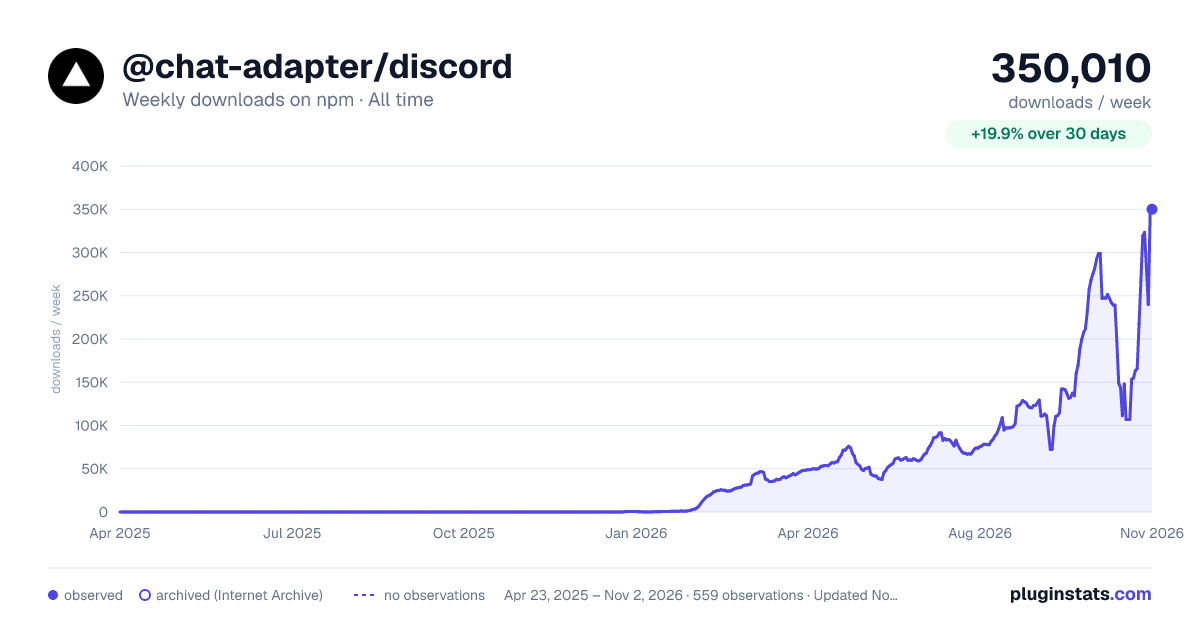

Adoption over time
7/30/90-day growth
Ranking history
Listing placement
Listing placement
Filled points are observed values; hollow points come from Internet Archive snapshots of the listing page. Dashed segments span periods with no observations — values between points are not interpolated.
Each band is one page of 20. Weekly downloads on a linear scale. Placement is projected from weekly downloads, so it can differ from the marketplace's own sort order. Hover a dot to see the listing.
Recent observations
Full history (544)Similar npm AI SDKs plugins
All 20 @chat-adapter/discord alternativesData source
Weekly downloads (trailing 7 complete days) come from the official npm downloads API. Downloads include CI and mirrors and are not equivalent to installs or users. npm publishes no ratings.
Listing: https://www.npmjs.com/package/@chat-adapter/discord. First seen Oct 16, 2026; last successful collection Oct 20, 2026. See the methodology.