 PluginStats
tailwindcss-viewport-spacing weekly downloads statistics
By gunubin · npm · Tailwind plugins
Tailwind CSS Viewport Spacing is a plugin that allows you to adjust the following utility classes based on viewport width (vw) and viewport height (vh):
tailwindcss-viewport-spacing has 5 recorded weekly downloads on npm, a decrease of 66.7% over the past 30 days, ranking #2038 of 2,306 tracked listings.
About tailwindcss-viewport-spacing
Tailwind CSS Viewport Spacing
Tailwind CSS Viewport Spacing is a plugin that allows you to adjust the following utility classes based on viewport width (vw) and viewport height (vh):
• Padding (e.g., p, px, py, pt, pr, pb, pl) • Margin (e.g., m, mx, my, mt, mr, mb, ml) • Position (e.g., top, right, bottom, left) • Width (e.g., w) • Height (e.g., h) • Max-width (e.g., max-w) • Max-height (e.g., max-h) • Min-width (e.g., min-w) • Min-height (e.g., min-h) • Font-size (e.g., text) • Inset-inline-start (e.g., start) • Inset-inline-end (e.g., end) • Inset (e.g., inset)
Installation
Install the package using npm:
or using yarn:
Usage
-
Import the plugin in your tailwind.config.js file:
-
Add the plugin to your tailwind.config.js plugins section and configure the options:
-
Use the generated utility classes in your HTML:
In this example, the p-vw-phone-[100] class will apply a padding of 100px when the viewport width is 375px, and the h-vh-phone-[100] class will apply a height of 100px when the viewport height is 667px.
Supported CSS Properties
• Padding: Apply viewport-based padding to elements. • Margin: Apply viewport-based margin to elements. • Position: Adjust the position of elements based on viewport width. • Width: Control the width of elements based on viewport width. • Height: Control the height of elements based on viewport width. • Max-width: Set the maximum width of elements based on viewport width. • Max-height: Set the maximum height of elements based on viewport width. • Min-width: Set the minimum width of elements based on viewport width. • Min-height: Set the minimum height of elements based on viewport width. • Font-size: Adjust the font size of text elements based on viewport width. • Inset-inline-start: Control the start inset of positioned elements based on viewport width. • Inset-inline-end: Control the end inset of positioned elements based on viewport width. • Inset: Control the inset of positioned elements based on viewport width.
License
MIT License
Description from the npm listing.
- tailwind
- tailwindcss
- tailwindcss-plugin
- tailwindcss-utilities
- plugin
- utilities
- viewport
- spacing
README badge
Show your rank in a README or on your website. The badge updates automatically.
Charts
Images: 30d · 1y · all time · 1600×900 dark


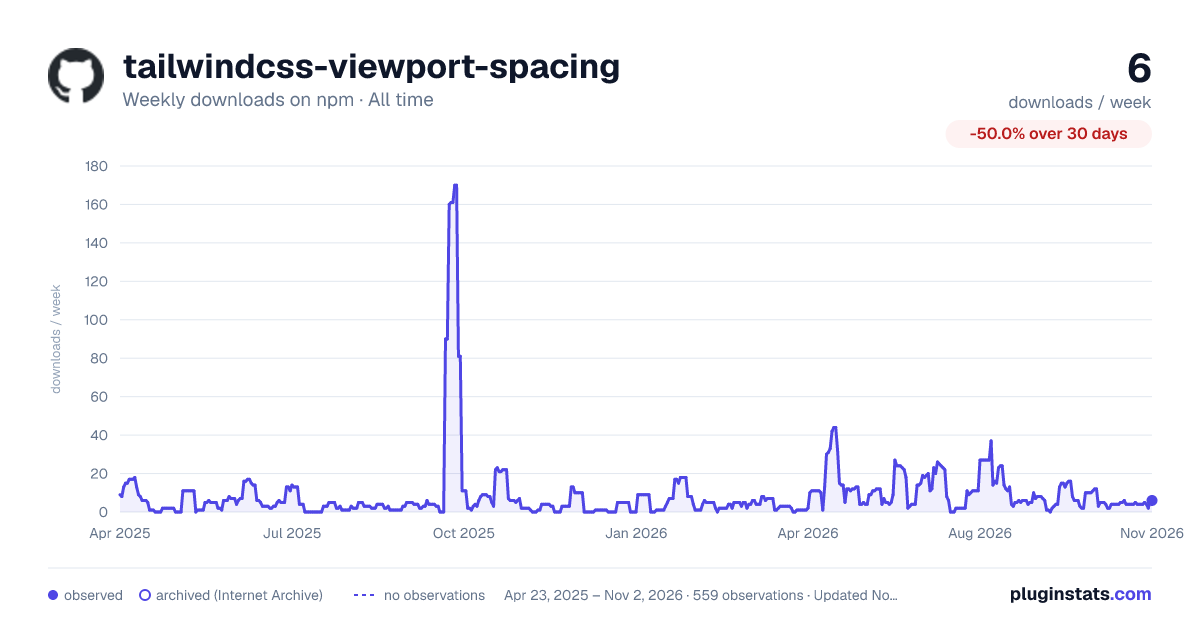

Adoption over time
7/30/90-day growth
Ranking history
Listing placement
Listing placement
Filled points are observed values; hollow points come from Internet Archive snapshots of the listing page. Dashed segments span periods with no observations — values between points are not interpolated.
Each band is one page of 20. Weekly downloads on a linear scale. Placement is projected from weekly downloads, so it can differ from the marketplace's own sort order. Hover a dot to see the listing.
Recent observations
Full history (543)Similar npm Tailwind plugins plugins
All 20 tailwindcss-viewport-spacing alternatives- 5 weekly downloads-86.1%
- 5 weekly downloads-50.0%
Data source
Weekly downloads (trailing 7 complete days) come from the official npm downloads API. Downloads include CI and mirrors and are not equivalent to installs or users. npm publishes no ratings.
Listing: https://www.npmjs.com/package/tailwindcss-viewport-spacing. First seen Oct 16, 2026; last successful collection Oct 19, 2026. See the methodology.