 PluginStats
vite-plugin-solid-svg weekly downloads statistics
By jfgodoy · npm · Vite plugins
Import SVG files as Solid.js Components
vite-plugin-solid-svg has 8,582 recorded weekly downloads on npm, a decrease of 54.2% over the past 30 days, ranking #997 of 2,322 tracked listings.
About vite-plugin-solid-svg
Features:
- SVGO optimization
- Hot Module Replacement support
- Support for
?component-solidquery string - SSR
Currently supported Vite version:
<p><code>4 or above</code></p>Install
yarn add --dev vite-plugin-solid-svg

pnpm i -D vite-plugin-solid-svg
Setup
// vite.config.js
import solidPlugin from 'vite-plugin-solid'
import solidSvg from 'vite-plugin-solid-svg'
import { defineConfig } from 'vite'

export default defineConfig({
  plugins: [solidPlugin(), solidSvg()],
})
typescript
vite adds its own definition for "*.svg" and defines them as string. As far as I know this cannot be overridden.
So we have two options: put our types before those of vite, or use imports with querystring.
If you are using defaultAsComponent which is the default, you need to put our types definition before vite in the tsconfig.
// tsconfig.json
"compilerOptions": {
  "types": [
    "vite-plugin-solid-svg/types-component-solid"
    "vite/client",
  ],
},
if you change to defaultAsComponent=false, you should use a different type definition that only identifies an svg import as a solid component when it matches the querystring. And in this case, put it before "vite/client"
// tsconfig.json
"compilerOptions": {
  "types": [
    "vite-plugin-solid-svg/types",
    "vite/client"
  ],
},
import MyIcon from './my-icon.svg';     // <-- this will match vite module definition, and therefore identified as string
import MyIcon from './my-icon.svg?component-solid';     // <-- this will match the definition in this plugin, and therefore identified as Solid Component
Options
SolidSvg({
  /**
   * If true, will export as JSX component if `as` isn't specified.
   *
   * Otherwise will export as url, or as JSX component if '?as=component-solid'
   *
   */
  defaultAsComponent: true,

  svgo: {
    enabled: true, // optional, by default is true
    svgoConfig: <svgo config>  // optional, if defined, the file svgo.config.js is not loaded.
  }
})
If you need to configure svgo, you can also create a config file svgo.config.js in the project's root, following the instructions at svgo docs. The svgo.svgoConfig has precedence over the file.
Usage
Import as a Solid.js component:
import MyIcon from './my-icon.svg?component-solid';
// or './my-icon.svg' if `defaultAsComponent` is `true`
import MyIcon from './my-icon.svg';

const App = () => {
  return (
    <div>
        <h1> Title </h1>
        <MyIcon />
    </div>
  );
};

export default App;
To import all svg inside a folder, use import.meta.glob('@/svgs/*.svg', { as: 'component-solid' }). See Vite docs for more details.
const icons = import.meta.glob('./*.svg', { as: 'component-solid' })

/*
  icons = {
    icon1: () => import("./icon1.svg"),
    icon2: () => import("./icon2.svg")
  }
*/

const App = () => {
  const Icon1 = lazy(() => iconsDic.icon1())
  return (
    <div>
        <p>hello</p><Icon1 />
    </div>
  );
};

export default App;
Why
In a Solidjs + vite project, you can easily add an svg image using:
import iconUrl from './icon.svg'

const App = () => {
  return (
    <div>
      <img href={iconUrl}>
    </div>
  )
}
However the fill color of the image cannot be overriden. Importing the svg as a component solves this and allows css styles to cascade into the svg content. Furthermore there may be situations where you'll need to ensure the image has been fully loaded, for example, before starting an animation. This module gives you a component that you can control when it's loaded.
Credits
This plugin is based on the work from the following projects:
Description from the npm listing.
- vite-plugin
- svg
- svgo
- vite
- solid
- solidjs
README badge
Show your rank in a README or on your website. The badge updates automatically.
Charts
Images: 30d · 1y · all time · 1600×900 dark


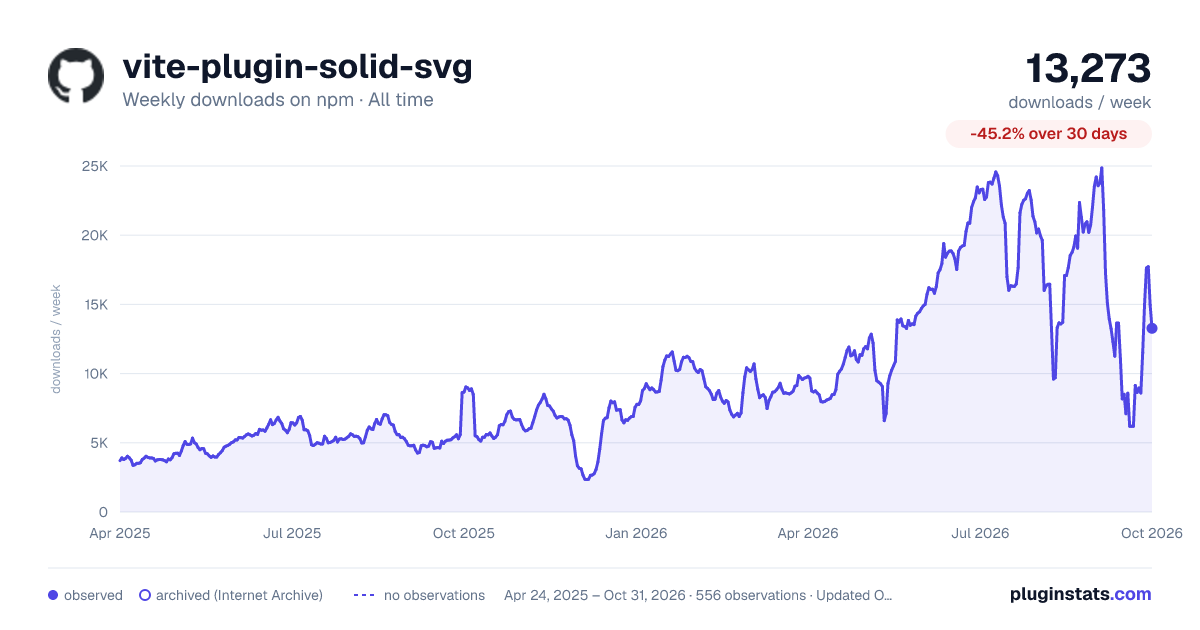

Adoption over time
7/30/90-day growth
Ranking history
Listing placement
Listing placement
Filled points are observed values; hollow points come from Internet Archive snapshots of the listing page. Dashed segments span periods with no observations — values between points are not interpolated.
Each band is one page of 20. Weekly downloads on a linear scale. Placement is projected from weekly downloads, so it can differ from the marketplace's own sort order. Hover a dot to see the listing.
Recent observations
Full history (543)Similar npm Vite plugins plugins
All 20 vite-plugin-solid-svg alternativesData source
Weekly downloads (trailing 7 complete days) come from the official npm downloads API. Downloads include CI and mirrors and are not equivalent to installs or users. npm publishes no ratings.
Listing: https://www.npmjs.com/package/vite-plugin-solid-svg. First seen Oct 16, 2026; last successful collection Oct 20, 2026. See the methodology.