 PluginStats
supergateway weekly downloads statistics
By supercorp-ai · npm · MCP servers
Run MCP stdio servers over SSE, Streamable HTTP or visa versa
supergateway has 45,576 recorded weekly downloads on npm, a decrease of 68.0% over the past 30 days.
It ranks #582 of 2,251 tracked npm listings by weekly downloads.
Over 90 days, weekly downloads changed by -60.0%.
PluginStats has 543 daily observations since Apr 23, 2025; the latest is from Oct 17, 2026.
About supergateway
Supergateway runs MCP stdio-based servers over SSE (Server-Sent Events) or WebSockets (WS) with one command. This is useful for remote access, debugging, or connecting to clients when your MCP server only supports stdio.
Questions, ideas or just want to chat? Join the community on Discord.
Supported by:
• Supercov — Coverage for coding agents and software factories 🌙 • Superinterface • Supercorp
Installation & Usage
Run Supergateway via npx:
• --stdio "command": Command that runs an MCP server over stdio • --sse "https://mcp-server-ab71a6b2-cd55-49d0-adba-562bc85956e3.supermachine.app": SSE URL to connect to (SSE→stdio mode) • --streamableHttp "https://mcp-server.example.com/mcp": Streamable HTTP URL to connect to (StreamableHttp→stdio mode) • --outputTransport stdio | sse | ws | streamableHttp: Output MCP transport (default: sse with --stdio, stdio with --sse or --streamableHttp). A remote server given with --sse or --streamableHttp can be served over sse, ws or streamableHttp too; see Remote server → SSE, WS or Streamable HTTP • --port 8000: Port to listen on (stdio→SSE, stdio→WS or stdio→Streamable HTTP mode, default: 8000) • --host 127.0.0.1: Address to listen on, e.g. 127.0.0.1 or ::1 ([::1] also works) (stdio→SSE, stdio→WS or stdio→Streamable HTTP mode, default: every interface). --baseUrl does not control binding: only --host limits which addresses accept connections. Refused in SSE→stdio and Streamable HTTP→stdio mode, which listen on nothing • --baseUrl "http://localhost:8000": Base URL for SSE clients (stdio→SSE mode; optional) • --ssePath "/sse": Path for SSE subscriptions (stdio→SSE mode, default: /sse) • --messagePath "/message": Path for messages (stdio→SSE or stdio→WS mode, default: /message) • --streamableHttpPath "/mcp": Path for Streamable HTTP (stdio→Streamable HTTP mode, default: /mcp) • --stateful: Run stdio→Streamable HTTP in stateful mode • --sessionTimeout 60000: Session timeout in milliseconds (stateful stdio→Streamable HTTP mode only) • --protocolVersion "2025-06-18": Protocol version the gateway uses when it initializes the server itself and the client's request doesn't name one (stateless stdio→Streamable HTTP mode, default: 2024-11-05) • --header "x-user-id: 123": Add one or more headers (stdio→SSE, stdio→Streamable HTTP, SSE→stdio, or Streamable HTTP→stdio mode; can be used multiple times). With a local server they go on the gateway's responses; with a remote one (--sse, --streamableHttp) they are sent to the remote server • --oauth2Bearer "some-access-token": Adds an Authorization header with the provided Bearer token • --logLevel debug | info | none: Controls logging level (default: info). Use debug for more verbose logs, none to suppress all logs. • --logFormat text | json: Log line format (default: text). json writes one JSON object per line with time, level, msg and, when a log call carries values, data, for ELK and similar log pipelines. Logs go to the same streams as text, so stdio output still carries only MCP messages. • --cors: Enable CORS (stdio→SSE or stdio→WS mode). Use --cors with no values to allow all origins, or supply one or more allowed origins (e.g. --cors "http://example.com" or --cors "/example\\.com$/" for regex matching). • --healthEndpoint /healthz: Register one or more endpoints (every mode but stdio output; can be used multiple times) that respond with "ok" • --healthCheck gateway | server: What the health endpoints check (default: gateway). gateway answers "ok" while the gateway is up. server also checks the MCP server: it starts one (or, for --sse/--streamableHttp, opens a session with the remote server), initializes and pings it, and stops it. It answers "ok" if the server responded within 10 seconds, and 503 with the reason otherwise (e.g. unhealthy: the server exited (code=1, signal=null)). The answer is reused for 10 seconds, so polling every second starts at most one server per 10 seconds. The startup log says when health turns bad and when it recovers • --toolPrefix "github_": Put this before every tool name the server lists, so search becomes github_search (all modes). Clients call the tool by that name, and the server still gets its own. It is used as given, so include a separator. Tool names may be letters, digits, _, - and ., at most 128 characters; the gateway warns about a prefix or name outside that • --tools search --tools get_issue: Expose only these tools, by the server's own names (all modes). The others are left out of tools/list, and a call to one is refused with -32602 Unknown tool, as a server refuses a tool it doesn't have, without reaching the server. A bare --tools exposes none • --apiKey "some-key": Require clients to present this key, as Authorization: Bearer or X-API-Key: (stdio→SSE, stdio→WS or stdio→Streamable HTTP mode; can be used multiple times). Also SUPERGATEWAY_API_KEY=some-key. See Requiring an API key • --apiKeyFile /run/secrets/keys: Accept the keys in this file, one per line (blank lines are skipped). Also SUPERGATEWAY_API_KEY_FILE=/run/secrets/keys • --exitWithProcess : Shut down, stopping the MCP server, when process exits (all modes). Pass the launcher's PID (e.g. $$); it need not be the direct parent, so it works through npx. Checked about once a second. A launcher that spawns Supergateway with a stdin pipe doesn't need this: since 4.0 Supergateway exits when its stdin closes. • --config servers.json: Read servers and settings from a config file instead of the server flags. See Several servers from a config file • --checkConfig: With --config, check the file, list each server's path and output, and exit • --printConfig: Print the resolved config and exit. Keys, bearer tokens, every env value, the query of every URL and headers with sensitive names are replaced; command lines (args, stdio) are printed as written, so read it over before sharing it. Without --config it prints the file equivalent to the command line given
stdio → SSE
Expose an MCP stdio server as an SSE server:…
Description from the npm listing.
- mcp
- stdio
- sse
- gateway
- proxy
- bridge
Where supergateway sits in the listing
Each band is one page of 20. Weekly downloads on a log scale. Placement is projected from weekly downloads, so it can differ from the marketplace's own sort order. Hover a dot to see the listing.


Charts
Images: 30d · 1y · all time · 1600×900 dark


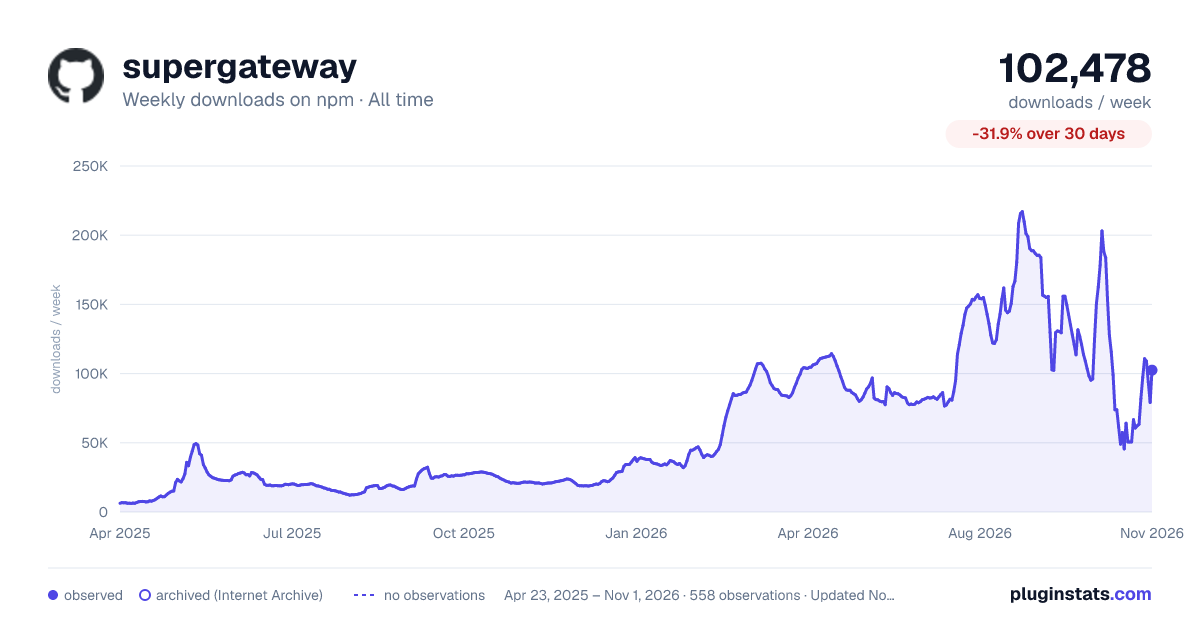

Adoption over time


7/30/90-day growth


Filled points are observed values; hollow points come from Internet Archive snapshots of the listing page. Dashed segments span periods with no observations — values between points are not interpolated.
Recent observations
Full history (543)Similar npm MCP servers plugins
Data source
Weekly downloads (trailing 7 complete days) come from the official npm downloads API. Downloads include CI and mirrors and are not equivalent to installs or users. npm publishes no ratings.
Listing: https://www.npmjs.com/package/supergateway. First seen Oct 16, 2026; last successful collection Oct 18, 2026. See the methodology.