 PluginStats
@aashari/mcp-server-atlassian-jira weekly downloads statistics
By aashari (2 listings) · npm · MCP servers
Node.js/TypeScript MCP server for Atlassian Jira. Equips AI systems (LLMs) with tools to list/get projects, search/get issues (using JQL/ID), and view dev info (commits, PRs). Connects AI capabilities directly into Jira project management and issue tracki
@aashari/mcp-server-atlassian-jira has 8,819 recorded weekly downloads on npm, a decrease of 37.0% over the past 30 days.
About @aashari/mcp-server-atlassian-jira
Connect AI to Your Jira Projects
Transform how you manage and track your work by connecting Claude, Cursor AI, and other AI assistants directly to your Jira projects, issues, and workflows. Get instant project insights, streamline issue management, and enhance your team collaboration.

What You Can Do
- Ask AI about your projects: "What are the active issues in the DEV project?"
- Get issue insights: "Show me details about PROJ-123 including comments"
- Track project progress: "List all high priority issues assigned to me"
- Manage issue comments: "Add a comment to PROJ-456 about the test results"
- Search across projects: "Find all bugs in progress across my projects"
- Create and update issues: "Create a new bug in the MOBILE project"
Perfect For
- Developers who need quick access to issue details and development context
- Project Managers tracking progress, priorities, and team assignments
- Scrum Masters managing sprints and workflow states
- Team Leads monitoring project health and issue resolution
- QA Engineers tracking bugs and testing status
- Anyone who wants to interact with Jira using natural language
Quick Start
Get up and running in 2 minutes:
1. Get Your Jira Credentials
Generate a Jira API Token:
- Go to Atlassian API Tokens
- Click Create API token
- Give it a name like "AI Assistant"
- Copy the generated token immediately (you won't see it again!)
2. Try It Instantly
# Set your credentials
export ATLASSIAN_SITE_NAME="your-company"  # for your-company.atlassian.net
export ATLASSIAN_USER_EMAIL="your.email@company.com"
export ATLASSIAN_API_TOKEN="your_api_token"

# List your Jira projects
npx -y @aashari/mcp-server-atlassian-jira get --path "/rest/api/3/project/search"

# Get details about a specific project
npx -y @aashari/mcp-server-atlassian-jira get --path "/rest/api/3/project/DEV"

# Get an issue with JMESPath filtering
npx -y @aashari/mcp-server-atlassian-jira get --path "/rest/api/3/issue/PROJ-123" --jq "{key: key, summary: fields.summary, status: fields.status.name}"
Connect to AI Assistants
For Claude Desktop Users
Add this to your Claude configuration file (~/.claude/claude_desktop_config.json):
{
  "mcpServers": {
    "jira": {
      "command": "npx",
      "args": ["-y", "@aashari/mcp-server-atlassian-jira"],
      "env": {
        "ATLASSIAN_SITE_NAME": "your-company",
        "ATLASSIAN_USER_EMAIL": "your.email@company.com",
        "ATLASSIAN_API_TOKEN": "your_api_token"
      }
    }
  }
}
Restart Claude Desktop, and you'll see the jira server in the status bar.
For Other AI Assistants
Most AI assistants support MCP. Install the server globally:
npm install -g @aashari/mcp-server-atlassian-jira
Then configure your AI assistant to use the MCP server with STDIO transport.
Alternative: Configuration File
Create ~/.mcp/configs.json for system-wide configuration:
{
  "jira": {
    "environments": {
      "ATLASSIAN_SITE_NAME": "your-company",
      "ATLASSIAN_USER_EMAIL": "your.email@company.com",
      "ATLASSIAN_API_TOKEN": "your_api_token"
    }
  }
}
Alternative config keys: The system also accepts "atlassian-jira", "@aashari/mcp-server-atlassian-jira", or "mcp-server-atlassian-jira" instead of "jira".
Available Tools
This MCP server provides 5 generic tools that can access any Jira API endpoint:
| Tool | Description |
|---|---|
jira_get | GET any Jira API endpoint (read data) |
jira_post | POST to any endpoint (create resources) |
jira_put | PUT to any endpoint (replace resources) |
jira_patch | PATCH any endpoint (partial updates) |
jira_delete | DELETE any endpoint (remove resources) |
Common API Paths
Projects:
/rest/api/3/project/search- List all projects/rest/api/3/project/{projectKeyOrId}- Get project details
Issues:
/rest/api/3/search/jql- Search issues with JQL (usejqlquery param)/rest/api/3/issue/{issueIdOrKey}- Get issue details/rest/api/3/issue- Create issue (POST)/rest/api/3/issue/{issueIdOrKey}/transitions- Get/perform transitions
Comments:
/rest/api/3/issue/{issueIdOrKey}/comment- List/add comments/rest/api/3/issue/{issueIdOrKey}/comment/{commentId}- Get/update/delete comment
Worklogs:
/rest/api/3/issue/{issueIdOrKey}/worklog- List/add worklogs/rest/api/3/issue/{issueIdOrKey}/worklog/{worklogId}- Get/update/delete worklog
Users & Statuses:
/rest/api/3/myself- Get current user/rest/api/3/user/search- Search users (usequeryparam)/rest/api/3/status- List all statuses/rest/api/3/issuetype- List issue types/rest/api/3/priority- List priorities
JMESPath Filtering
All tools support optional JMESPath (jq) filtering to extract specific data:
# Get just project names and keys
npx -y @aashari/mcp-server-atlassian-jira get \
  --path "/rest/api/3/project/search" \
  --jq "values[].{key: key, name: name}"

# Get issue key and summary
npx -y @aashari/mcp-server-atlassian-jira get \
  --path "/rest/api/3/issue/PROJ-123" \
  --jq "{key: key, summary: fields.summary, status: fields.status.name}"
Real-World Examples
Explore Your Projects
Ask your AI assistant:
- "List all projects I have access to"
- "Show me details about the DEV project"
- "What projects contain the word 'Platform'?"
Search and Track Issues
Ask your AI assistant:
- "Find all high priority issues in the DEV project"
- "Show me issues assigned to me that are in progress"
- "Search for bugs reported in the last week"
- "List all open issues for the mobile team"
Manage Issue Details…
Description from the npm listing.
- mcp
- typescript
- claude
- anthropic
- ai
- atlassian
- jira
- project-management
- issue-tracking
- server
- model-context-protocol
- tools
- resources
- tooling
- ai-integration
- mcp-server
- llm
- ai-connector
- external-tools
- cli
README badge
Show your rank in a README or on your website. The badge updates automatically.
Charts
Images: 30d · 1y · all time · 1600×900 dark


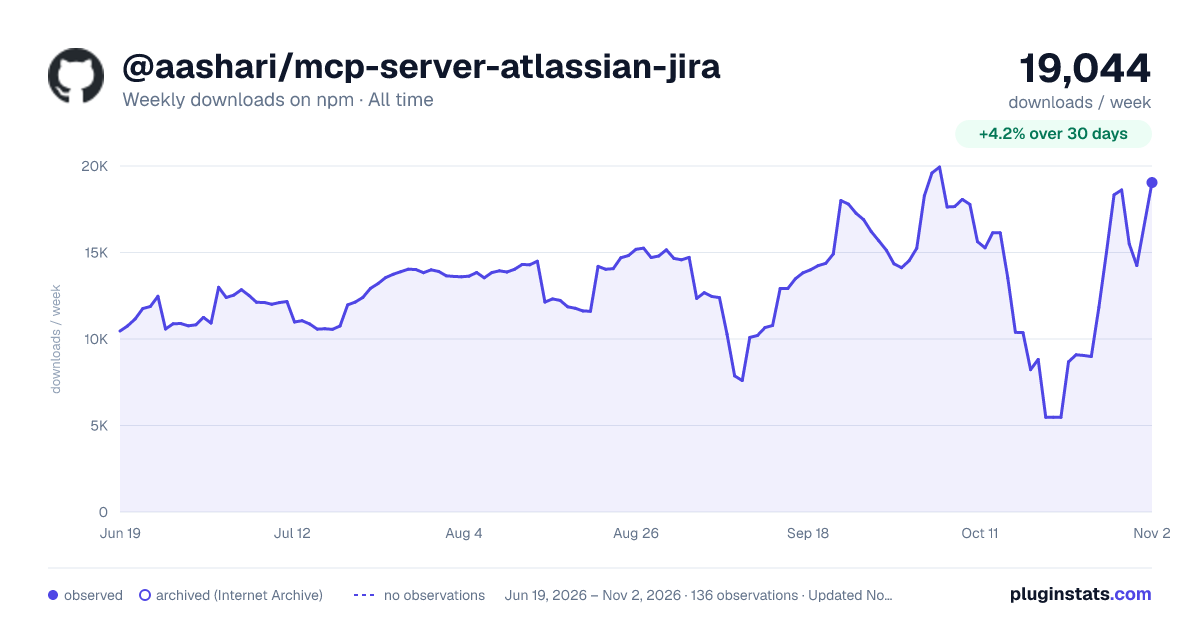

Adoption over time
7/30/90-day growth
Ranking history
Listing placement
Listing placement
Filled points are observed values; hollow points come from Internet Archive snapshots of the listing page. Dashed segments span periods with no observations — values between points are not interpolated.
Each band is one page of 20. Weekly downloads on a linear scale. Placement is projected from weekly downloads, so it can differ from the marketplace's own sort order. Hover a dot to see the listing.
Recent observations
Full history (122)Similar npm MCP servers plugins
All 20 @aashari/mcp-server-atlassian-jira alternatives- 8.7K weekly downloads-82.5%
- 9.4K weekly downloads-68.7%
Data source
Weekly downloads (trailing 7 complete days) come from the official npm downloads API. Downloads include CI and mirrors and are not equivalent to installs or users. npm publishes no ratings.
Listing: https://www.npmjs.com/package/@aashari/mcp-server-atlassian-jira. First seen Oct 16, 2026; last successful collection Oct 23, 2026. See the methodology.