 PluginStats
vite-plugin-css-injected-by-js weekly downloads statistics
By marco-prontera · npm · Vite plugins
A Vite plugin that takes the CSS and adds it to the page through the JS. For those who want a single JS file.
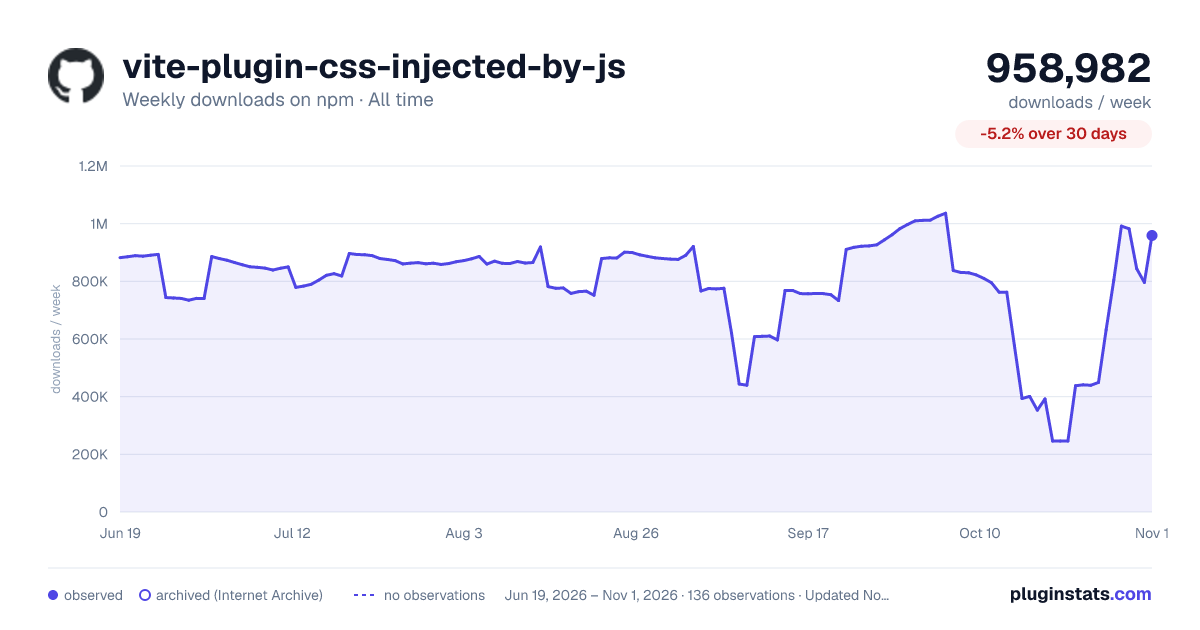
vite-plugin-css-injected-by-js has 353,216 recorded weekly downloads on npm, a decrease of 53.3% over the past 30 days, ranking #284 of 2,256 tracked listings.
About vite-plugin-css-injected-by-js
vite-plugin-css-injected-by-js 🤯
A Vite plugin that bundles your CSS into JavaScript at build time, removing separate CSS files and enabling single-file deployments.
How does it work
By default, Vite extracts CSS into separate files during the build process. This plugin instead gathers all generated CSS and embeds it directly into the JavaScript bundle, injecting it at runtime. As a result, no standalone CSS file is produced and the corresponding tag is removed from the generated HTML. You can also control the timing of the injection, specifying whether the styles should be applied before or after your application code executes.
Installation
or
or
Usage
By default, the CSS is injected automatically when the JavaScript bundle loads. If you need explicit control over when the CSS is injected (e.g. for Web Components, Shadow DOM, or SPAs that need to defer rendering), see the Virtual Module section below.
Virtual Module: On-Demand Injection
The plugin exposes an optional virtual module virtual:css-injected-by-js that gives you explicit control over when and where the bundled CSS is injected into the DOM.
When to use this
| Use case | Recommended approach |
| Component-level granular lazy-loading | Vite's native ?inline query | | Macro-level injection control (Library authors, Web Components, SPAs) | Virtual module virtual:css-injected-by-js |
?inline vs Virtual Module: For component-level CSS that you want to control per-file, use Vite's built-in ?inline query (e.g. import css from './my.css?inline'). The virtual module is designed for macro-level control over the entire bundled CSS payload — deferring injection until your app is ready, or targeting a specific DOM node like a ShadowRoot.
Basic example
⚠️ Advanced Configuration Limitations
When using the virtual:css-injected-by-js module, please be aware of the following architectural boundaries:
• topExecutionPriority is ignored: When using the virtual module, the plugin forces the injection payload to the absolute top of your chunks. This is mathematically required to ensure the CSS Queue is initialized before your application code calls injectCSS(). • Custom injectCode Boundaries: The removeCSS() function uses a synchronous MutationObserver on the target element. It will fail to track and remove your styles if your custom code: 1. Injects into an element other than the configured target. 2. Uses asynchronous logic (setTimeout, Promises, requestAnimationFrame). 3. Uses Constructable Stylesheets (new CSSStyleSheet()) instead of actual DOM nodes.
Shadow DOM example
Pass a target option to inject the CSS into a ShadowRoot instead of document.head:
Server-Side Rendering (SSR) extraction
In SSR environments (like Next.js, Nuxt, or custom Node servers), DOM methods like document.head.appendChild are not available. Calling injectCSS() will safely do nothing. Instead, you can extract the raw CSS string to manually inject it into your server-rendered HTML payload.
Note: In Vite Dev Mode (npm run dev), getRawCSS() will return an empty string because Vite handles CSS natively via HMR. Test your SSR CSS extraction using the production build (npm run build).
TypeScript support
The plugin ships type declarations for the virtual module. Add it to your tsconfig.json:
The InjectCSSOptions interface:
How it works under the hood
Build mode (Queue & Unlock)
During the build, each chunk's CSS injection code is wrapped in a function and pushed onto a global queue (globalThis.VITE_CSS_QUEUE). The CSS is not injected until you call injectCSS(). When called:
- A global flag (globalThis.VITE_CSS_UNLOCKED) is set to true. 2. The queue is flushed — all pending CSS is injected. 3. Any future lazy-loaded chunks that arrive after the unlock inject their CSS immediately.
This ensures correct behavior with relativeCSSInjection and code-split chunks that load asynchronously.
Dev mode (Mute & Observe)
In development, Vite handles CSS natively for HMR. The virtual module uses a MutationObserver to mute all tags (by setting media="not all") as soon as they appear. When you call injectCSS():
- The observer is disconnected. 2. All cached style nodes are unmuted (media attribute removed). 3. If a target is provided, the style nodes are moved into that target.
SSR & Web Worker safety
All DOM operations are guarded by typeof document !== 'undefined' checks and globalThis is used instead of window. The injectCSS() call is a safe no-op in SSR or Web Worker contexts.
Source Maps
The plugin correctly preserves source maps when prepending CSS injection code to your chunks. When build.sourcemap is enabled and topExecutionPriority is true (the default), the injected CSS code is flattened into a single line and prepended to the chunk. The source map mappings string is shifted by prepending a single ; character, which moves all original mappings down by exactly one row. This ensures debugger breakpoints remain accurate.
No additional configuration is needed — source maps work automatically with all injection modes (topExecutionPriority, relativeCSSInjection, and the virtual module).
Configurations
When you add the plugin, you can provide a configuration object. Below you can find all configuration parameters available.
cssAssetsFilterFunction (function)
The cssAssetsFilterFunction parameter allows you to specify a filter function that will enable you to exclude some output css assets.
This option is not applied to relativeCSSInjection logic.
Here is an example of how to use the cssAssetsFilterFunction:
dev (object)
EXPERIMENTAL Why experimental? Because it uses a non-conventional solution.
Previously, the plugin strictly applied logic solely during the build phase. Now, we have the capability to experiment with it in the development environment.
To activate the plugin in the development environment as well, you need to configure a dev object and set the enableDev parameter to true.
Here's an example:…
Description from the npm listing.
- vite
- vite-plugin
- plugin
- typescript
- css-injected-by-js
- single-js-file
- css
- js
README badge
Show your rank in a README or on your website. The badge updates automatically.
Charts
Images: 30d · 1y · all time · 1600×900 dark



Adoption over time
7/30/90-day growth
Ranking history
Listing placement
Listing placement
Filled points are observed values; hollow points come from Internet Archive snapshots of the listing page. Dashed segments span periods with no observations — values between points are not interpolated.
Each band is one page of 20. Weekly downloads on a linear scale. Placement is projected from weekly downloads, so it can differ from the marketplace's own sort order. Hover a dot to see the listing.
Recent observations
Full history (121)Similar npm Vite plugins plugins
All 20 vite-plugin-css-injected-by-js alternatives- 312.5K weekly downloads-35.7%
Data source
Weekly downloads (trailing 7 complete days) come from the official npm downloads API. Downloads include CI and mirrors and are not equivalent to installs or users. npm publishes no ratings.
Listing: https://www.npmjs.com/package/vite-plugin-css-injected-by-js. First seen Oct 16, 2026; last successful collection Oct 19, 2026. See the methodology.