 PluginStats
@ironbee-ai/cli weekly downloads statistics
By ironbee-ai (2 listings) · npm · Claude Code
The CLI for IronBee — Verification and Intelligence Layer for Agentic Development
@ironbee-ai/cli has 5,841 recorded weekly downloads on npm, a decrease of 36.6% over the past 30 days, ranking #1098 of 2,322 tracked listings.
About @ironbee-ai/cli
IronBee ensures that AI agents verify their code changes before completing a task. When an agent edits code, it cannot finish until it exercises the affected paths through real tools — in the browser for frontend changes, against the wire protocol (HTTP / gRPC / GraphQL / WebSocket) for any-runtime backend changes, or via the Node.js V8 inspector for Node-specific backend changes — and submits a passing verdict.
No more "it should work" — every change is tested.
IronBee also tracks every verification cycle — coding time, fix time, pass/fail rates, problematic files — and links each activity to the pull request(s) and issues the work belongs to, so verification data is attributable to an issue rather than an opaque session id.
Powered by IronBee DevTools (@ironbee-ai/devtools), which runs in three modes from the same package:
- Browser mode (
bdt_*tools, default-on): the agent navigates pages, clicks buttons, fills forms, takes screenshots, checks console errors. - Backend mode (
bedt_*tools, opt-in, runtime-agnostic): the agent drives real HTTP / gRPC / GraphQL / WebSocket calls against your backend, inspects logs, and queries databases — works for Node, Java, Python, Go, Rust, Ruby, .NET, PHP, Elixir, Kotlin, and Scala backends alike. - Node mode (
ndt_*tools, opt-in): the agent connects to a running Node process, sets V8 probes (tracepoint / logpoint / exceptionpoint) at the changed code paths, exercises them, and reads back snapshots or runtime logs.
A single Stop hook can drive multiple cycles in parallel — touching frontend, a backend protocol, and a Node runtime in the same change requires evidence for each before the task can complete.
Demo
https://github.com/user-attachments/assets/9d4e602b-6c05-4b48-89a8-3df429d10e00
Supported Clients
| Client | Status |
|---|---|
| Claude Code | Supported |
| Cursor | Supported |
| Codex | Planned |
| OpenCode | Planned |
Quick Start
Install IronBee globally
npm install -g @ironbee-ai/cli
Set up a project
cd your-project
ironbee install
This auto-detects your AI client and writes:
- Hook configuration (so the client calls IronBee automatically)
- Verification skill/rules (so the agent knows the workflow — covers every enabled cycle)
- MCP server entries from the same
@ironbee-ai/devtoolspackage (IronBee DevTools), per-cycle gated — only currently enabled cycles get an entry:browser-devtools(PLATFORM=browser,bdt_prefix) — registered on first install (browser is the default-on cycle); strip withironbee browser disablebackend-devtools(PLATFORM=backend,bedt_prefix) — only afterironbee backend enablenode-devtools(PLATFORM=node,ndt_prefix) — only afterironbee node enable
- Permissions matching the registered entries (
mcp__browser-devtools__*, plusmcp__backend-devtools__*and/ormcp__node-devtools__*once their cycles are enabled)
Optional: opt out of the browser cycle
ironbee browser disable
The browser cycle is the default-on cycle — every code-file edit (40+ extensions: .ts, .tsx, .css, .html, .py, .go, .java, …) requires browser-driven verification (navigate / screenshot / aria / console). Run browser disable for projects where you don't want browser-cycle enforcement (e.g. backend-only services where only backend enable / node enable apply). With browser off, an enabled node / python / backend cycle switches from its server-layout defaults to its language's broad glob (**/*.{ts,js,…} / **/*.py / multi-language) — browser's globs were the wide net, and without them a desktop app / CLI / library would match no cycle; install and <cycle> enable warn when an enabled cycle matches no tracked file. It writes browser.verifyPatterns: [] to override the legacy 40+ extension default; customizations of alwaysRequired / evidencePaths / additionalVerifyPatterns are preserved.
To re-enable: ironbee browser enable — strips the verifyPatterns: [] override so the code defaults (legacy 40+ extension list) flow back in at runtime. config.json stays minimal; the default list is NOT materialized into the file (it lives in code and tracks the CLI version automatically).
Optional: enable runtime-agnostic backend protocol verification
ironbee backend enable
Activates the backend protocol cycle — drives real HTTP / gRPC / GraphQL / WebSocket calls against your running backend service via the backend-devtools MCP (bedt_* tools) and verifies the responses. Works for any backend runtime: Node, Java, Python, Go, Rust, Ruby, .NET, PHP, Elixir, Kotlin, Scala. The command writes a minimal { "backend": {} } block to config — code defaults (multi-language paths covering server/**, api/**, routes/**, controllers/**, handlers/**, services/**; the broad multi-language **/*.{…} glob when the browser cycle is disabled) flow in at runtime.
To revert: ironbee backend disable (drops the block clean if no customizations / lower-layer override; otherwise hard-kills via verifyPatterns: []).
Optional: enable Node.js runtime debug verification
ironbee node enable
```…
Description from the npm listing.
- ai
- ai-agent
- verification
- intelligence
- browser-testing
- claude
- claude-code
- cursor
- cursor-ide
- mcp
- mcp-server
- browser-devtools
- coding-agent
- agentic
- devtools
- e2e
- qa
- testing
- automation
README badge
Show your rank in a README or on your website. The badge updates automatically.
Charts
Images: 30d · 1y · all time · 1600×900 dark


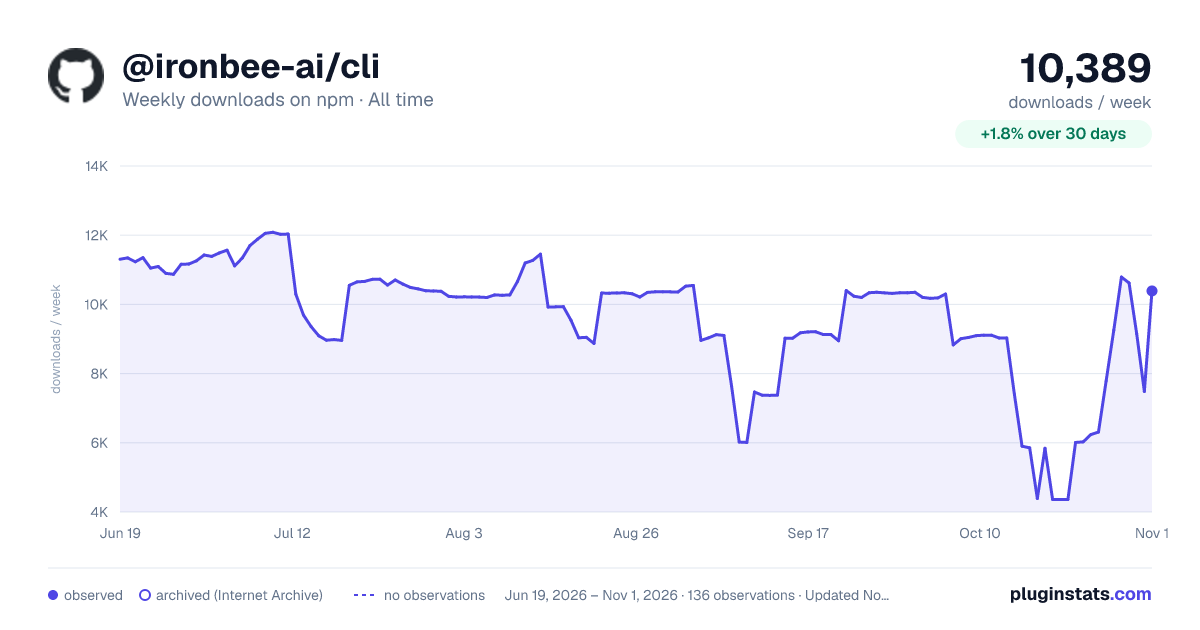

Adoption over time
7/30/90-day growth
Ranking history
Listing placement
Listing placement
Filled points are observed values; hollow points come from Internet Archive snapshots of the listing page. Dashed segments span periods with no observations — values between points are not interpolated.
Each band is one page of 20. Weekly downloads on a linear scale. Placement is projected from weekly downloads, so it can differ from the marketplace's own sort order. Hover a dot to see the listing.
Recent observations
Full history (122)Similar npm Claude Code plugins
All 20 @ironbee-ai/cli alternativesData source
Weekly downloads (trailing 7 complete days) come from the official npm downloads API. Downloads include CI and mirrors and are not equivalent to installs or users. npm publishes no ratings.
Listing: https://www.npmjs.com/package/@ironbee-ai/cli. First seen Oct 16, 2026; last successful collection Oct 20, 2026. See the methodology.