 PluginStats
mcp-remote weekly downloads statistics
By punkpeye · npm · MCP servers
Remote proxy for Model Context Protocol, allowing local-only clients to connect to remote servers using oAuth
mcp-remote has 459,968 recorded weekly downloads on npm, a decrease of 76.8% over the past 30 days.
It ranks #262 of 2,256 tracked npm listings by weekly downloads.
Over 90 days, weekly downloads changed by +9.6%.
PluginStats has 542 daily observations since Apr 23, 2025; the latest is from Oct 16, 2026.
About mcp-remote
mcp-remote
Connect an MCP Client that only supports local (stdio) servers to a Remote MCP Server, with auth support:
Why is this necessary?
So far, the majority of MCP servers in the wild are installed locally, using the stdio transport. This has some benefits: both the client and the server can implicitly trust each other as the user has granted them both permission to run. Adding secrets like API keys can be done using environment variables and never leave your machine. And building on npx and uvx has allowed users to avoid explicit install steps, too.
But there's a reason most software that _could_ be moved to the web _did_ get moved to the web: it's so much easier to find and fix bugs & iterate on new features when you can push updates to all your users with a single deploy.
With the latest MCP Authorization specification, we now have a secure way of sharing our MCP servers with the world _without_ running code on user's laptops. Or at least, you would, if all the popular MCP _clients_ supported it yet. Most are stdio-only, and those that _do_ support HTTP+SSE don't yet support the OAuth flows required.
That's where mcp-remote comes in. As soon as your chosen MCP client supports remote, authorized servers, you can remove it. Until that time, drop in this one liner and dress for the MCP clients you want!
Usage
All the most popular MCP clients (Claude Desktop, Cursor & Windsurf) use the following config format:
Custom Headers
To bypass authentication, or to emit custom headers on all requests to your remote server, pass --header CLI arguments:
Note: Cursor, Codex-Cli and Claude Desktop (Windows) have a bug where spaces inside args aren't escaped when it invokes npx, which ends up mangling these values. You can work around it using:
To keep a credential out of the process arguments — where any other user on the machine can read it from the process list — put the headers in a file instead and pass --header-file. One Name: value per line; # starts a comment.
A file that cannot be read is an error rather than a warning, so a mistyped path fails immediately instead of sending the request unauthenticated.
Multiple Instances
To run multiple instances of the same remote server with different configurations (e.g., different Atlassian tenants), use the --resource flag to isolate OAuth sessions:
Each unique combination of server URL, resource, custom headers, and --authorize-param values will maintain separate OAuth sessions and token storage.
The --resource value is sent as the RFC 8707 resource indicator on the authorization, token and refresh requests alike, so they always agree.
Extra authorization parameters
Some authorization servers require parameters of their own on the authorize call. Pass each as --authorize-param key=value, repeating the flag as needed:
Those two are what Google wants before it will part with a refresh token — it does not recognise the offline_access scope. Auth0 wants audience=https://your-api to issue a JWT rather than an opaque token. login_hint=user@example.com is also common.
These apply to the authorization request only. resource is the exception: RFC 8707 wants the same value on the token and refresh requests too, and only --resource puts it there. Parameters the flow derives per request — state, code_challenge, client_id, redirect_uri, response_type — are refused, because a value that disagrees with the real one surfaces as an opaque server error.
Changing these starts a new sign-in, since a parameter like audience decides which API the token is for and a token issued for one is not valid for another.
Some authorization servers reject the resource parameter outright — Microsoft Entra ID v2 answers AADSTS9010010, for example. Pass --disable-resource-parameter to omit it entirely:
Flags
• If npx is producing errors, consider adding -y as the first argument to auto-accept the installation of the mcp-remote package. • To force npx to always check for an updated version of mcp-remote, add the @latest flag: • To change which port mcp-remote listens for an OAuth redirect, add an additional argument after the server URL. By default the port is derived from the server URL, so every server gets a stable port of its own somewhere in 3335-49150, and mcp-remote walks up to 8 ports from there if it finds one taken. A port you pass explicitly is used as-is: it implies a redirect_uri the authorization server has already been given, so mcp-remote fails rather than quietly moving to a different one. --static-oauth-client-info pins the port the same way, for the same reason. • To change which host mcp-remote registers as the OAuth callback URL (by default localhost), add the --host flag. • To change the path mcp-remote serves the OAuth callback on (by default /oauth/callback), add the --callback-path flag. The path must start with /, and /wait-for-auth is reserved. • To send the browser to your own completion page after a successful OAuth token exchange, add --auth-success-url. The registered callback URL, state, PKCE flow and credential cache stay unchanged. No code, state, issuer or tokens are appended to the completion URL. Without this flag, the existing completion page is unchanged.
The destination must be HTTPS, or HTTP on loopback. For HTTP on a trusted private network, also pass --allow-http. URLs containing credentials, a query or a fragment are rejected. A failed or timed-out exchange shows an error on the callback page instead of redirecting. --auth-timeout also bounds this wait (30 seconds by default). The option applies to browser authentication in both binaries, including mid-session reauthorization; device-code and client-credentials authentication have no browser callback.…
Description from the npm listing.
- mcp
- stdio
- sse
- remote
- oauth
Where mcp-remote sits in the listing
Each band is one page of 20. Weekly downloads on a log scale. Placement is projected from weekly downloads, so it can differ from the marketplace's own sort order. Hover a dot to see the listing.


Charts
Images: 30d · 1y · all time · 1600×900 dark


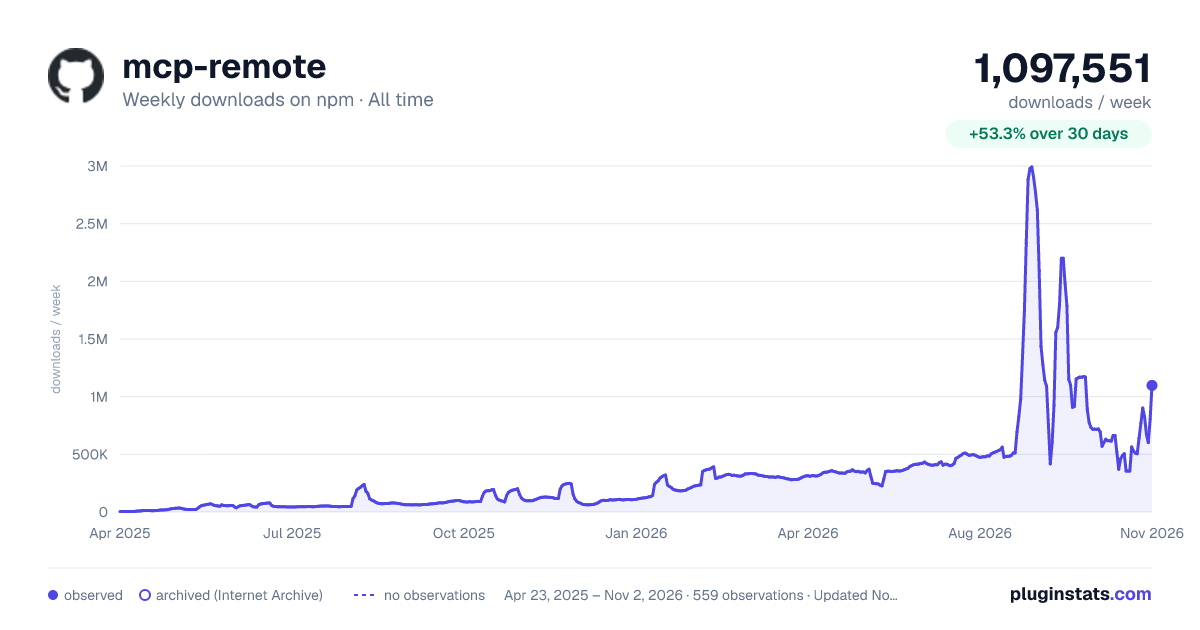

Adoption over time


7/30/90-day growth


Filled points are observed values; hollow points come from Internet Archive snapshots of the listing page. Dashed segments span periods with no observations — values between points are not interpolated.
Recent observations
Full history (542)Similar npm MCP servers plugins
Data source
Weekly downloads (trailing 7 complete days) come from the official npm downloads API. Downloads include CI and mirrors and are not equivalent to installs or users. npm publishes no ratings.
Listing: https://www.npmjs.com/package/mcp-remote. First seen Oct 16, 2026; last successful collection Oct 19, 2026. See the methodology.