 PluginStats
@afterpack/webpack weekly downloads statistics
By afterpack · npm · Webpack plugins
webpack plugin for AfterPack: obfuscate your production JavaScript during the webpack build
@afterpack/webpack has 248 recorded weekly downloads on npm.
It ranks #1567 of 2,251 tracked npm listings by weekly downloads.
Over the past 7 days it changed by +58.0%.
PluginStats has 121 daily observations since Jun 19, 2026; the latest is from Oct 17, 2026.
About @afterpack/webpack
@afterpack/webpack
A webpack obfuscation plugin for webpack 5. It obfuscates your production JavaScript inside the webpack build, using the AfterPack JavaScript obfuscator.
Install
Usage
The plugin obfuscates each JavaScript asset your chunks produce at the last step before webpack writes to disk, so the readable bundle is never written. Hot-update chunks and assets other plugins copy in are left alone. If obfuscation fails, the build fails.
Subresource integrity plugins such as webpack-subresource-integrity are not supported: they hash each chunk before AfterPack rewrites it, so the recorded hashes would not match the files you ship.
Each build writes a protection receipt to .afterpack/receipts/, one per output directory (.afterpack/receipts/dist.json for dist). .afterpack/ sits next to your project's lockfile, afterpack.json or .git (failing those, its package.json), otherwise beside the build directory, so the receipt never ships with your build. Run npx afterpack verify dist in your deploy step to check that what you ship is what was obfuscated.
Options
| Option | What it does | Default |
| [preset][preset] | "minify", "light", "medium", "hard" or "extreme" | "light" | | [seed][seed] | a number or string; "git" uses the current commit | a new random seed per build | | [identifiers.reserved][identifiers.reserved] | names never to rename | none | | [paths.exclude][paths.exclude] | globs for files to leave untouched | none | | [sourceMap.enabled][sourceMap.enabled] | write source maps for the obfuscated output; off also drops the build's CSS maps | off; on in development mode (build.mode or NODE_ENV=development) when webpack emits a map | | [protectionMap.enabled][protectionMap.enabled] | write the Protection Map | on when devtool emits source maps | | [build.autorun][build.autorun] | false turns AfterPack off | true |
Dotted names are nested objects: sourceMap.enabled is { sourceMap: { enabled: true } }. Every other option is in the configuration reference.
/* @afterpack */ directives that raise protection for a region are a Pro feature. They need a devtool that emits source maps, such as "source-map". Without one, the plugin skips them and tells you.
The Protection Map is written to .afterpack/, outside webpack's output; that directory carries its own .gitignore and self-ignores. It contains your original source, so never deploy or commit it.
Options can also live in afterpack.json or in AFTERPACK_* environment variables. The options object wins over the environment, which wins over the file. An unknown or misspelled key fails the build and names the right spelling.
Pro
Without a key, AfterPack runs on your machine with the full pipeline at any preset. Set AFTERPACK_KEY in your environment and the same plugin builds in AfterPack's cloud instead, which adds per-region directives and two hardening transforms you can turn on: self-integrity, which detects edits to its own check table only, not edits elsewhere in your code, and comparison hardening. Keep the key out of your webpack config: the plugin rejects it there. See AfterPack Pro.
Not supported here
• build.backup: the output goes back to webpack in memory, so there is no file to back up. • paths.include: the plugin works on webpack's assets and does not walk the output directory.
Links
• webpack setup guide • Presets and protection levels • A javascript-obfuscator alternative: how AfterPack compares • Protecting pricing logic
License
Apache-2.0. The engine it runs, @afterpack/core, has its own license.
Feedback
Questions, suggestions and bug reports: afterpack.dev/contact. You can also file a bug on GitHub Issues.
Description from the npm listing.
- obfuscator
- javascript-obfuscator
- obfuscation
- code-protection
- source-code-protection
- javascript-security
- anti-reverse-engineering
- webpack
- webpack-plugin
- afterpack
Where @afterpack/webpack sits in the listing
Each band is one page of 20. Weekly downloads on a log scale. Placement is projected from weekly downloads, so it can differ from the marketplace's own sort order. Hover a dot to see the listing.


Charts
Images: 30d · 1y · all time · 1600×900 dark


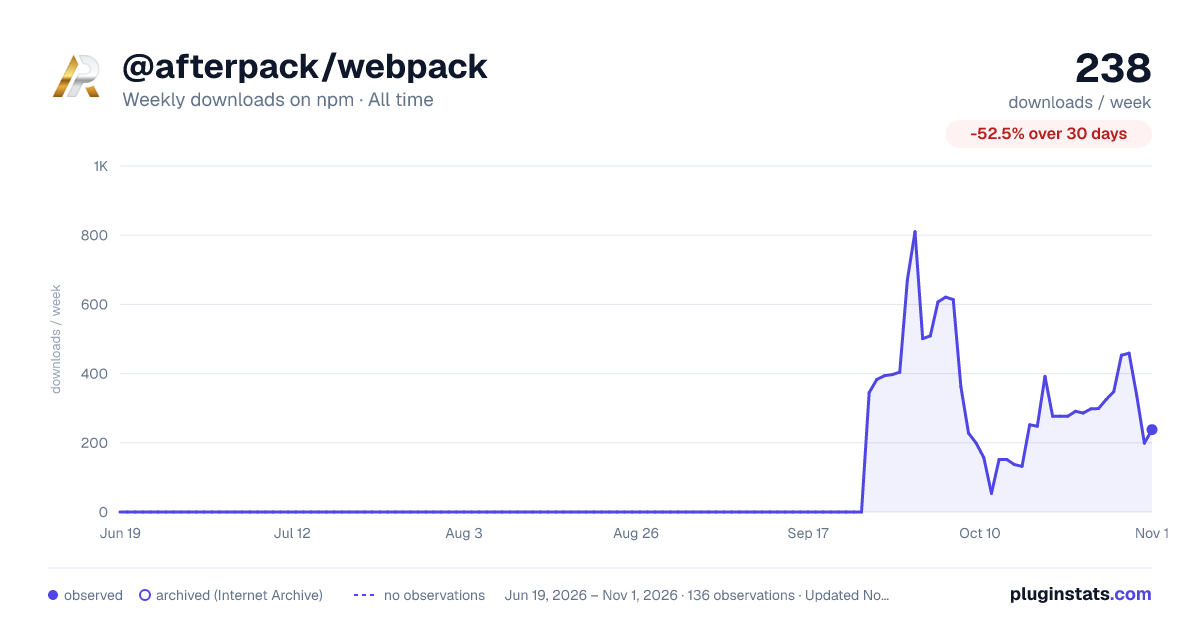

Adoption over time


7/30/90-day growth


Filled points are observed values; hollow points come from Internet Archive snapshots of the listing page. Dashed segments span periods with no observations — values between points are not interpolated.
Recent observations
Full history (121)Similar npm Webpack plugins plugins
Data source
Weekly downloads (trailing 7 complete days) come from the official npm downloads API. Downloads include CI and mirrors and are not equivalent to installs or users. npm publishes no ratings.
Listing: https://www.npmjs.com/package/@afterpack/webpack. First seen Oct 16, 2026; last successful collection Oct 18, 2026. See the methodology.