 PluginStats
mcp-image weekly downloads statistics
By shinpr (2 listings) · npm · Claude Code
MCP server for AI image generation
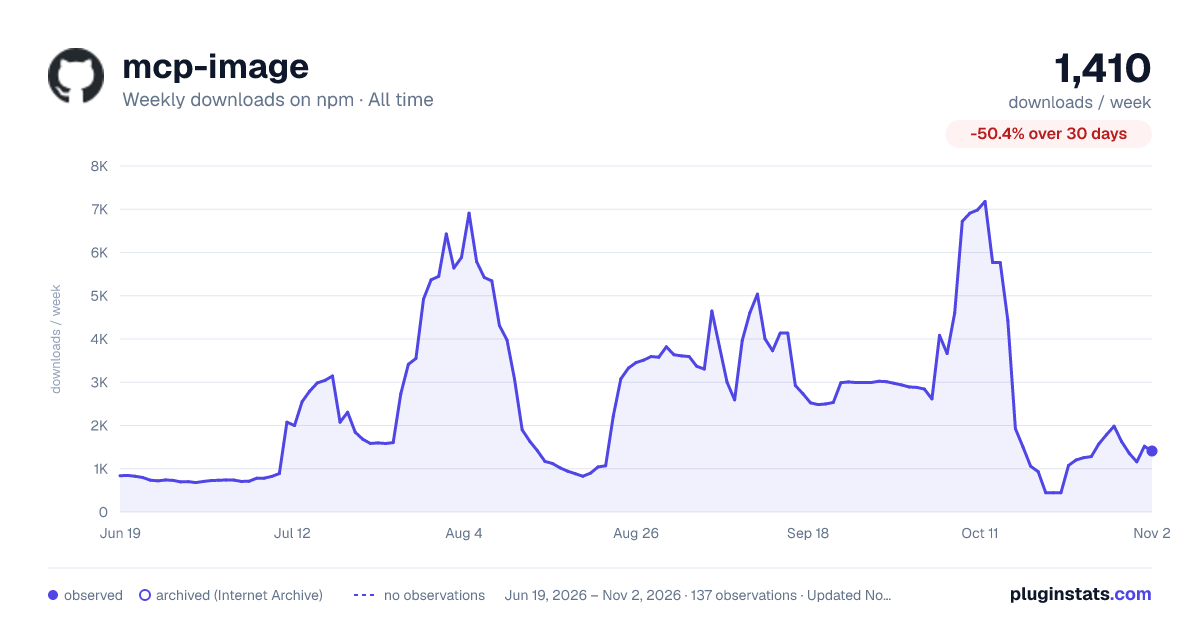
mcp-image has 1,060 recorded weekly downloads on npm, a decrease of 61.2% over the past 30 days, ranking #1384 of 2,256 tracked listings.
About mcp-image
MCP Image Generator 🍌
Generate and edit images from Codex, Cursor, Claude Code, or any MCP client. mcp-image adds visual direction to your request before sending it to Gemini, OpenAI, or BytePlus Seedream.
Tell it what image to create or what to change in an existing image, and what it is for. The result is saved to disk and returned to your assistant.
What It Does
Before generating an image, mcp-image rewrites short requests into more specific prompts. It keeps what you asked for and fills in details such as composition, lighting, and camera angle. The more detail you provide, the less it changes.
You ask:
"A photo of a roast chicken dinner for a recipe site. It should look like it was actually cooked, and it should be partway through being carved so you can tell how juicy it is."
mcp-image sends to the image model:
"... a freshly roasted whole chicken resting on a rustic, seasoned wooden carving board. The chicken features deeply bronzed, blistered, and crispy skin ... It is partway carved, with one breast cleanly sliced open to reveal tender, steaming-hot white meat glistening with natural juices pooling slightly onto the board ... shallow depth of field with a softly blurred background."
Generated with Gemini using the default fast quality preset.
What carried through:
• for a recipe site: one clear subject, with everything else kept subordinate • actually cooked: blistered, uneven browning, rising steam, and drippings on the knife • partway through being carved: one breast sliced open, with the cut piece still resting against the bird • how juicy it is: juices pooling on the board and shallow depth of field around the cut
Compare the same request with prompt enhancement turned off
Baseline from the same request, with prompt enhancement disabled.
Set SKIP_PROMPT_ENHANCEMENT=true to send the original prompt to the image model unchanged.
Quick Start
You need Node.js 22 or later, an MCP-compatible client, and an API key for one image provider.
- Get an API key
All three providers generate and edit images. Gemini is the default and requires the least configuration.
| Provider | Image size | Output format | Setup |
| Gemini (default) | 1K, 2K, 4K | Automatic | Get a key, then set GEMINI_API_KEY | | OpenAI | 1K, 2K, 4K | PNG or JPEG | Get a key, then set IMAGE_PROVIDER=openai and OPENAI_API_KEY | | BytePlus Seedream | 1K, 2K | PNG or JPEG | Get an AP region key, then set IMAGE_PROVIDER=seedream and ARK_API_KEY |
Google Search grounding is available with Gemini only. OpenAI may require organization verification before it can generate images.
The examples below use Gemini. Replace the provider settings if you prefer OpenAI or Seedream.
- Configure your MCP client
Codex
Add this to ~/.codex/config.toml:
Cursor
Add this to ~/.cursor/mcp.json for all projects, or .cursor/mcp.json in a project:
Claude Code
Run this in your project directory:
Add --scope user after mcp-image to make it available in every project.
Never commit API keys to version control. Use an absolute IMAGE_OUTPUT_DIR in MCP configuration because the server's working directory depends on the client. If omitted, images are written to ./output relative to that working directory.
- Generate an image
Restart your MCP client after changing its configuration, then ask your AI assistant:
The generated file is saved in the configured output directory and returned to the assistant as an MCP resource.
Run mcp-image from a local checkout
Configure the MCP client to run the local build instead of npx -y mcp-image:
More Examples
Edit an existing image
Give the assistant an absolute path to the source image:
Control the result
• Generate a high-quality product photo of a smartphone with clear text on the screen. • Generate a cinematic desert landscape in a 21:9 aspect ratio. • Keep the knight's appearance consistent with the previous image.
See the tool reference for the options your assistant can pass explicitly.
Configuration
Changing the provider changes both prompt enhancement and image generation. The way you ask for an image stays the same.
Quality
IMAGE_QUALITY accepts fast (default), balanced, or quality. Set it in the MCP server environment:
Use fast to try ideas quickly, balanced for everyday use, and quality for complex scenes or images where small details matter. Higher settings can take longer and cost more; results vary by provider.
All three providers support these presets for generation and editing. You can override the default with the quality option on each request.
Environment variables
| Variable | Default | Description |
| IMAGE_PROVIDER | gemini | Default provider: gemini, openai, or seedream | | GEMINI_API_KEY | - | API key for Gemini | | OPENAI_API_KEY | - | API key for OpenAI | | ARK_API_KEY | - | ModelArk AP API key for Seedream | | IMAGE_OUTPUT_DIR | ./output | Directory where generated images are saved; use an absolute path in MCP configuration | | IMAGE_QUALITY | fast | Default quality preset: fast, balanced, or quality | | SKIP_PROMPT_ENHANCEMENT | false | Set to true to send prompts through unchanged |
You can configure keys for more than one provider and switch per request. A request-level provider option takes precedence over IMAGE_PROVIDER.
Tool Reference
Your MCP client calls this tool for you. Open the reference when you need to check an option or provider limitation.
generate_image parameters
| Parameter | Type | Required | Description |…
Description from the npm listing.
- mcp
- mcp-server
- model-context-protocol
- image-generation
- generative-ai
- image-editing
- prompt-enhancement
- gemini
- google-ai
- openai
- gpt-image-2.5
- nano-banana
- claude-code
- cursor
- codex
- typescript
- agent-skills
- skills
README badge
Show your rank in a README or on your website. The badge updates automatically.
Charts
Images: 30d · 1y · all time · 1600×900 dark



Adoption over time
7/30/90-day growth
Ranking history
Listing placement
Listing placement
Filled points are observed values; hollow points come from Internet Archive snapshots of the listing page. Dashed segments span periods with no observations — values between points are not interpolated.
Each band is one page of 20. Weekly downloads on a linear scale. Placement is projected from weekly downloads, so it can differ from the marketplace's own sort order. Hover a dot to see the listing.
Recent observations
Full history (121)Similar npm Claude Code plugins
All 20 mcp-image alternativesData source
Weekly downloads (trailing 7 complete days) come from the official npm downloads API. Downloads include CI and mirrors and are not equivalent to installs or users. npm publishes no ratings.
Listing: https://www.npmjs.com/package/mcp-image. First seen Oct 16, 2026; last successful collection Oct 19, 2026. See the methodology.