 PluginStats
@drawio/mcp weekly downloads statistics
By drawio · npm · MCP servers
Official draw.io MCP server for LLMs - Open diagrams in draw.io editor
@drawio/mcp has 6,718 recorded weekly downloads on npm, a decrease of 62.8% over the past 30 days, ranking #1018 of 2,256 tracked listings.
About @drawio/mcp
Draw.io MCP Tool Server
The official draw.io MCP server that opens diagrams directly in the draw.io editor. Supports XML, CSV, and Mermaid.js formats with lightbox and dark mode options.
This package is part of the drawio-mcp repository, which also includes:
• MCP App Server — Renders diagrams inline in AI chat interfaces. Hosted at https://mcp.draw.io/mcp — no install required. • Claude Code Plugin — Claude Code plugin that generates native .drawio files with optional PNG/SVG/PDF export. • Project Instructions — Zero-install approach using Claude Project instructions.
Features
• Open XML diagrams: Load native draw.io/mxGraph XML format • Import CSV data: Convert tabular data to diagrams (org charts, flowcharts, etc.) • Render Mermaid.js: Transform Mermaid syntax into editable draw.io diagrams • Customizable display: Lightbox mode, dark mode, and more
Installation
Using npx (recommended)
Global installation
From source
Configuration
Claude Desktop
Add to your Claude Desktop configuration file:
macOS: ~/Library/Application Support/Claude/claude_desktop_config.json Windows: %APPDATA%\Claude\claude_desktop_config.json
Claude Code
Or manually in .claude/settings.json:
VS Code (GitHub Copilot)
Add to .vscode/mcp.json in your workspace (or run MCP: Open User Configuration for a global config):
Then click Start above the server entry, trust the server when prompted, switch Copilot Chat to Agent mode, and make sure the drawio tools are enabled under Configure Tools (🔧) in the chat input.
Other clients that use stdio (Windsurf, etc.) use the same config shape as above.
Tip: VS Code 1.109 and later also supports the MCP Apps extension, so the hosted MCP App Server at https://mcp.draw.io/mcp works in Copilot Chat too, rendering diagrams inline in chat instead of opening a browser tab. To use it, replace command and args above with "type": "http" and "url": "https://mcp.draw.io/mcp". Use this stdio server if you prefer diagrams to open in the full draw.io editor.
Cursor
Click the button above for one-click install, or add the server manually to ~/.cursor/mcp.json (global) or .cursor/mcp.json in your project:
Enable the server when prompted (or under Cursor Settings → MCP), then ask the Agent to create a diagram — it opens in the draw.io editor in your browser.
Tip: Cursor also supports the MCP Apps extension, so the hosted MCP App Server at https://mcp.draw.io/mcp works in Cursor too, rendering diagrams inline in chat instead of opening a browser tab. Use this stdio server if you prefer diagrams to open in the full draw.io editor.
OpenCode
Add the server under the mcp key of opencode.json in your project root (or ~/.config/opencode/opencode.json for every project):
The tools are available on the next start; ask the agent to create a diagram and it opens in the draw.io editor in your browser.
Tip: OpenCode also loads the drawio skill (native .drawio files, PNG/SVG/PDF export) without any plugin wrapper — see the plugins README.
Other MCP Clients
Configure your MCP client to run the server via stdio:
Self-hosted draw.io
To open diagrams in a self-hosted draw.io instance, set the DRAWIO_BASE_URL environment variable to your instance URL (default: https://app.diagrams.net/):
Tools
open_drawio_xml
Opens the draw.io editor with XML content.
| Parameter | Type | Required | Description |
| content | string | Yes | Draw.io XML content | | lightbox | boolean | No | Read-only view mode (default: false) | | dark | string | No | "auto", "true", or "false" (default: "auto") | | postLayout | string | No | "elk" re-lays out the diagram (ELK layered flow) before opening: vertices are placed, edges routed | | direction | string | No | Flow direction for postLayout: "vertical" (default) or "horizontal" | | routing | string | No | "libavoid" reroutes connectors around shapes (obstacle-avoiding orthogonal routing) before opening, leaving positions untouched |
Every diagram is repaired first: text around it is dropped (a leaked tool-call tag, a code fence), element); all other pages stay untouched |
Example Prompts
• "Use open_drawio_mermaid to create a sequence diagram showing OAuth2 authentication flow" • "Use open_drawio_csv to create an org chart: CEO → CTO, CFO; CTO → 3 Engineers" • "Use open_drawio_xml to create a detailed AWS architecture diagram with VPC, subnets, and security groups"
Tip: Claude Desktop may have multiple ways to create diagrams. To ensure it uses the draw.io MCP, mention the tool name explicitly or add a system instruction: "Always use the draw.io MCP tools to create diagrams."
How It Works
- The MCP server receives diagram content (XML, CSV, or Mermaid) 2. Content is compressed using pako deflateRaw and encoded as base64 3. A draw.io URL is generated with the diagram in its hash: #R for XML, #create= for Mermaid and CSV, which draw.io converts in the browser 4. The URL is returned to the LLM, which can present it to the user 5. Opening the URL loads draw.io with the diagram ready to view/edit
The open_drawio_xml description carries the condensed XML rules from shared/xml-essentials.md (~1.5k characters). The full XML generation reference (edge routing, containers, layers, tags, metadata, dark mode, etc.) in shared/xml-reference.md, the single source of truth for all draw.io MCP prompts, and the Mermaid reference in shared/mermaid-reference.md are fetched with get_drawio_reference. That keeps every tool description short: clients like VS Code Copilot index tool descriptions, and a description carrying a whole reference is too long for them. A prepack script bundles the three files into the npm package so they work after npm install.
Related Resources
• draw.io - Free online diagram editor • draw.io Desktop - Desktop application • drawio-mcp on GitHub - Full repository with all four approaches • MCP Specification
Description from the npm listing.
- mcp
- drawio
- draw.io
- diagrams
- mermaid
- csv
- xml
- llm
- claude
- anthropic
README badge
Show your rank in a README or on your website. The badge updates automatically.
Charts
Images: 30d · 1y · all time · 1600×900 dark


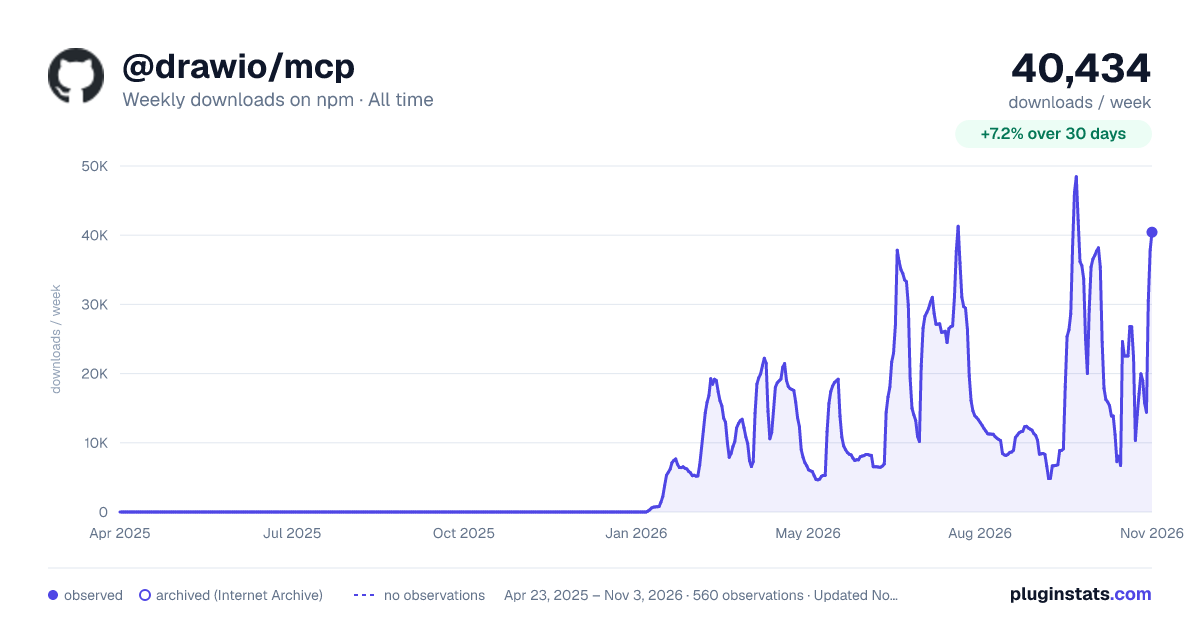

Adoption over time
7/30/90-day growth
Ranking history
Listing placement
Listing placement
Filled points are observed values; hollow points come from Internet Archive snapshots of the listing page. Dashed segments span periods with no observations — values between points are not interpolated.
Each band is one page of 20. Weekly downloads on a linear scale. Placement is projected from weekly downloads, so it can differ from the marketplace's own sort order. Hover a dot to see the listing.
Recent observations
Full history (543)Similar npm MCP servers plugins
All 20 @drawio/mcp alternativesData source
Weekly downloads (trailing 7 complete days) come from the official npm downloads API. Downloads include CI and mirrors and are not equivalent to installs or users. npm publishes no ratings.
Listing: https://www.npmjs.com/package/@drawio/mcp. First seen Oct 16, 2026; last successful collection Oct 19, 2026. See the methodology.