 PluginStats
@imgly/codesign-mcp weekly downloads statistics
By imgly · npm · MCP servers
A real design engine for your AI agent: generate designs, print-ready PDFs and videos with audio, over MCP.
@imgly/codesign-mcp has 7,453 recorded weekly downloads on npm, a decrease of 9.5% over the past 30 days, ranking #1034 of 2,322 tracked listings.
About @imgly/codesign-mcp
@imgly/codesign-mcp


IMG.LY CoDesign — an MCP server that gives your AI agent a real design engine. It runs locally, so an agent can compose vector layouts, set type, place and edit images, and export print-quality PDF alongside PNG, JPEG, WebP and SVG — or turn the same design into an mp4 video with music, voiceover and sound effects.
It works with any MCP host — Claude Code, Claude Desktop, Codex and others.
Requirements
- Node.js 22.15 or newer on your
PATH - The design engine downloads on first launch — give it a few minutes the first time
Install
Hosts spawn the server with npx, so there is no separate install step.
Keep the @latest pin in every recipe below. A bare npx spec caches the
first version it sees and never updates.
Claude Code
claude mcp add codesign -- npx -y @imgly/codesign-mcp@latest stdio
Codex
codex mcp add codesign -- npx -y @imgly/codesign-mcp@latest stdio
Claude Desktop
Settings → Developer → Edit Config, then add to claude_desktop_config.json:
{
  "mcpServers": {
    "codesign": {
      "command": "npx",
      "args": ["-y", "@imgly/codesign-mcp@latest", "stdio"]
    }
  }
}
Other MCP hosts
Every other host spawns the same stdio server — only the config file and the
top-level key differ. Cursor (.cursor/mcp.json) and Windsurf
(~/.codeium/windsurf/mcp_config.json) take the block above as-is; VS Code
(.vscode/mcp.json) uses the key servers instead of mcpServers.
What your agent gets
- A design loop.
editapplies changes to a scene,previewrenders what it looks like,inspectandchangesreport structure and diffs,historyandlistcover the workspace. Designs live on disk and persist across sessions. - Embedded skills. The handbook, API reference, guides, plus task skills
for brand, localization, resizing, format conversion and design review. The
CoDesign plugin installs them as native skills; every other host reads them
as MCP resources (
skill://codesign/<name>/SKILL.md, theio.modelcontextprotocol/skillsextension), and a host that can't read resources callsread_skill_resourcewith the same URI. One MCP prompt,/codesign, loads the whole design context in a single message (optionally with a brief) so a session needs no reference reads. - Import and export.
importopens Photoshop (.psd/.psb), InDesign (.idml), PowerPoint (.pptx), PDF, plain images and SVG as a new design;exportwrites PDF, print-ready PDF/X, PNG, JPEG, WebP, SVG, HTML, MP4 video, WAV/M4A audio and the portable, self-contained.imglydesign file. - Video and audio. Any design can become a video: timed clips, text and
shape animations, transitions between clips, and audio tracks for music,
voiceover and sound effects, rendered to H.264 mp4 with its sound.
previewshows any frame on the timeline. Bring your own footage and audio withasset_add, or generate them (below). Needs the native engine — see Release channels. - A visual editor.
viewopens the current design in a browser-based editor for hands-on tweaks; edits you save there come back as a new revision the agent can continue from.
Licensing
Each release ships with a CE.SDK license for the engine it bundles, so the install commands above work as-is — there is nothing to sign up for first, and it does not expire.
Production use needs a license of your own. See img.ly/pricing, or talk to us at img.ly/support.
Accounts and AI generation
The design tools need no account. Signing in is only required for AI
generation (asset_generate — images, video clips, music, sound effects,
voiceover and transcripts with word timings): call the login tool from inside
a session and finish in your browser, or logout to sign out.
Your designs and your data
The server keeps everything under ~/.codesign/: your designs in
workspace/, your session token in auth.json after you sign in, and a small
amount of engine bookkeeping. Designs are read and written on your machine,
and the view editor is served from a local port — no design is uploaded to
run the design loop. AI generation and asset search contact IMG.LY services by
design, since that is where they run.
Command line
The binary serves one transport and three subcommands:
codesign-mcp stdio           # MCP over stdin/stdout — what hosts spawn
codesign-mcp system-prompt   # the design context as one system prompt
codesign-mcp diagnose        # redacted log bundle for IMG.LY support
codesign-mcp --help
diagnose collects local logs into a .zip and makes no network calls.
Headless runs: system-prompt
An interactive host can invoke the /codesign prompt and get the whole design
context in one message. A headless run cannot invoke a prompt at all — it gets a
brief and starts working, so it pays the reference reads on every run, re-sends
their results with every turn, and produces broken output when it skips one.
system-prompt writes the same bundle — handbook, design rules, the edit-code
API surface, judge, copy rules, quirks, fonts — as a system prompt, where it
costs nothing to re-read:
codesign-mcp system-prompt -o codesign.md
claude -p "an A4 recruiting poster for a bakery" \
  --append-system-prompt-file codesign.md \
  --strict-mcp-config --mcp-config mcp.json
```…
Description from the npm listing.
- mcp
- mcp-server
- model-context-protocol
- ai-agent
- design
- graphic-design
- design-automation
- svg
- video
- mp4
- audio
- animation
- cesdk
- imgly
README badge
Show your rank in a README or on your website. The badge updates automatically.
Charts
Images: 30d · 1y · all time · 1600×900 dark


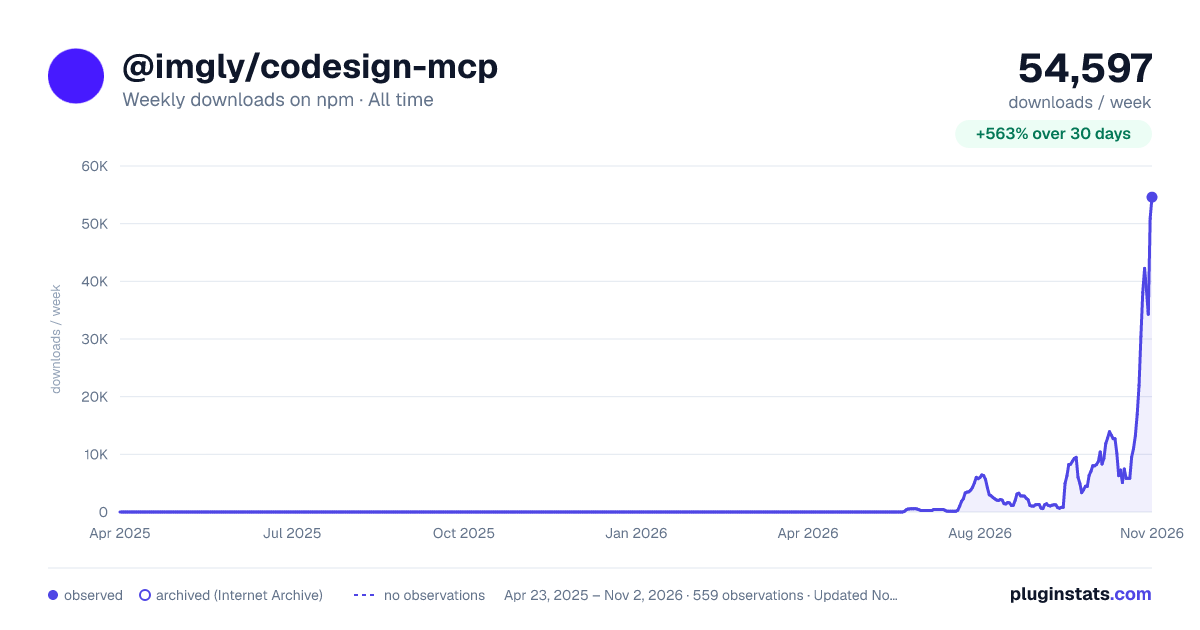

Adoption over time
7/30/90-day growth
Ranking history
Listing placement
Listing placement
Filled points are observed values; hollow points come from Internet Archive snapshots of the listing page. Dashed segments span periods with no observations — values between points are not interpolated.
Each band is one page of 20. Weekly downloads on a linear scale. Placement is projected from weekly downloads, so it can differ from the marketplace's own sort order. Hover a dot to see the listing.
Recent observations
Full history (544)Similar npm MCP servers plugins
All 20 @imgly/codesign-mcp alternativesData source
Weekly downloads (trailing 7 complete days) come from the official npm downloads API. Downloads include CI and mirrors and are not equivalent to installs or users. npm publishes no ratings.
Listing: https://www.npmjs.com/package/@imgly/codesign-mcp. First seen Oct 16, 2026; last successful collection Oct 20, 2026. See the methodology.