 PluginStats
prettier-plugin-openapi weekly downloads statistics
By LukasParke · npm · Prettier plugins
A Prettier plugin for formatting OpenAPI/Swagger JSON and YAML files
prettier-plugin-openapi has 17 recorded weekly downloads on npm, a decrease of 52.8% over the past 30 days.
It ranks #1852 of 2,251 tracked npm listings by weekly downloads.
Over 90 days, weekly downloads changed by -5.6%.
PluginStats has 121 daily observations since Jun 19, 2026; the latest is from Oct 17, 2026.
About prettier-plugin-openapi
Prettier Plugin OpenAPI
A Prettier plugin for formatting OpenAPI/Swagger JSON and YAML files with intelligent key sorting, proper indentation, and support for modular OpenAPI file structures.
Features
• 🎯 OpenAPI/Swagger Support: Formats both JSON and YAML OpenAPI specifications • 🔄 Smart Key Sorting: Automatically sorts OpenAPI keys in the recommended order • 📁 Modular File Support: Handles both monolithic and modular OpenAPI file structures • 🧩 Component Files: Supports individual component files (schemas, parameters, responses, etc.) • 📝 YAML & JSON: Supports both .yaml/.yml and .json file formats • 🎨 Consistent Formatting: Applies consistent indentation and line breaks • 🔌 Vendor Extensions: Programmatic loading of vendor-specific extensions • ⚡ Fast: Built with performance in mind using modern JavaScript • 🧪 Comprehensive Testing: 142 tests with 95.69% line coverage • 🚀 CI/CD Ready: Automated testing, building, and publishing • 🔒 Strict Validation: Properly rejects non-OpenAPI content • 📊 High Quality: Biome, Prettier, and TypeScript for code quality
Current Status
✅ Production Ready: Version 1.0.1 with comprehensive test coverage ✅ Modern Tooling: Updated to use Biome for fast linting and formatting ✅ Comprehensive Testing: 142 tests covering all major functionality ✅ High Performance: Optimized for large OpenAPI files ✅ Active Development: Regular updates and improvements
Installation
This plugin has a prettier peer dependency and works with Prettier 3 on Node 18+.
Usage
Command Line
Configuration
Add the plugin to your Prettier configuration:
package.json
.prettierrc
.prettierrc.js
Repo Setup
For a typical repository, add a couple of scripts so local development and CI use the same commands:
package.json
.prettierrc.json
Then you can run:
Adjust the openapi/**/*.{yaml,yml,json} glob to match wherever your specs live.
GitHub Actions
If you want formatting to run whenever main is updated and automatically push formatting fixes back to pull requests, you can use autofix.ci.
1. Install the autofix.ci GitHub App for your repository. 2. Add a workflow like this:
.github/workflows/format-openapi.yml
This runs the same Prettier command on pushes to main and on pull requests, while autofix.ci writes any formatting changes back to the PR branch for you.
If you only want CI to verify formatting instead of auto-fixing it, replace npm run format with npm run format:check and remove the autofix-ci step.
Supported File Extensions
• .openapi.json • .openapi.yaml • .openapi.yml • .swagger.json • .swagger.yaml • .swagger.yml • .json (for component files) • .yaml / .yml (for component files)
Modular File Structure Support
The plugin supports both monolithic and modular OpenAPI file structures:
Monolithic Structure
Modular Structure
Key Sorting
The plugin automatically sorts OpenAPI keys in the recommended order:
📖 Complete Key Reference: For a comprehensive reference of all keys, their ordering, and detailed reasoning, see KEYS.md.
Examples
Monolithic File Structure
Before (unformatted):
After (formatted):
Modular File Structure
Root Document (openapi.yaml):
Component File (components/schemas/User.yaml):
Path File (paths/users.yaml):
Vendor Extension Guide
Adding Your Vendor Extensions
The plugin supports a simple system for vendors to contribute custom extensions.
Here's how to add your vendor extensions:
Step 1: Create Your Vendor Extension File
Create a new TypeScript file in src/extensions/vendor/your-vendor.ts:
Step 2: Register Your Vendor
Add your vendor to the vendor loader in src/extensions/vendor-loader.ts:
Step 3: Define Your Extensions
Use the before() and after() helper functions to position your extensions relative to standard OpenAPI keys. The system now provides full IntelliSense support with type-safe key suggestions:
🎯 Enhanced IntelliSense Features
The vendor extension system now provides comprehensive IntelliSense support:
Type-Safe Key Suggestions
• Context-aware autocomplete: Each context shows only valid OpenAPI keys • Real-time validation: TypeScript errors for invalid keys • Hover documentation: Detailed information about each key's purpose
Available Contexts with IntelliSense
• 'top-level' → Shows: swagger, openapi, info, paths, components, etc. • 'info' → Shows: title, version, description, contact, license, etc. • 'operation' → Shows: summary, operationId, parameters, responses, etc. • 'schema' → Shows: $ref, title, type, format, example, etc. • 'parameter' → Shows: name, description, in, required, schema, etc. • 'response' → Shows: description, headers, content, links • 'securityScheme' → Shows: type, description, name, in, scheme, etc. • 'server' → Shows: url, description, variables • 'tag' → Shows: name, description, externalDocs • 'externalDocs' → Shows: description, url • 'webhook' → Shows: summary, operationId, parameters, responses, etc. • 'definitions' → Shows schema keys (Swagger 2.0) • 'securityDefinitions' → Shows security scheme keys (Swagger 2.0)
Enhanced Helper Functions
Supported Contexts
You can define extensions for these OpenAPI contexts:
• 'top-level' - Root OpenAPI document • 'info' - API information section • 'operation' - HTTP operations (GET, POST, etc.) • 'parameter' - Operation parameters • 'schema' - Data schemas • 'response' - Operation responses • 'securityScheme' - Security schemes • 'server' - Server definitions • 'tag' - API tags • 'externalDocs' - External documentation • 'webhook' - Webhook definitions • 'definitions' - Swagger 2.0 definitions • 'securityDefinitions' - Swagger 2.0 security definitions
Standard OpenAPI Keys Reference
When positioning your extensions, you can reference these standard OpenAPI keys:
Top-Level Keys
• openapi, swagger, info, externalDocs, servers, security, tags, paths, webhooks, components
Info Section Keys
• title, version, summary, description, termsOfService, contact, license
Operation Keys…
Description from the npm listing.
- prettier
- prettier-plugin
- openapi
- swagger
- yaml
- json
- formatting
Where prettier-plugin-openapi sits in the listing
Each band is one page of 20. Weekly downloads on a log scale. Placement is projected from weekly downloads, so it can differ from the marketplace's own sort order. Hover a dot to see the listing.


Charts
Images: 30d · 1y · all time · 1600×900 dark


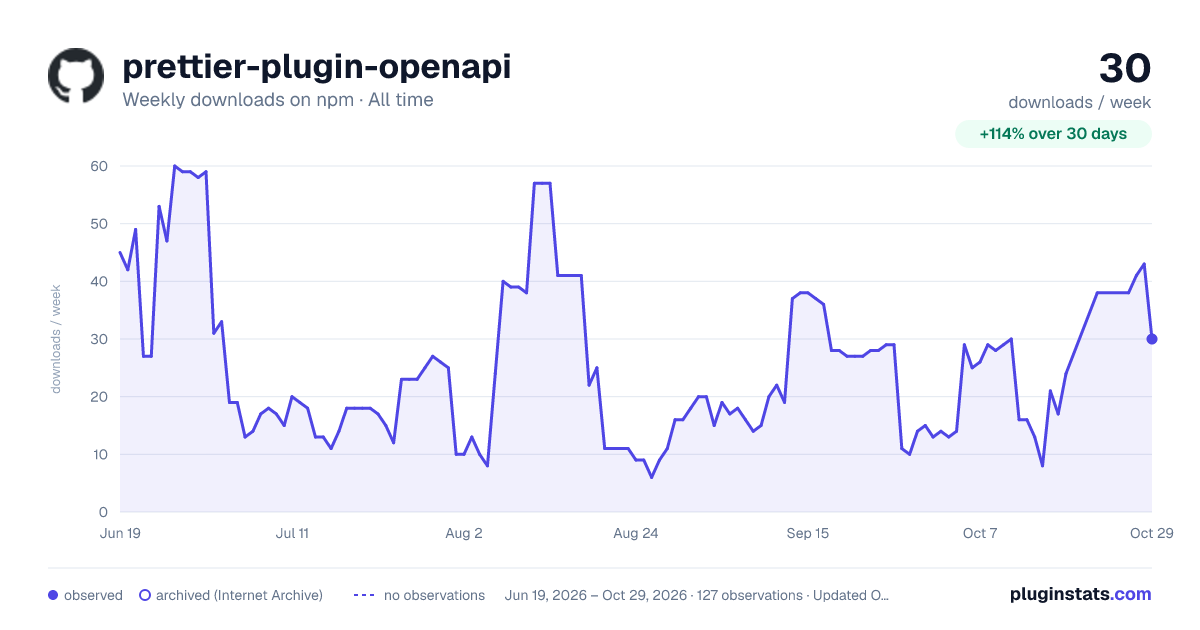

Adoption over time


7/30/90-day growth


Filled points are observed values; hollow points come from Internet Archive snapshots of the listing page. Dashed segments span periods with no observations — values between points are not interpolated.
Recent observations
Full history (121)Similar npm Prettier plugins plugins
Data source
Weekly downloads (trailing 7 complete days) come from the official npm downloads API. Downloads include CI and mirrors and are not equivalent to installs or users. npm publishes no ratings.
Listing: https://www.npmjs.com/package/prettier-plugin-openapi. First seen Oct 16, 2026; last successful collection Oct 18, 2026. See the methodology.