 PluginStats
@brainbase-labs/cli weekly downloads statistics
By brainbase-labs (2 listings) · npm · Claude Code
Pack, share, and install agent templates across harnesses (Claude Code, Codex, ...).
@brainbase-labs/cli has 77 recorded weekly downloads on npm, a decrease of 92.2% over the past 30 days.
It ranks #1698 of 2,256 tracked npm listings by weekly downloads.
Over 90 days, weekly downloads changed by -92.2%.
PluginStats has 543 daily observations since Apr 23, 2025; the latest is from Oct 17, 2026.
About @brainbase-labs/cli
brainbase
Pack, share, and install agent templates across harnesses (Claude Code, Codex, Kafka).
Install
The package installs a brainbase command on your PATH. Requires Node.js 18+.
Quick start
Run brainbase help to see every command.
Link and pull in one step
A fresh checkout — a task sandbox, a CI job — can attach to an agent and pull it in a single process:
--link does what brainbase link --agent --yes does (harness routing, using BB_TASK_KEY when set, plus the folder's link) on the agent the pull fetches anyway, so the agent is fetched once instead of twice. The agent, its manifest and — when the pull is certain to apply them — its secrets are fetched concurrently. brainbase link and brainbase agent pull without --link behave as before.
Task follow-ups
Send an instruction to an existing task, including while its agent is running:
send prints the input ID and generation to stderr before submitting and reports delivery status in stdout. Initial acceptance can say delivery pending while the server determines whether native steering is available. Native steering follows the harness's own timing. A confirmed fallback says queued for the next turn. submitted means the harness has received the input; it does not mean the agent has acted on it. Multiple follow-ups can join one execution and receive one combined answer.
By default, both commands read the current input generation before sending their request. The credential must have receipt-read access as well as permission to send or stop. Resource-scoped keys can lack that read access when task-read enforcement is enabled. If the read fails, no mutation is sent. Use --generation to bypass the read only with a trusted current cutoff for a new operation, or the original cutoff for a retry. A concurrent Stop prevents a send from joining newer work with an older generation. If the HTTP response is lost or you press Ctrl-C, keep the input ID and generation, and repeat the exact message with --input-id --generation to recover that request safely. Reusing an ID does not replay an existing input. A delivery unconfirmed receipt means the agent may already have received the instruction; deliberately resend without --input-id only if you want to retry it as a new input.
Known pre-admission HTTP 503 refusals include task_inputs_disabled, task_input_recovery_unavailable, and recognized sandbox provisioning or access codes. These mean no input was admitted by that request. Retry the same ID, message and generation after the service recovers. Unrecognized server or network failures can leave delivery unconfirmed. A recovered receipt reports idempotency_replayed: true in JSON when the server supplies its replay header.
stop stops execution and cancels pending follow-ups while retaining their text. A new instruction will not replay them. Before submitting, it prints a retry command with --generation . Keep that command even if the response is lost: retrying the original generation cannot interrupt newer work. An error can mean queued inputs were already cancelled while the original execution is still running. Follow the error's retry or operator-recovery guidance. Omit --generation only when deliberately issuing a new Stop. JSON includes the original expected_generation separately from the server's resulting generation.
Ctrl-C in task create --wait or task logs --follow still only detaches; it does not stop remote work. Both commands support --json. send exits 1 for unconfirmed, cancelled or failed inputs, and for request errors. Other acknowledged states exit 0; this confirms admission or delivery, not task success.
Benchmark management
benchmark init, benchmark validate, and command help are local and need no login or linked agent. Control-plane commands use the claimed agent in brainbase.agent.yaml by default; pass --agent to override it.
benchmark pull and benchmark push round-trip the local directory layout:
benchmark.yaml carries a local-only case_order list so pull and push preserve case ordering; it is not sent as part of the remote manifest. Case-local files stay beside their case. Shared, hidden, and root-level bundle paths are stored below bundle/ while retaining their original remote paths. Pull destinations must be absent or empty. Use a new directory to refresh a benchmark instead of overwriting local edits.
Human-readable output is the default. --json emits one versioned envelope. For paginated commands, it returns one page and its next_cursor unless --all is set. --jsonl emits item and page-boundary records, while watch emits state-change events. Resume with --cursor; structured modes never prompt.
Idempotency is explicit-only: requests omit the idempotency header unless --idempotency-key is supplied. Reuse a key only for an identical retry. Starting a run requires --yes; confirming the same plan ID is replay-safe. Interrupting run watch does not cancel the remote run. A run that MAS pauses for billing stops run watch with exit code 1; once billing is fixed, run brainbase benchmark run resume --yes to put it back in the queue.
Use brainbase benchmark --help, brainbase benchmark run --help, or brainbase benchmark --help for local command help.
Benchmark runtime commands
Managed benchmark workers invoke two machine-only commands inside the same sandbox as the agent task:
The CLI executes local, versioned phase specifications. It does not claim work, authorize users, or persist benchmark database state. The capabilities response advertises both the CLI version and supported phase schema versions.
Both specs use schema_version: "1", an attempt_id, a stable phase_id, absolute workspace/staging/log paths, and a phase budget. Staging must be:
Phase log/test roots must be absent, empty, or carry the CLI's matching attempt/phase ownership marker; the CLI never recursively clears an unowned non-empty directory.…
Description from the npm listing.
- brainbase
- cli
- agents
- claude-code
- codex
- templates
- ai
Charts
Images: 30d · 1y · all time · 1600×900 dark


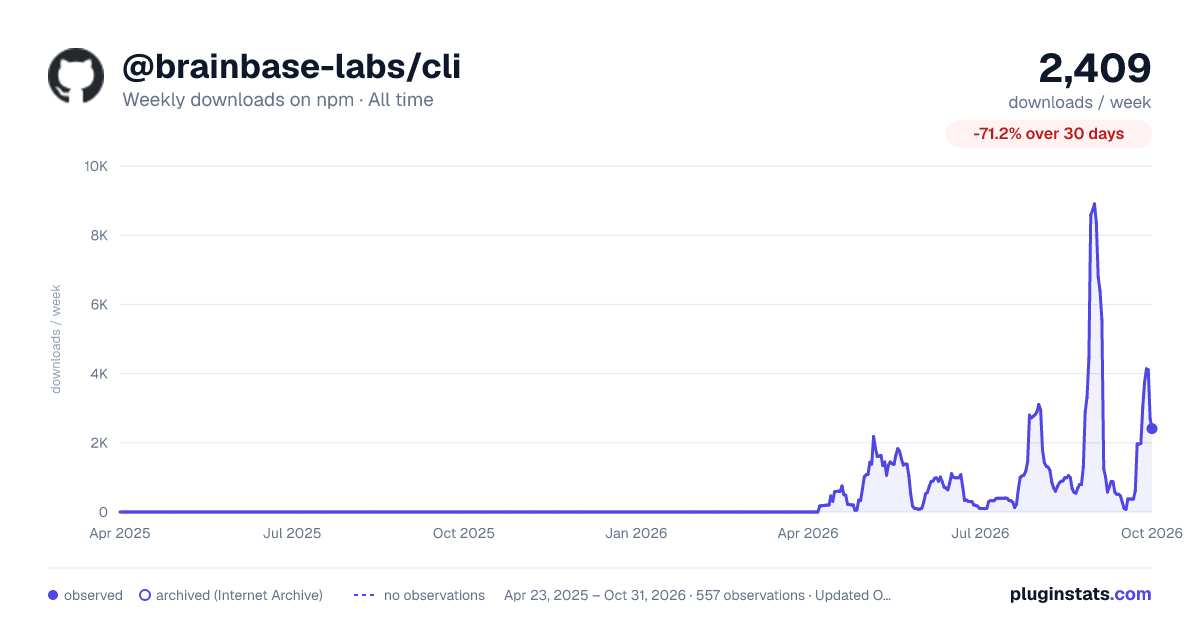

Adoption over time


7/30/90-day growth


Ranking history


Listing placement


Filled points are observed values; hollow points come from Internet Archive snapshots of the listing page. Dashed segments span periods with no observations — values between points are not interpolated.
Each band is one page of 20. Weekly downloads on a log scale. Placement is projected from weekly downloads, so it can differ from the marketplace's own sort order. Hover a dot to see the listing.
Recent observations
Full history (543)Similar npm Claude Code plugins
All 20 @brainbase-labs/cli alternativesData source
Weekly downloads (trailing 7 complete days) come from the official npm downloads API. Downloads include CI and mirrors and are not equivalent to installs or users. npm publishes no ratings.
Listing: https://www.npmjs.com/package/@brainbase-labs/cli. First seen Oct 16, 2026; last successful collection Oct 19, 2026. See the methodology.