 PluginStats
tailwindcss-custom-native weekly downloads statistics
By babichjacob · npm · Tailwind plugins
Write your Tailwind CSS configuration file with your own custom utilities as though they were native to the framework
tailwindcss-custom-native has 150 recorded weekly downloads on npm, a decrease of 16.2% over the past 30 days, ranking #1697 of 2,322 tracked listings.
About tailwindcss-custom-native
🧩 Tailwind CSS Custom Native Utilities
This Tailwind CSS plugin allows you to write configuration for your own custom utility in the theme and variants section of your config as though it were actually part of the framework. Just define it with a single line in the plugins section!
This should allow you to finally kill off leftover CSS and inline styles that have no accompanying plugin-made or native utility. Although you can replace other plugins with this one, it's probably a good idea to use those instead because they're purpose-built and likely to create a better output.
💻 Installation
npm install --save-dev tailwindcss-custom-native
🛠 Basic usage
With this Tailwind configuration,
module.exports = {
  theme: {
    // This utility is not native to Tailwind,
    mixBlendMode: {
      'screen': 'screen',
      'overlay': 'overlay',
    },
    // So we define it here!
    customUtilities: {
      mixBlendMode: {},
      // There are extra parameters for further customization -- see the advanced usage section
    },
  },

  plugins: [
    require('tailwindcss-custom-native'),
  ],
};
this CSS is generated:
.mix-blend-mode-screen {
  mix-blend-mode: screen;
}

.mix-blend-mode-overlay {
  mix-blend-mode: overlay;
}
Variants
When no variants are specified in the variants key of your config, no variants will be generated, as you saw above. (If you would prefer for ['responsive'] to be the default, I am open to changing it).
If you want variants (in the same config as above):
module.exports = {
  theme: {
    mixBlendMode: {
      'screen': 'screen',
      'overlay': 'overlay',
    },
    customUtilities: {
      mixBlendMode: {},
    },
  },

  variants: {
    // All variants, whether added by plugin or not, are at your disposal
    mixBlendMode: ['hover', 'focus'],
  },

  plugins: [
    require('tailwindcss-custom-native'),
  ],
};
you get this additional CSS:
.hover\:mix-blend-mode-screen:hover {
  mix-blend-mode: screen;
}
.hover\:mix-blend-mode-overlay:hover {
  mix-blend-mode: overlay;
}

.focus\:mix-blend-mode-screen:focus {
  mix-blend-mode: screen;
}
.focus\:mix-blend-mode-overlay:focus {
  mix-blend-mode: overlay;
}
⚙️ Full configuration
This plugin expects configuration of the form
theme: {
  customUtilities: {
    key: { property, rename, addUtilitiesOptions },
    // Keep repeating this pattern for more utilities
  },
}
Where each parameter means:
-
key(required, string) - The name of the key for your custom utility, as you wrote in thethemeandvariantssection -
property(optional, string) - The CSS property that your utility is forWhen not specified, it defaults to kebab-casing (AKA hyphenating) the
key. For example,key: 'animationTimingFunction'has correspondingproperty: 'animation-timing-function').This parameter allows you to use a
keythat may be shorter than the property name, or completely different from it. -
rename(optional, string) - The prefix before each value name (fromtheme[key]) in the generated classesWhen not specified, it defaults to kebab-casing (AKA hyphenating) the
key. For example,key: 'mixBlendMode'has correspondingrename: 'mix-blend-mode').If set to the empty string (
''), then there is no prefix and each generated class is just the value name. -
addUtilitiesOptions(optional, object) - Extra options to pass to theaddUtilitiesfunction call.As of Tailwind 1.2.0, this just means the
respectPrefixandrespectImportantoptions
📚 Examples
Specify rename: '' so you can write blur-4 and grayscale instead of filter-blur-4 and filter-grayscale:
module.exports = {
  theme: {
    extend: {
      customUtilities: {
        filter: { rename: "" },
      },

      filter: {
        "grayscale": "grayscale(100%)",
        "blur-4": "blur(1rem)",
      },
    },
  },
  variants: {
    filter: ["responsive"],
  },
  plugins: [
    require("tailwindcss-custom-native"),
  ],
};
.grayscale {
  filter: grayscale(100%);
}

.blur-4 {
  filter: blur(1rem);
}

/* Or whatever screen `sm` is in your config */
@media (min-width: 640px) {
  .sm\:grayscale {
    filter: grayscale(100%);
  }

  .sm\:blur-4 {
    filter: blur(1rem);
  }
}

/* ... and so on for the other screens */
Any property named with a - in front will have that moved to the front of the generated class name, just like the native margin or z-index utilities do.
Let's say you want a section specifically for blur utilities, because they really have nothing to do with other kinds of CSS filters. Use 'blur' as the key and 'filter' as the property:
module.exports = {
  theme: {
    extend: {
      blur: {
        '0': 'blur(0)',
        '1': 'blur(0.25rem)',
        '2': 'blur(0.5rem)',
        // ... as many numbers as you want
      },

      customUtilities: {
        blur: { property: 'filter' },
      },
    },
  },
  variants: {
    blur: ['active'],
  },
  plugins: [
    require('tailwindcss-custom-native'),
  ],
};
.blur-0 {
  filter: blur(0);
}

.blur-1 {
  filter: blur(0.25rem);
}

.blur-2 {
  filter: blur(0.5rem);
}

.active\:blur-0:active {
  filter: blur(0);
}

.active\:blur-1:active {
  filter: blur(0.25rem);
}

.active\:blur-2:active {
  filter: blur(0.5rem);
}

/* and so on for the other numbers you specified */
In practice, you will probably need more than one custom utility, so just add another to the list:…
Description from the npm listing.
- plugin
- tailwind
- tailwindcss
- tailwindcss-plugin
- custom-utilities
- custom-native
README badge
Show your rank in a README or on your website. The badge updates automatically.
Charts
Images: 30d · 1y · all time · 1600×900 dark


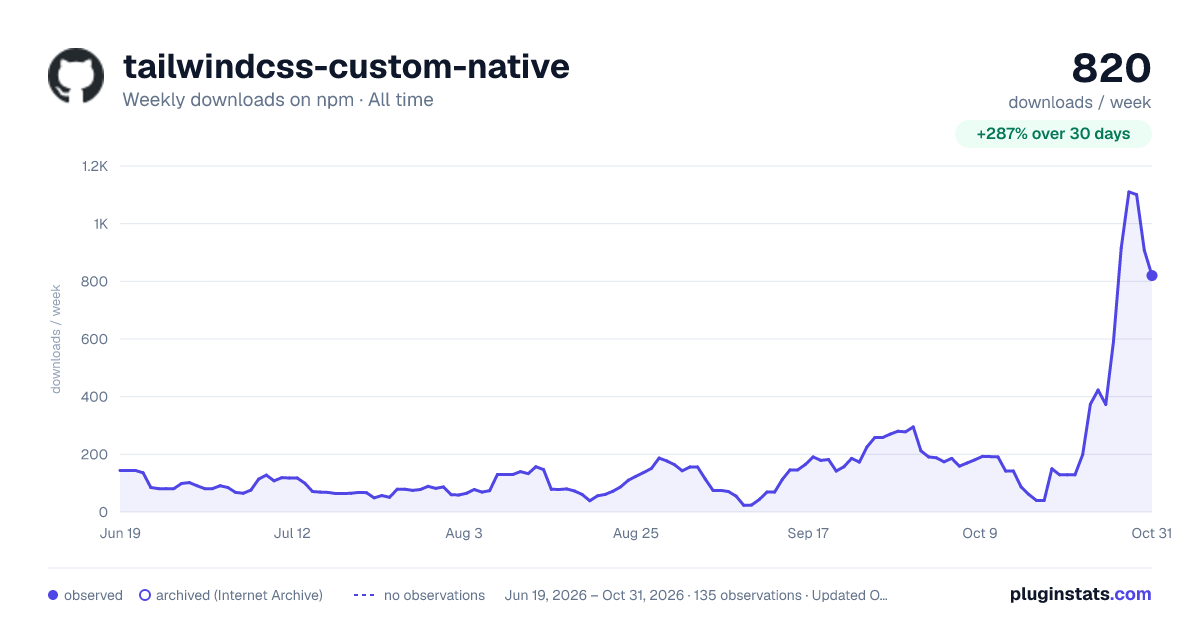

Adoption over time
7/30/90-day growth
Ranking history
Listing placement
Listing placement
Filled points are observed values; hollow points come from Internet Archive snapshots of the listing page. Dashed segments span periods with no observations — values between points are not interpolated.
Each band is one page of 20. Weekly downloads on a linear scale. Placement is projected from weekly downloads, so it can differ from the marketplace's own sort order. Hover a dot to see the listing.
Recent observations
Full history (122)Similar npm Tailwind plugins plugins
All 20 tailwindcss-custom-native alternatives- 179 weekly downloads-78.5%
Data source
Weekly downloads (trailing 7 complete days) come from the official npm downloads API. Downloads include CI and mirrors and are not equivalent to installs or users. npm publishes no ratings.
Listing: https://www.npmjs.com/package/tailwindcss-custom-native. First seen Oct 16, 2026; last successful collection Oct 20, 2026. See the methodology.