 PluginStats
unplugin-preprocessor-directives weekly downloads statistics
By kejunmao (2 listings) · npm · Vite plugins
<img src="assets/logo.svg" alt="logo" width="100" height="100" align="right" />
unplugin-preprocessor-directives has 2,822 recorded weekly downloads on npm, a decrease of 62.4% over the past 30 days, ranking #1257 of 2,322 tracked listings.
About unplugin-preprocessor-directives
unplugin-preprocessor-directives
[![npm version][npm-version-src]][npm-version-href] [![npm downloads][npm-downloads-src]][npm-downloads-href] [![github stars][github-stars-src]][github-stars-href] [![bundle][bundle-src]][bundle-href] [![License][license-src]][license-href] [![JSDocs][jsdocs-src]][jsdocs-href]
English | 简体中文
Install
npm i unplugin-preprocessor-directives
<details> <summary>Vite</summary><br>[!NOTE] This plugin should be placed before all other plugins in your configuration to ensure preprocessor directives are processed first.
// vite.config.ts
import PreprocessorDirectives from 'unplugin-preprocessor-directives/vite'

export default defineConfig({
  plugins: [
    PreprocessorDirectives({ /* options */ }), // Should be the first plugin
  ],
})
Example: playground/
<br></details>
<details> <summary>Rollup</summary><br>// rollup.config.js
import PreprocessorDirectives from 'unplugin-preprocessor-directives/rollup'
export default {
plugins: [
PreprocessorDirectives({ /* options */ }),
],
}
<br></details>
<details> <summary>Webpack</summary><br>// webpack.config.js
module.exports = {
/* ... */
plugins: [
require('unplugin-preprocessor-directives/webpack')({ /* options */ })
]
}
<br></details>
<details> <summary>Nuxt</summary><br>// nuxt.config.js
export default defineNuxtConfig({
modules: [
['unplugin-preprocessor-directives/nuxt', { /* options */ }],
],
})
This module works for both Nuxt 2 and Nuxt Vite
<br></details>
<details> <summary>Vue CLI</summary><br>// vue.config.js
module.exports = {
configureWebpack: {
plugins: [
require('unplugin-preprocessor-directives/webpack')({ /* options */ }),
],
},
}
<br></details>
<details> <summary>esbuild</summary><br>// esbuild.config.js
import { build } from 'esbuild'
import PreprocessorDirectives from 'unplugin-preprocessor-directives/esbuild'
build({
plugins: [PreprocessorDirectives()],
})
<br></details>
<details> <summary>Rspack (⚠️ experimental)</summary><br>// rspack.config.js
module.exports = {
plugins: [
require('unplugin-preprocessor-directives/rspack')({ /* options */ }),
],
}
<br></details>
Usage
Defining symbols
You use the following two preprocessor directives to define or undefine symbols for conditional compilation:
#define: Define a symbol.#undef: Undefine a symbol.
You use #define to define a symbol. When you use the symbol as the expression that's passed to the #if directive, the expression will evaluate to true, as the following example shows:
// #define VERBOSE

// #if VERBOSE
console.log('Verbose output version')
// #endif
Conditional compilation
#if: Opens a conditional compilation, where code is compiled only if the specified symbol is defined and evaluated to true.#elif: Closes the preceding conditional compilation and opens a new conditional compilation based on if the specified symbol is defined and evaluated to true.#else: Closes the preceding conditional compilation and opens a new conditional compilation if the previous specified symbol isn't defined or evaluated to false.#endif: Closes the preceding conditional compilation.
[!NOTE] By default, use vite's
loadEnvfunction to load environment variables based onprocess.env.NODE_ENVand compile symbols as conditions.
// src/index.ts

// #if DEV
console.log('Debug version')
// #endif

// #if !MYTEST
console.log('MYTEST is not defined or false')
// #endif
You can use the operators == (equality) and != (inequality) to test for the bool values true or false. true means the symbol is defined. The statement #if DEBUG has the same meaning as #if (DEBUG == true). You can use the && (and), || (or), and ! (not) operators to evaluate whether multiple symbols have been defined. You can also group symbols and operators with parentheses.
class MyClass {
  constructor() {
    // #if (DEBUG && MYTEST)
    console.log('DEBUG and MYTEST are defined')
    // #elif (DEBUG==false && !MYTEST)
    console.log('DEBUG and MYTEST are not defined')
    // #endif
  }
}
Error and warning and info messages
You instruct the compiler to generate user-defined compiler errors and warnings and informational messages.
#error: Generates an error, but does not terminate compilation.#warning: Generates a warning.#info: Generates an informational message.
// #error this is an error message
// #warning this is a warning message
// #info this is an info message
Of course, it can also be combined with conditional compilation:
// #if DEBUG
// #info Debug mode is on
// #endif
// #if !DEBUG
// #info Debug mode is off
// #endif
#include directive
You can use the #include directive to include the contents of other files into the current file. The included files are also processed by the preprocessor.
[!WARNING] The
#includedirective is a compile-time text replacement tool, primarily intended for these scenarios:
- Including different configuration code snippets in different environments
- Combining with conditional compilation to include different code based on compilation conditions
- Sharing code snippets that require preprocessing
It cannot and should not replace:
- JavaScript/TypeScript
importorrequire- for modularization and dependency management- CSS
@import- for stylesheet modularization- HTML template systems or component systems
If you simply want to modularize your code, please use the language's native module system. Only use
#includewhen you need compile-time processing and conditional inclusion.…
Description from the npm listing.
- unplugin
- vite
- webpack
- rollup
- rspack
- transform
- vite-plugin
- webpack-plugin
- rollup-plugin
- esbuild-plugin
- rspack-plugin
- nuxt-plugin
- directives
- preprocessor
README badge
Show your rank in a README or on your website. The badge updates automatically.
Charts
Images: 30d · 1y · all time · 1600×900 dark


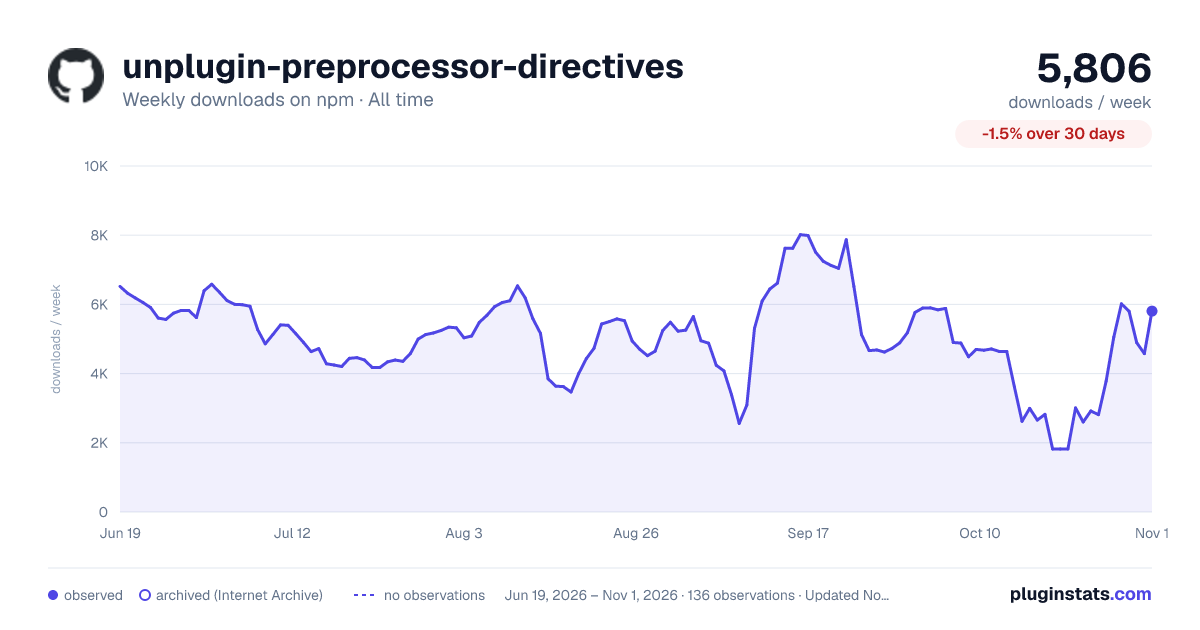

Adoption over time
7/30/90-day growth
Ranking history
Listing placement
Listing placement
Filled points are observed values; hollow points come from Internet Archive snapshots of the listing page. Dashed segments span periods with no observations — values between points are not interpolated.
Each band is one page of 20. Weekly downloads on a linear scale. Placement is projected from weekly downloads, so it can differ from the marketplace's own sort order. Hover a dot to see the listing.
Recent observations
Full history (122)Similar npm Vite plugins plugins
All 20 unplugin-preprocessor-directives alternatives- 3.1K weekly downloads-50.3%
- 3.1K weekly downloads-61.8%
Data source
Weekly downloads (trailing 7 complete days) come from the official npm downloads API. Downloads include CI and mirrors and are not equivalent to installs or users. npm publishes no ratings.
Listing: https://www.npmjs.com/package/unplugin-preprocessor-directives. First seen Oct 16, 2026; last successful collection Oct 20, 2026. See the methodology.