 PluginStats
@yawlabs/ctxlint weekly downloads statistics
By yawlabs (2 listings) · npm · MCP servers
Linter for AI agent context files and MCP configs: CLAUDE.md, AGENTS.md, .cursorrules, .mcp.json - catches broken paths, wrong commands, leaked secrets
@yawlabs/ctxlint has 12,139 recorded weekly downloads on npm, an increase of 38.2% over the past 30 days, ranking #906 of 2,391 tracked listings.
About @yawlabs/ctxlint
ctxlint

One click adds this to your local Yaw MCP config so it's available in every Yaw Terminal session. Or install manually below.



Lint your AI agent context files, MCP server configs, and session data against your actual codebase. Context linting + MCP config linting + session auditing. 16 AI tools, 8 MCP clients, cross-project consistency, auto-fix. Works as a CLI, CI step, pre-commit hook, or MCP server.
Your CLAUDE.md is lying to your agent. Your .mcp.json has a hardcoded API key. ctxlint catches both.
Why ctxlint?
Every AI coding tool ships a context file: CLAUDE.md, .cursorrules, AGENTS.md, .mcp.json. These files are the single most important interface between you and your agent — they tell it what to build, how to test, where things live.
But context files rot fast. You rename a file, change a build script, or switch from Jest to Vitest — and your CLAUDE.md still says the old thing. Your agent follows those stale instructions faithfully, then fails. You lose 10 minutes debugging what turns out to be a wrong path in line 12 of a markdown file.
Multiply that across a team with 5 context files, 3 MCP configs, and 2 people who touched the build system last week — and you have a real problem with no existing solution.
ctxlint is a linter purpose-built for this. It reads your context files, cross-references them against your actual codebase, and catches the drift before your agent does.
- Instant startup — ships as a single self-contained bundle with zero runtime dependencies.
npxdownloads a ~400 KB tarball and starts immediately - Catches real problems — broken paths, wrong commands, stale references, contradictions across files
- Smart suggestions — detects git renames and fuzzy-matches to suggest the right path
- Auto-fix —
--fixrewrites broken paths automatically using git history - Token-aware — shows how much context window your files consume and flags redundant content
- Every AI tool — supports Claude Code, Cursor, Copilot, Windsurf, Gemini, Cline, Aider, and 9 more
- Multiple outputs — text, JSON, and SARIF (GitHub Code Scanning)
- MCP server — 7 tools for IDE/agent integration with tool annotations for auto-approval
- Watch mode —
--watchre-lints automatically when context files change
Install
Run directly (no install needed):
npx -y @yawlabs/ctxlint@latest
Project install (recommended for teams)
npm install -D @yawlabs/ctxlint
# or
pnpm add -D @yawlabs/ctxlint
Then add to your package.json scripts:
{
  "scripts": {
    "lint:ctx": "ctxlint --strict"
  }
}
Global install
npm install -g @yawlabs/ctxlint
Useful if you want ctxlint available in every project without per-project setup.
What It Checks
| Check | What it finds |
|---|---|
| Broken paths | File references in context that don't exist in your project |
| Wrong commands | Build/test commands that don't match your package.json scripts or Makefile targets, and Gradle project paths or Maven -pl modules your build doesn't declare |
| Stale context | Context files not updated after recent code changes |
| Token waste | How much context window your files consume per session |
| Redundancy | Content the agent can already infer (e.g. "We use React" when react is in package.json) |
| Contradictions | Conflicting directives across context files (e.g. "use Jest" in one, "use Vitest" in another)… |
Description from the npm listing.
- claude-md
- agents-md
- cursorrules
- windsurfrules
- copilot-instructions
- context-lint
- linter
- lint
- ai-agents
- ai-coding
- context-engineering
- mcp
- mcp-server
- model-context-protocol
- claude-code
- cursor
- windsurf
- github-copilot
- gemini
- cline
README badge
Show your rank in a README or on your website. The badge updates automatically.
Charts
Images: 30d · 1y · all time · 1600×900 dark


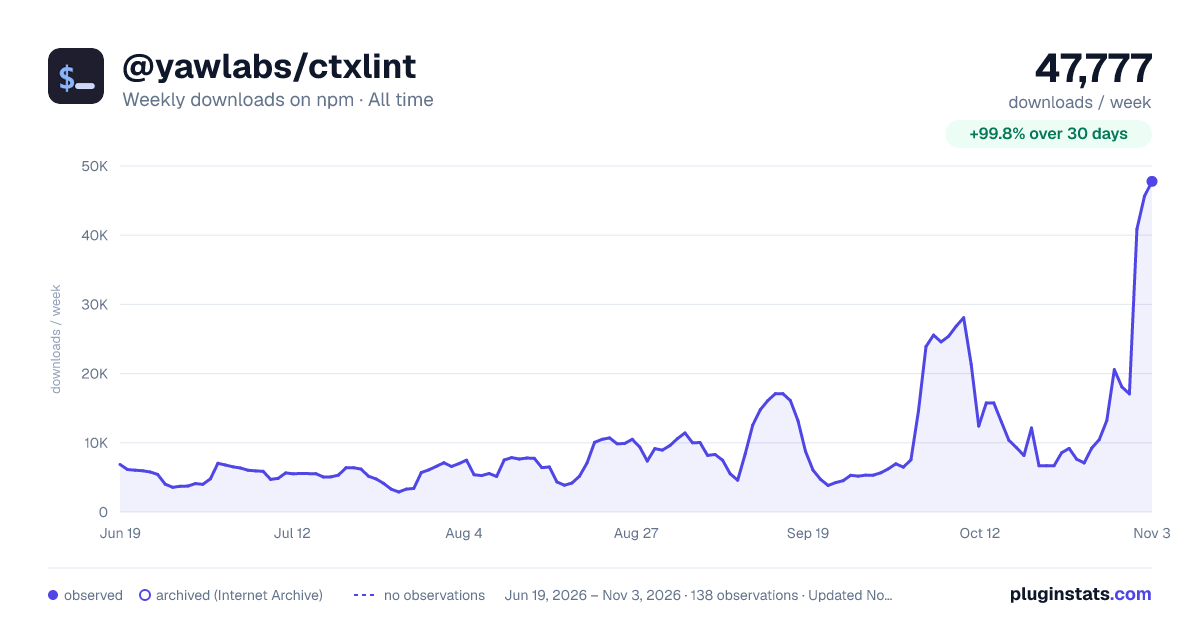

Adoption over time
7/30/90-day growth
Ranking history
Listing placement
Listing placement
Filled points are observed values; hollow points come from Internet Archive snapshots of the listing page. Dashed segments span periods with no observations — values between points are not interpolated.
Each band is one page of 20. Weekly downloads on a linear scale. Placement is projected from weekly downloads, so it can differ from the marketplace's own sort order. Hover a dot to see the listing.
Recent observations
Full history (122)Similar npm MCP servers plugins
All 20 @yawlabs/ctxlint alternativesData source
Weekly downloads (trailing 7 complete days) come from the official npm downloads API. Downloads include CI and mirrors and are not equivalent to installs or users. npm publishes no ratings.
Listing: https://www.npmjs.com/package/@yawlabs/ctxlint. First seen Oct 16, 2026; last successful collection Oct 21, 2026. See the methodology.