 PluginStats
tailwindcss-scrims weekly downloads statistics
By brettgullan · npm · Tailwind plugins
Tailwind CSS plugin to generate scrim classes.
tailwindcss-scrims has 38 recorded weekly downloads on npm, a decrease of 35.6% over the past 30 days, ranking #1839 of 2,322 tracked listings.
About tailwindcss-scrims
Tailwind CSS Scrims
Configurable Tailwind plugin for generating scrim utility classes.
What are Scrims?
In photography, a scrim is something that softens light — from the sun, or a flash — and is typically a piece of fabric, paper or acrylic stretched across a frame.
In UX, a scrim is a design technique (a gradient or overlay) used to make text more legible when overlaid on an image. The kind of visual treatment that is becoming increasingly common in card-based design.
A typical scrim is a neutral gradient that starts about half-way down an image and increases to 30%-40% opacity, creating a subtle darkening effect that provides enought contrast for white text to be legible.
Install
tailwindcss-scrims automatically generates generates scrim class variations for specified directions, distances and gradient densities.
npm install --save-dev tailwindcss-scrims
Usage
// tailwind.js
module.exports = {
  // ...
  plugins: [
    require('tailwindcss-scrims')({
      directions: {
        't': 'to bottom',
        'b': 'to top',
        'r': 'to left',
        'l': 'to right',
      },
      distances: {
        '1/4': '25%',
        '1/3': '33.33333%',
        '1/2': '50%',
        '2/3': '66.66666%'
        '3/4': '75%',
      },
      colors: {
        default: [rgba(0,0,0,0.4), rgba(0,0,0,0)],
      },
      variants: ['responsive', 'hover'],
    })
  ]
  // ...
}
Options
directions (optional)
Default:
{
  't': 'to bottom',
  'b': 'to top',
  'r': 'to left',
  'l': 'to right',
}
This is where you can define the direction — or location of emphasis — for a scrim. i.e. where the scrim color is darkest.
Each direction is specified as a key/value pair. The key is used in the utility class name, the value is a valid CSS Gradient direction.
distances (optional)
Default:
{
  '1/4': '25%',
  '1/3': '33.33333%',
  '1/2': '50%',
  '2/3': '66.66666%'
  '3/4': '75%',
}
This defines the distance the scrim covers. i.e. how much of the image is covered by the scrim gradient. Each distance is specified as a key/value pair. The key is used in the utility class name, the value is a valid CSS Gradient 'stop' location.
colors (optional)
Default:
{
  default: [rgba(0,0,0,0.4), rgba(0,0,0,0)],
}
colors define the {start} and {end} colors (including alpha) for a scrim.
variants (optional)
Default:
['responsive', 'hover']
As per the tailwind plugin docs you can also pass variants (responsive, hover, etc.) as an option.
require('tailwindcss-scrims')({
  variants: ['responsive', 'hover'],
})
Example
This configuration:
// tailwind.js
module.exports = {
  // ...
  plugins: [
    require('tailwindcss-scrims')({
      directions: {
        't': 'to bottom',
        'b': 'to top',
      },
      distances: {
        default: '25%',
        '1/2': '50%',
      },
      colors: {
        default: [rgba(0,0,0,0.4), rgba(0,0,0,0)],
      },
      variants: [],
    })
  ]
  // ...
}
Results in the following utilities:
.scrim-t::after: {
  content: " ",
  position: absolute,
  top: 0,
  left: 0,
  width: 100%,
  height: 100%,
  backgroundImage: linear-gradient(to bottom, rgba(0,0,0,0.4), rgba(0,0,0,0) 25%);
}

.scrim-t-1\/2::after: {
  content: " ",
  position: absolute,
  top: 0,
  left: 0,
  width: 100%,
  height: 100%,
  backgroundImage: linear-gradient(to bottom, rgba(0,0,0,0.4), rgba(0,0,0,0) 50%);
}

.scrim-b::after: {
  content: " ",
  position: absolute,
  top: 0,
  left: 0,
  width: 100%,
  height: 100%,
  backgroundImage: linear-gradient(to top, rgba(0,0,0,0.4), rgba(0,0,0,0) 25%);
}

.scrim-b-1\/2::after: {
  content: " ",
  position: absolute,
  top: 0,
  left: 0,
  width: 100%,
  height: 100%,
  backgroundImage: linear-gradient(to top, rgba(0,0,0,0.4), rgba(0,0,0,0) 50%);
}
Description from the npm listing.
- tailwind
- tailwindcss
- tailwind-css
- tailwindcss-plugin
README badge
Show your rank in a README or on your website. The badge updates automatically.
Charts
Images: 30d · 1y · all time · 1600×900 dark


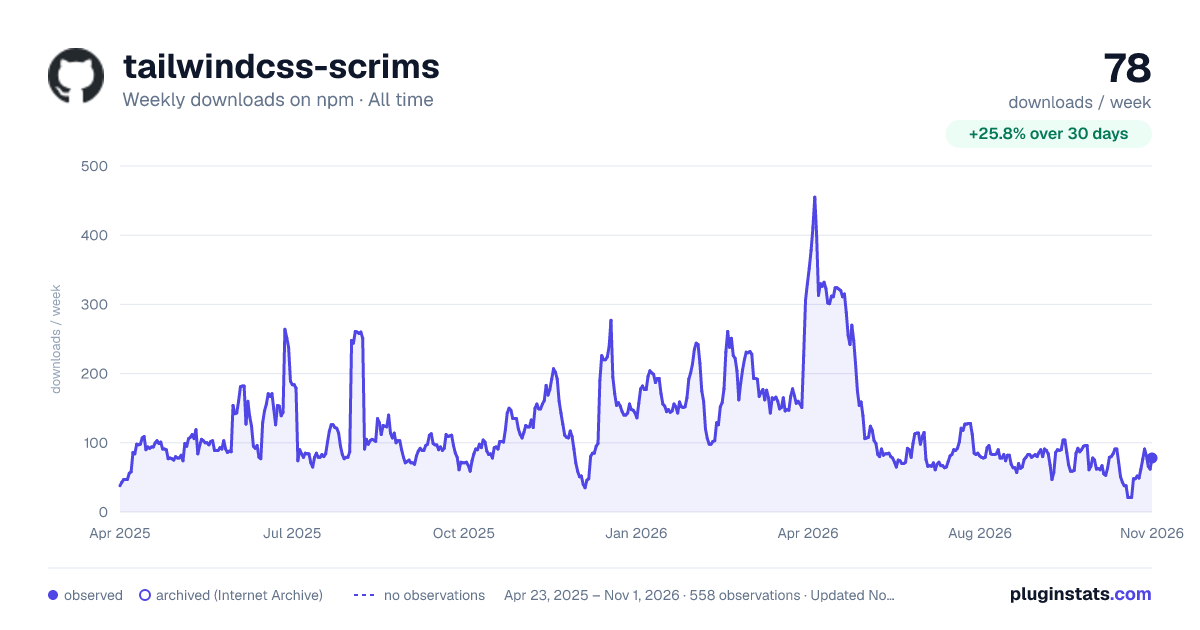

Adoption over time
7/30/90-day growth
Ranking history
Listing placement
Listing placement
Filled points are observed values; hollow points come from Internet Archive snapshots of the listing page. Dashed segments span periods with no observations — values between points are not interpolated.
Each band is one page of 20. Weekly downloads on a linear scale. Placement is projected from weekly downloads, so it can differ from the marketplace's own sort order. Hover a dot to see the listing.
Recent observations
Full history (544)Similar npm Tailwind plugins plugins
All 20 tailwindcss-scrims alternativesData source
Weekly downloads (trailing 7 complete days) come from the official npm downloads API. Downloads include CI and mirrors and are not equivalent to installs or users. npm publishes no ratings.
Listing: https://www.npmjs.com/package/tailwindcss-scrims. First seen Oct 16, 2026; last successful collection Oct 20, 2026. See the methodology.