 PluginStats
bb-app has 5,565 recorded weekly downloads on npm, a decrease of 2.5% over the past 30 days, ranking #1111 of 2,391 tracked listings.
About bb-app
bb

bb is an agentic IDE that builds itself. It can control, customize, and automate itself, laying the groundwork for your own software factory.
This package provides the npx bb-app launcher, bundled bb CLI entry, and
Node SDK export. Every surface — the web app, CLI, and HTTP API — is a
first-class way to drive bb. Work runs in threads you can follow live, steer at
any point, or hand off to another agent.
Note: bb is in active development. Workflows and surfaces are still evolving.
Quick Start
bb runs from npm and orchestrates coding agents you already have installed.
Prerequisites
- Node.js 22.19, 24, or 26.
- Git.
- At least one supported agent provider: Claude Code, Codex, Cursor via ACP, Pi, or another ACP-compatible agent.
If you already use one of these providers, bb will pick up your existing credentials. If you use multiple providers, you can mix and match per task.
Supported host environments
- macOS
- Linux
Run all bb commands inside WSL2, install Node.js, Git, and your provider CLIs
inside that WSL2 distro, and use Linux-style paths such as /home/me/repo or
/mnt/c/Users/me/repo.
Inside WSL2, use Linux paths rather than drive-letter or UNC paths. Repos
inside the WSL filesystem are recommended;
/mnt/c/... is intentionally supported so you can keep an existing Windows
checkout, but it is slower and less reliable for file watching.
Install and run
npx bb-app@latest
Then open: http://localhost:38886
To opt into the automated nightly channel:
npx bb-app@nightly
Nightly versions are built from main and may be unstable. The nightly
dist-tag moves independently of the stable latest tag.
npm 12 and later block dependency install scripts by default. bb needs those
scripts to build its native add-ons (better-sqlite3, node-pty,
@parcel/watcher). Without them bb stops at startup with
Could not locate the bindings file. If your npm version is 12 or later, allow
the scripts for the install:
npx --allow-scripts=better-sqlite3,node-pty,@parcel/watcher bb-app@latest
Or set the policy once for all global installs:
npm config set allow-scripts=better-sqlite3,node-pty,@parcel/watcher --location=user
npx bb-app@latest downloads the published bb-app package, starts the server and
local host daemon, and serves the web app. It stores bb-managed state under
~/.bb/ by default. If either managed child process exits unexpectedly, the
launcher restarts that child without stopping the other one. Press Ctrl+C in
the terminal to stop both processes and exit with status 0.
If another live bb owns the runtime record for the same data directory and a
healthy server answers on the configured local address, startup exits with
status 1 without starting either child process. The existing instance keeps
running. A runtime record without a healthy server does not prevent startup.
Server and host-daemon output goes directly to logs/server-stdio.log and
logs/host-daemon-stdio.log under the data directory, including startup errors
and console output. These files append across restarts; they are separate from
the rotating application logs. The launcher prints status and log locations
without forwarding service output to the terminal, so a stalled terminal cannot
block service logging. To follow output with the default data directory:
tail -F ~/.bb/logs/server-stdio.log ~/.bb/logs/host-daemon-stdio.log
Launcher status output is plain when stdout is redirected, including in CI.
Set FORCE_COLOR=1 to request color or NO_COLOR=1 to disable it; NO_COLOR
takes precedence. In-place progress updates require a stdout TTY.
The same output capture applies to bb-server and bb-host-daemon.
To stop a bb that runs in another terminal or in the background:
npx bb-app stop
stop reads bb-app-runtime.json from the data directory, confirms that the
recorded process really is that launcher, then stops it. Pass --data-dir when
the bb you want to stop does not use the default ~/.bb/.
The bb command
To control bb from outside bb, open Settings → General → Command line and
choose Install next to bb CLI. Threads in bb already have bb; this
is for your own terminals, scripts, and agents running outside bb, such as
Claude Code or Codex. bb links a launcher from ~/.bb/bin/bb into a folder on
your PATH (~/.local/bin on Linux; /opt/homebrew/bin, /usr/local/bin, or
~/.local/bin on macOS). On Windows it adds ~/.bb/bin to your user PATH;
open a new terminal afterwards. Remove takes it off again. bb leaves any
other bb you already have in place.
From a terminal, before bb is on your PATH:
npx --package bb-app bb settings cli-command install
Updating from the app…
Description from the npm listing.
- bb
- coding-agent
- agent
- cli
- workspace
- codex
- claude-code
README badge
Show your rank in a README or on your website. The badge updates automatically.
Charts
Images: 30d · 1y · all time · 1600×900 dark


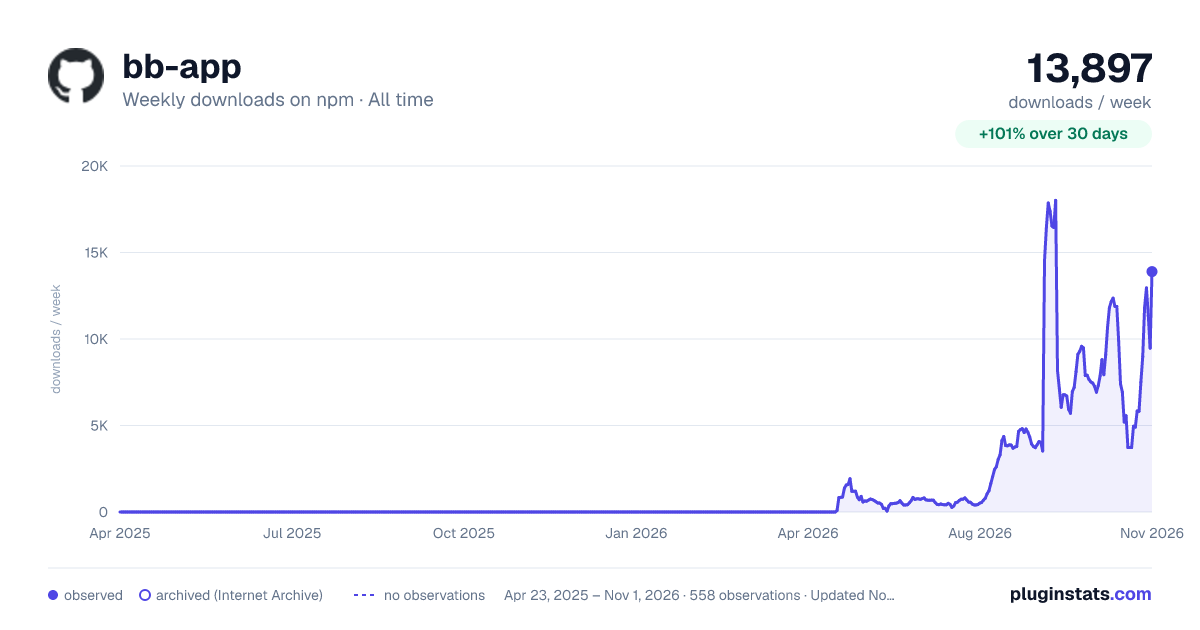

Adoption over time
7/30/90-day growth
Ranking history
Listing placement
Listing placement
Filled points are observed values; hollow points come from Internet Archive snapshots of the listing page. Dashed segments span periods with no observations — values between points are not interpolated.
Each band is one page of 20. Weekly downloads on a linear scale. Placement is projected from weekly downloads, so it can differ from the marketplace's own sort order. Hover a dot to see the listing.
Recent observations
Full history (544)Similar npm Claude Code plugins
All 20 bb-app alternativesData source
Weekly downloads (trailing 7 complete days) come from the official npm downloads API. Downloads include CI and mirrors and are not equivalent to installs or users. npm publishes no ratings.
Listing: https://www.npmjs.com/package/bb-app. First seen Oct 16, 2026; last successful collection Oct 21, 2026. See the methodology.