 PluginStats
tailwind-color-utilities weekly downloads statistics
By teranes10 · npm · Tailwind plugins
Tailwind CSS plugin to generate color shades and tint.
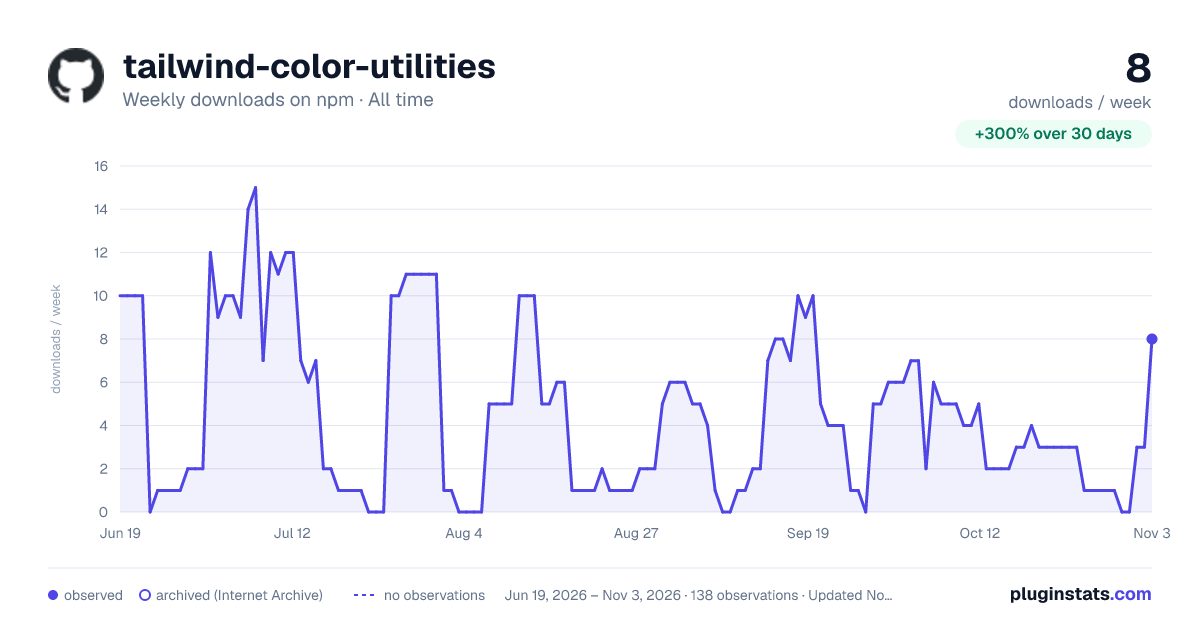
tailwind-color-utilities has 4 recorded weekly downloads on npm, a decrease of 55.6% over the past 30 days, ranking #2222 of 2,322 tracked listings.
About tailwind-color-utilities
Tailwind Color Utilities
Tailwind CSS plugin for generating color shades, background tints, and automatically importing utilities and components.
Features
- Generate color shades.
- Generate background tints. (CSS filter for adding a tint to images.)
- Automatically import CSS files for Tailwind @layer utilities and components.
Tailwind CSS @layer classes may not work as expected in style-per-component libraries like Vue, Svelte, and React. These frameworks are processing every single <style> block independently. In such cases, one viable option is to generate and inject utilities and components using Tailwind plugins. More
Installation
To install the plugin, you can simply run the following command:
# Install using npm
npm install -D tailwind-color-utilities

# Install using yarn
yarn add -D tailwind-color-utilities
Setup
After installing the plugin, include it in your tailwind.config.js:
// tailwind.config.js
import { Colors, Utilities, Components } from "tailwind-color-utilities";

module.exports = {
  //...
  plugins: [
    Colors({
      colors: {
        primary: "#3bb77e",
        secondary: "#fdc040",
        grey: "#243d4e",
        white: "#ffffff",
      },
      out: "./src/assets/css/output/tints.css", //optional
    }),
    Utilities({
      src: ["./src/assets/css/utilities/**/*.css"],
      out: "./src/assets/css/output/utilities.css", //optional
    }),
    Components({
      src: ["./src/layouts/**/*.css"],
      out: "./src/assets/css/output/components.css", //optional
    }),
 ]
};
Note
If you provide an output file path, the CSS code will be written directly to the specified file instead of being injected into the Tailwind CSS. This means that manual configuration is required to set the output file.
@import "tailwindcss/base";

@import "tailwindcss/utilities";
@import "./output/tints.css";
@import "./output/utilities.css";

@import "tailwindcss/components";
@import "./output/components.css";
Usage
default color stops: 25, 50, 100, 200, 300, 400, 500, 600, 700, 800, 900, 950
<div class="bg-grey-50">
    <h1 class="text-primary-700">Hello, World!</h1>
    <img class="tint-secondary" src="icon.png" alt="Icon">
</div>
License
This project is licensed under the MIT License.
Description from the npm listing.
- plugin
- tailwindcss
- tailwindcss-plugin
- tailwindcss-colors
- tailwindcss-background-tint
- utilities-auto-import
README badge
Show your rank in a README or on your website. The badge updates automatically.
Charts
Images: 30d · 1y · all time · 1600×900 dark



Adoption over time
7/30/90-day growth
Ranking history
Listing placement
Listing placement
Filled points are observed values; hollow points come from Internet Archive snapshots of the listing page. Dashed segments span periods with no observations — values between points are not interpolated.
Each band is one page of 20. Weekly downloads on a linear scale. Placement is projected from weekly downloads, so it can differ from the marketplace's own sort order. Hover a dot to see the listing.
Recent observations
Full history (122)Similar npm Tailwind plugins plugins
All 20 tailwind-color-utilities alternatives- 4 weekly downloads-76.5%
- 4 weekly downloads-60.0%
Data source
Weekly downloads (trailing 7 complete days) come from the official npm downloads API. Downloads include CI and mirrors and are not equivalent to installs or users. npm publishes no ratings.
Listing: https://www.npmjs.com/package/tailwind-color-utilities. First seen Oct 16, 2026; last successful collection Oct 20, 2026. See the methodology.